Home
Elo Touch Solutions
Touchscreen
ET1517L
Page 27
Elo Touch Solutions ET1517L - Page 27
44 pages
Manual
Save Page as PDF
To Next Page
To Next Page
To Previous Page
To Previous Page
Loading...
Service Manual: ET1517L, ET1717L
ES600904 Rev B, Page 27 of 44
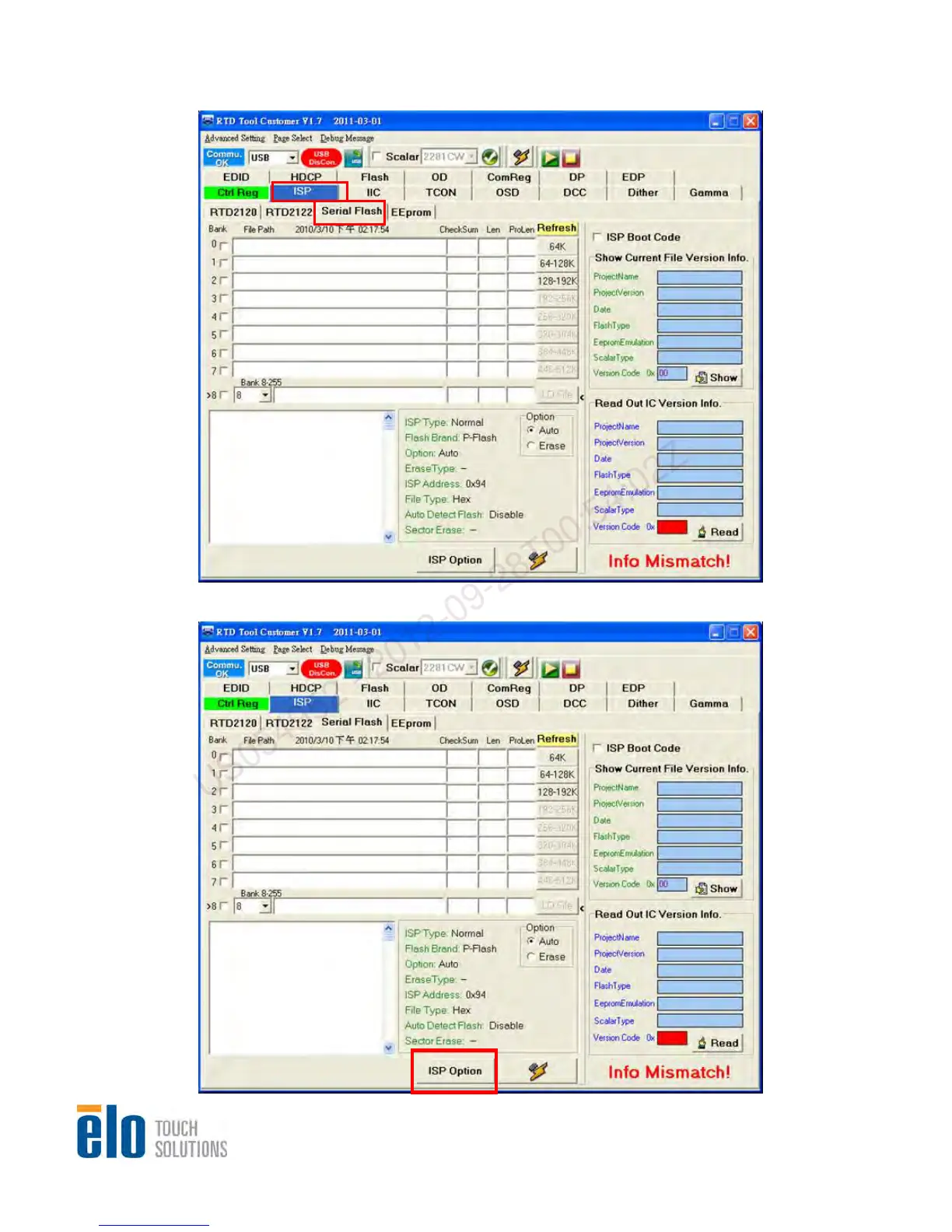
Step 2.
Step 3.
Select “ISP”, then, select “Serial Flash”
Click on “IS
P Option” to set appropriate setting for monitor
US054952 - 2012-09-28T00:54:02Z
26
28
Table of Contents
Main Page
Default Chapter
2
Revision History
2
Table of Contents
3
1 Product Overview
4
Specification Overview
4
Interface Functions
5
Software Specification
5
LED Indicator
5
Compliant Timing
5
OSD Table
6
Hotkey
6
Main Menu
8
Auto Adjust Menu
9
Luminance Menu
10
Brightness
10
Contrast
10
Image Setting Menu (VGA Input Source)
11
Image Setting Menu (DVI Input Source)
11
Input Select Menu
12
H. Position
12
V. Position
13
Clock
13
Phase
13
Aspect Ratio
14
Sharpness
14
Color Menu
15
User Preset Menu
15
Red
16
Green
16
Blue
16
OSD Menu
16
Rotation
17
OSD Timeout
17
Language
18
Information
18
Recall Menu
18
Audio Menu
19
Mute
19
Volume
19
Factory Menu
20
EDID Code
21
Firmware and EDID Upgrade Process
22
Software Configuration
22
2 Level 1 Cosmetic / Appearance / Alignment Service
22
Hardware Configuration
25
FW Update Procedure
26
EDID Upgrade Procedure
30
Alignment Procedure (for Function Adjustment)
32
Auto Color Balance Adjustment
32
Color Temperature Adjustment
32
Preparation
32
Color Temperature
33
Level 2 Disassembly/Assembly Circuit Board and Standard Parts
34
Parts List
34
Replacement
34
Packing Drawing
38
Packing Method
38
Pallet Packing
38
Pallet Loading Data
39
Trouble Shooting Guide
40
Circuit Operation Theory
42
Scalar RTD2270CLW Spec
42
System Diagram
42
AD Board Diagram (LCD Controller Board)
43
LED Driver Board Diagram (for ET1717L Only)
44
Power Structure
44
Related product manuals
Elo Touch Solutions ET1502L
24 pages
Elo Touch Solutions ET2002L
24 pages
Elo Touch Solutions 2201L
23 pages


 To Next Page