06/2022
| 34 |
924EHUCE4.00 - Mistral Humidier
7. USER INTERFACE
Makesurethehumidifierandalltheinstalledcomponentsareproperlyconnectedbeforestart-up,inaccordancewith
regulations,criteriaandallapplicablelocal,regionalandnationalstandards.
7.1 MISTRAL USER INTERFACE
5
10
20
30
50
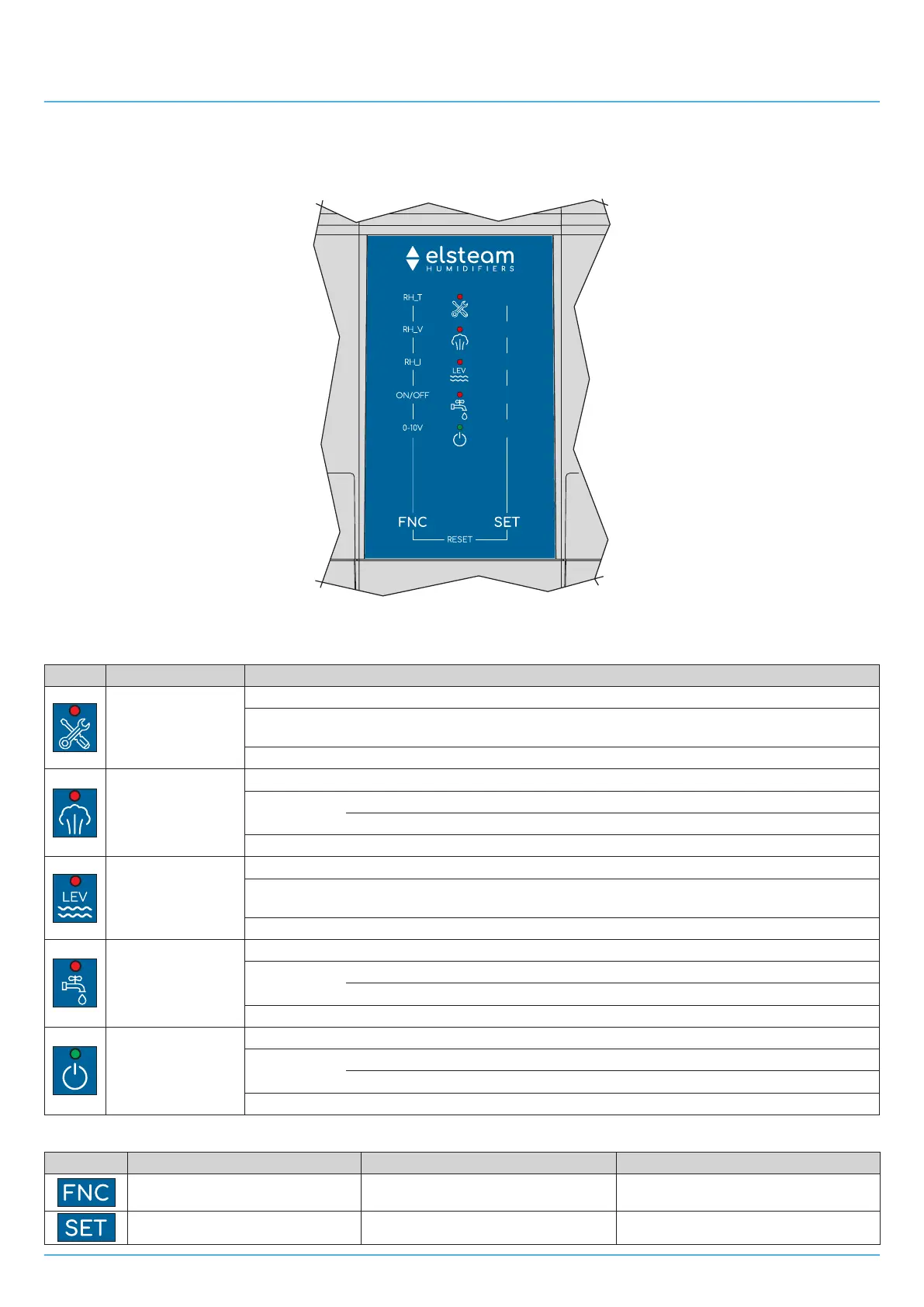
Fig. 24. LED user interface
7.1.1 LED
LED Function Description
Alert LED
Lit steadily: Level sensor board alert
Blinking:
Itindicatesanalertaccordingtothenumberofblinks(see
"14.1 ALERTS TABLE
(LED INTERFACE)" ON PAGE 60)
OFF: In all other cases
High/low humidity
LED
Lit steadily: Analogue input on alert
Blinking:
0.5 s ON / 0.5 s OFF: High humidity alert if CFG=2,3,4,7,8,9
1 s ON / 1 s OFF: Low humidity alert if CFG=2,3,4,7,8,9
OFF: In all other cases
Level sensor Alert
LED
Lit steadily: Level sensor alert
Blinking:
Itindicatesawarningaccordingtothenumberofblinks(see
"14.1 ALERTS TABLE
(LED INTERFACE)" ON PAGE 60)
OFF: In all other cases
Water Alert LED
Lit steadily: Fillingprocedurefailed
Blinking:
3 s ON / 3 s OFF:Waterbelowminimumlevelforactivatingmist-maker
0.5 s ON / 0.5 s OFF:If,afterdraining,thesensorsstilldetectwater
OFF: In all other cases
Power Supply LED
Lit steadily:
Mist-makerONandhumidifierproduceshumidity
Blinking:
0.5 s ON / 0.5 s OFF: Humidity enable consent ID2 not given
1 s ON / 3 s OFF: Mistral produces no humidity
OFF:
Humidifier not powered
7.1.2 Keys
Keys Tap and release to... Tap and hold for at least 1 second to... Tap and hold for at least 4 seconds to...
Change fan speed
During lamp test: enter the operating
mode configuration menu
Start reservoir emptying
--- Humidity setpoint setting
Change maximum humidity production


 To Next Page