06/2022
| 49 |
924EHUCE4.00 - Mistral Humidier
9.7.3 Regulator with humidity sensor
Humidity adjustment via a humidity sensor is made by setting:
• CFG = 2; CFG = 3; CFG =4 or
• CFG = 7; CFG = 8; CFG = 9.
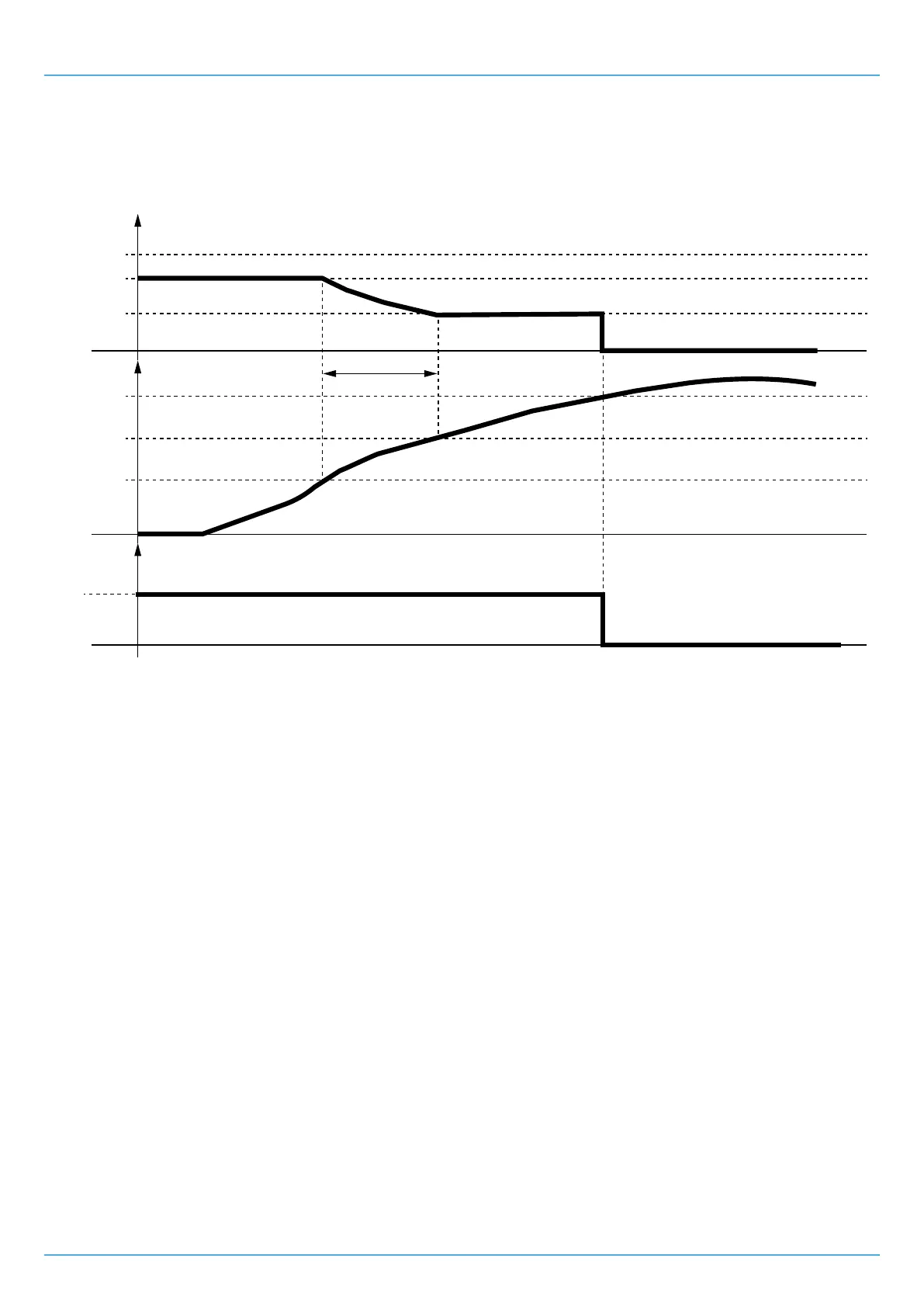
The outlet produces humidity with the following logic:
Production
Humidity
100%
r5
r6
0%
r4
SP-r0-r4
Closed
Open
IA1
t
t
ID2
SP-r0
SP
Fig. 43. Adjustment with humidity sensor
• If the sensor reading is less than SP-r0-r4,thenthehumidityproductionisatitsmaximum;
• If the sensor reading is between SP-r0-r4 and SP-r0,thentheproductionisproportionalbetweenr5 and r6;
• If the sensor reading is between SP-r0 and SP then there is little or no production;
• Mistral does not produce humidity under any other conditions;
• Mistral does not produce any humidity with the sensor in error.
9.8 RECORDING HOURS OF OPERATION
The Mistralhumidifier,amongitsfunctions,includesrecordingtheoperatinghours,tomonitorandalertyouwhentoperform
routine maintenance. Some of the recordings made include:
• Partialhoursofmist-makeroperation;
• Partial hours of fan operation.
The operating hours are stored in the internal memory.
Thisisreferredtoaspartialhours,astherecordedoperatinghourscanberesettozero.
Toview/resetthepartialoperatinghours,youneedtoconnecttheremoteuserinterface(see"1.6 ACCESSORIES" ON PAGE 10).
9.8.1 Mist-maker operating hours: partial number
Ifthemist-makeroperatinghours>A10,theEHUC humidifier will generate a warning. If A10=0,nowarningisgenerated.
The data is considered partial because it can be reset by pressing and holding button T1 for at least 4 seconds.
To view and reset the partial operating hours of the fan see "7.2.5 MAINTENANCE MENU" ON PAGE 37
9.8.2 Fan operating hours: partial number
Ifthefanoperatinghours>A13,theEHUC humidifier will generate a warning. If A13=0,nowarningisgenerated.
The data is considered partial because it can be reset by pressing and holding button T1 for at least 4 seconds.
To view and reset the partial operating hours of the fan see "7.2.5 MAINTENANCE MENU" ON PAGE 37


 To Next Page