06/2022
| 44 |
924EHUCE4.00 - Mistral Humidier
9.4 HUMIDITY SETPOINT CONFIGURATION
Procedure available with CFG =2,3,4,7,8,9.
Duringnormaloperation,tosetthesetpointpressthe
button.
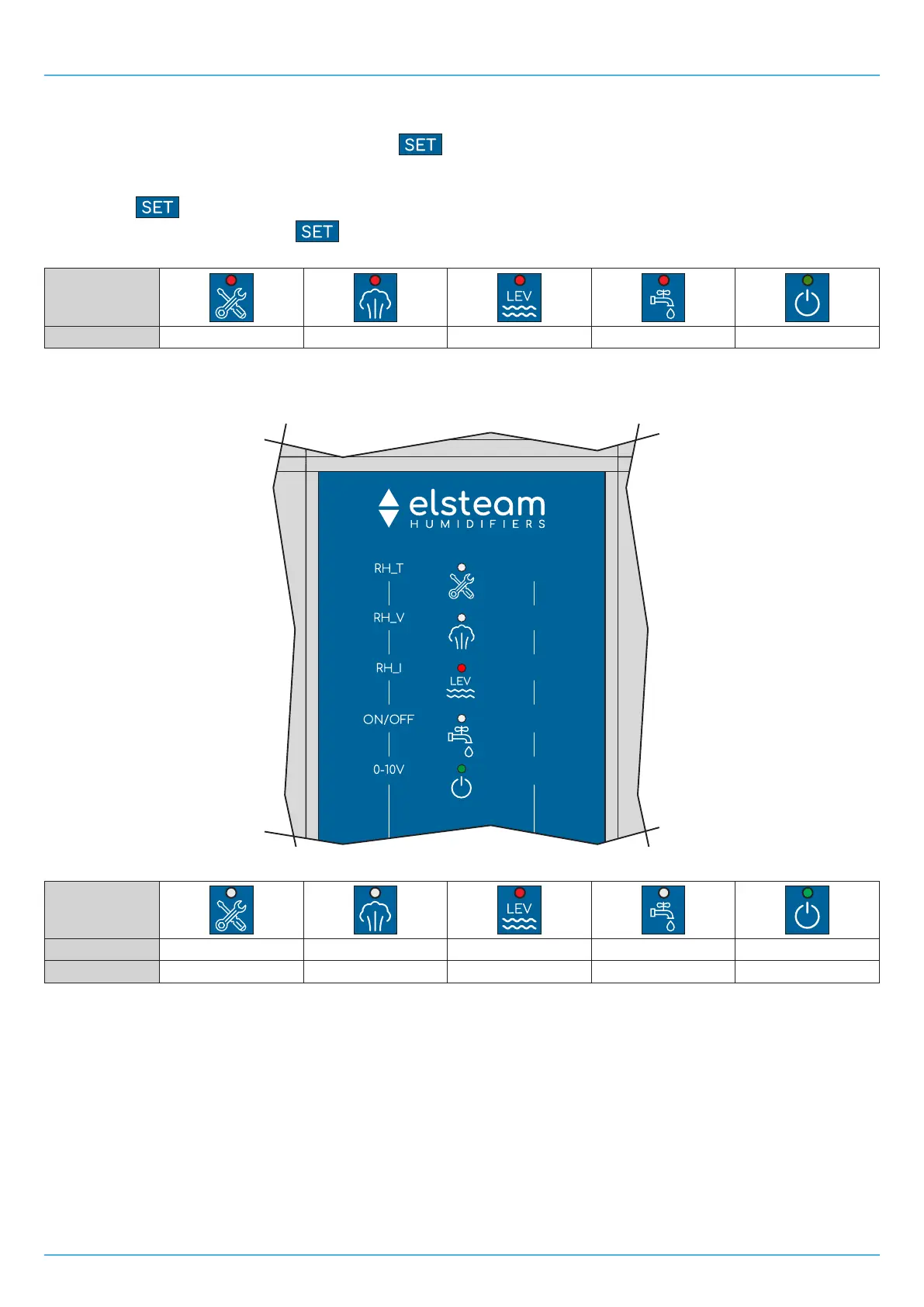
During the phase of configuring the humidity setpoint SP,aLEDcorrespondingtoasetpercentagevaluewilllightup.The
humidity setpoint can vary within the range of values set by parameters r1 and r2.
Each time the
buttonispressed,thehumidityvalueisincreasedby5%.
Wait 5 seconds after last pressing the
button to exit the procedure and save the new value.
The humidity percentage values corresponding to the lit LEDs are:
LED
Humidity value 50% 30% 20% 10% 5%
9.4.1 Examples of humidity setpoint configuration
Example 25% Humidity Setpoint:
5
10
20
30
50
Fig. 36. Example of humidity setpoint conguration at 25%
LED
LED ON/OFF OFF OFF ON OFF ON
Humidity value --- --- 20% --- 5%


 To Next Page