06/2022
| 35 |
924EHUCE4.00 - Mistral Humidier
7.2 EV3K USER INTERFACE
EV3K is available as an accessory completing the range of Mistral humidifiers (see
"1.6 ACCESSORIES" ON PAGE 10
).
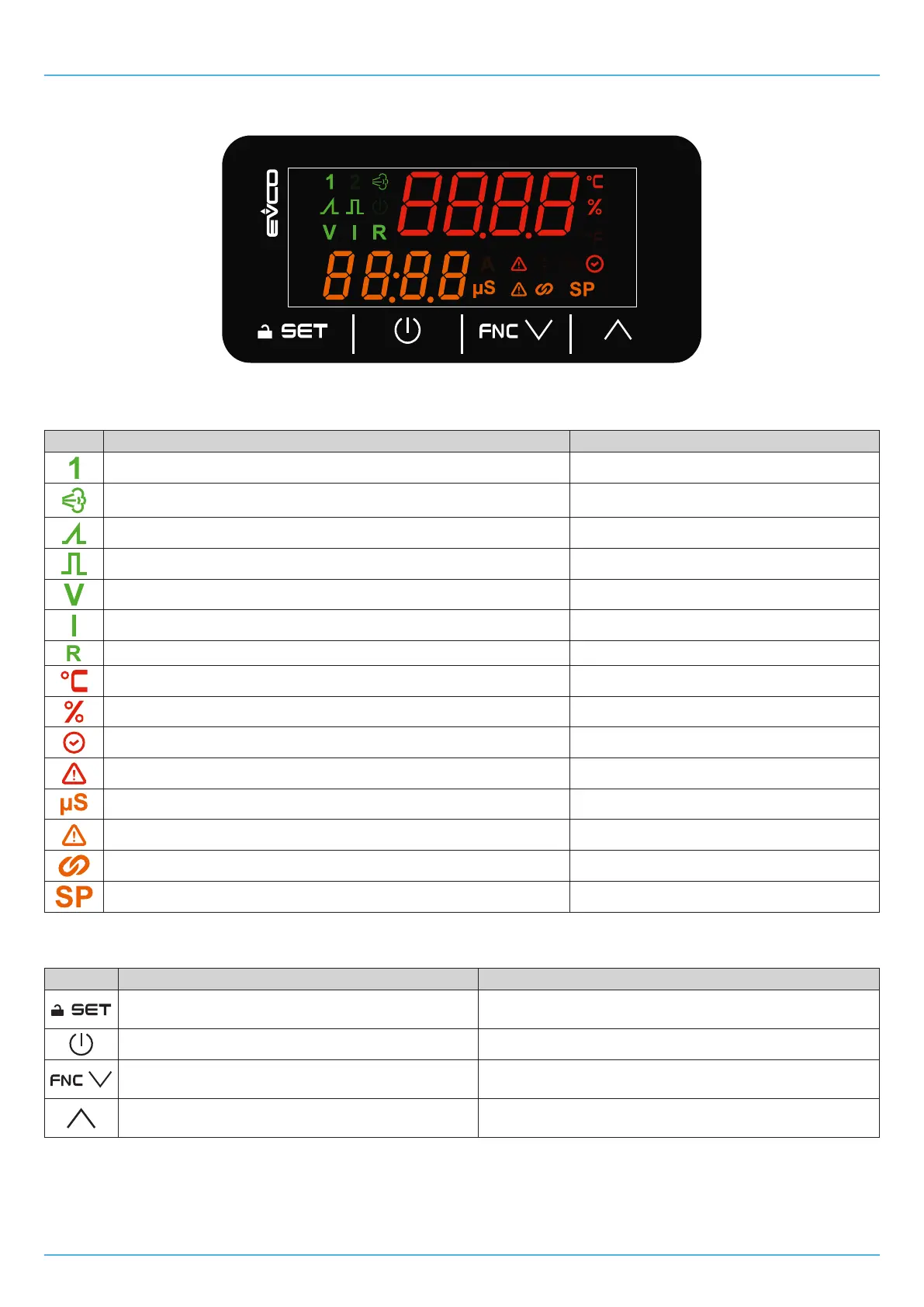
Fig. 25. EV3K user interface
7.2.1 Icons
Icon Lit steadily OFF
Display shows the humidity sensor value on the top row In all other cases
Humidity production in progress
No humidity production
Proportional operating mode (CFG = 1 or CFG = 6) In all other cases
ON/OFFoperatingmode(CFG = 0 or CFG = 5) In all other cases
0...10 V sensor operating mode (CFG = 3 or CFG = 8) In all other cases
4...20 mA sensor operating mode (CFG = 2 or CFG = 7) In all other cases
Resistive sensor operating mode (CFG = 4 or CFG = 9) In all other cases
Display shows temperature in °C In all other cases
Displayshowshumidityin% In all other cases
Displayedvalueisoperatinghours(fanormist-maker) In all other cases
Alert warning in progress No alert in progress
Changing value of P1 in progress In all other cases
Warning in progress No warning in progress
ID2 closed (humidity consent present) ID2 open (humidity consent not provided)
Changing humidity setpoint in progress In all other cases
7.2.2 Touch keys
Thetouchkeyfunctionsaredescribedbelow:
Keys... Tap and release to... Tap and hold for at least 3 seconds to...
• Conrmthevaluesonthedisplay
• Set/change the humidity setpoint
Enter the parameters menu
Gobackalevel
---
• Scroll down through the values
• Navigate within the menu
Go to the maintenance and reset operating hours menu
• Scroll up through the values
• Navigate within the menu
---


 To Next Page