VHS
08
SYSTEM SETUP
Connection through analogue audio/video cable
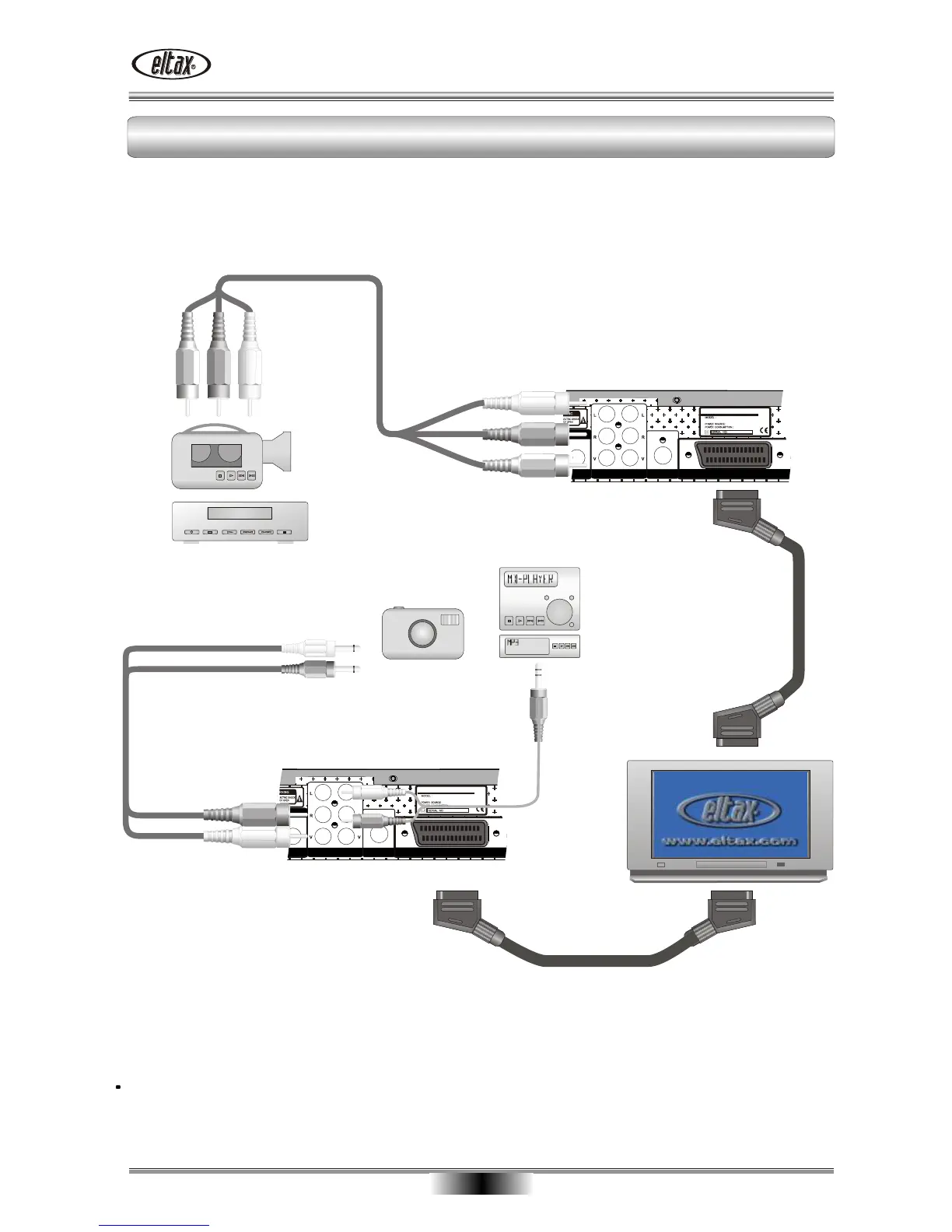
The audio/video jacks of the video camera are connected to the ELTAX AV receiver through an audio/video
cable. As you wish to see the film through your television set, the camera must also be connected to the
television set. Use the SCART cable for this purpose (see illustration). For simplicity, the individual
conductors have been marked by different colours.
3 X RCA audio video cable
SCART Cable
Digital Camera
SCART Cable
Minidisc- or Mp3-player
Stereo camcorder
The audio/video jacks of the digital camera are connected to the ELTAX AV receiver through an audio/video
cable. As you wish to see the film through your television set, the camera must also be connected to the
television set. Use the SCART cable for this purpose (see illustration). For simplicity, the individual
conductors have been marked by different colours.
The audio/video cables used in the illustration may deviate a little from camera to camera! If in doubt, please
read the manual provided with your video camera/digital camera.
.........
.........
.........
.........
.........
.........
.........
.........
.........
.........
.........
.........
.........
.........
.........
.........
.........
.........
.........
.........
.........
.........
.........
.........
.........
.........
.........
.........
.........
.........
.........
.........
.........
.........
.........
.........
.........
.........
.........
.........
.........
.........
.........
.........
.........
.........
.........
.........
.........
.........
.........
.........
.........
.........
.........
.........

 To Next Page
 Loading...