8
Section 1. Getting Started
Comfort settings
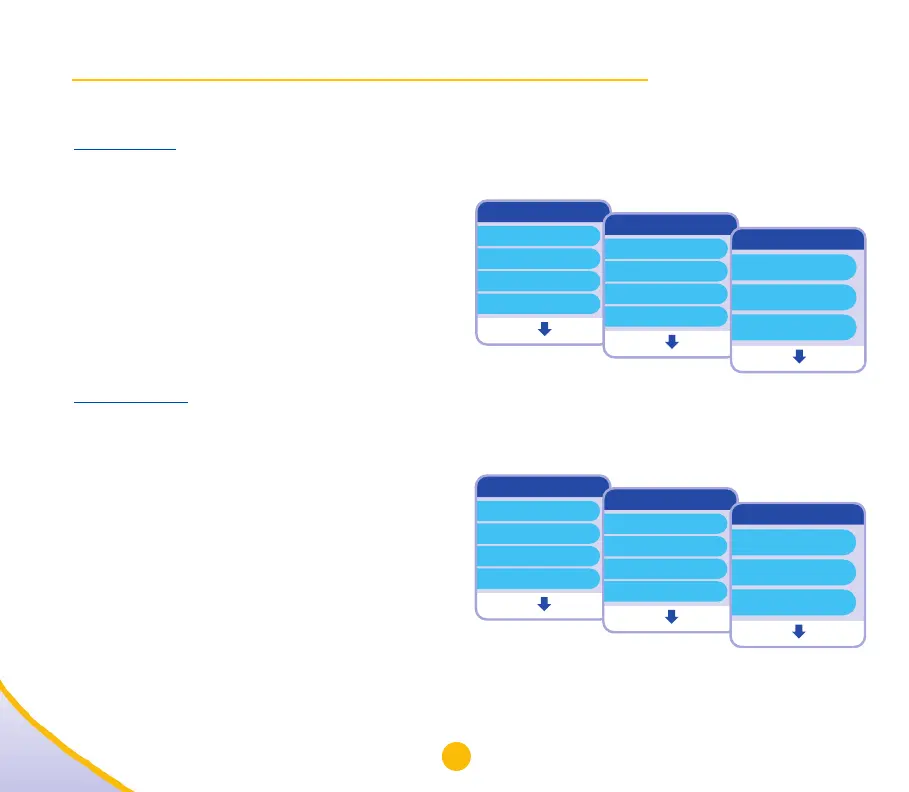
Needle speed – controls how fast the needle is inserted into your skin.
1. Open the “Comfort settings” menu (8a),
“Needle speed” will be highlighted.
2. Select “Change” (8b) to open the
“Needle speed” menu. The current
setting will be highlighted.
3. Use the “” key to select Slow,
Medium, or Fast (8c).
4. Select “OK”.
Injection speed – controls how fast your
Saizen
®
[somatropin (rDNA origin) for injection] is delivered.
1. Open the “Comfort settings” menu (8d).
2. Use the “” key to highlight
“Injection Speed” (8e).
3. Select “Change” to open the
“Injection speed” menu. The current
setting will be highlighted.
4. Use the “” key to select Slow,
Medium, or Fast (8f).
5. Select “OK”.
Menu
Dose history
Battery status
Comfort settings
Remove cartridge
Open Exit
Comfort settings
Needle speed
Injection speed
Injection depth
Injection time
Change Back
Needle speed
OK Cancel
Slow
Medium
Fast
Menu
Dose history
Battery status
Comfort settings
Remove cartridge
Open Exit
Comfort settings
Needle speed
Injection speed
Injection depth
Injection time
Change Back
Injection speed
OK Cancel
Slow
Medium
Fast
8a
8b
8c
8d
8e
8f


 To Next Page