Section 1. Getting Started
Clinical settings
Input in mg – dose in milligrams
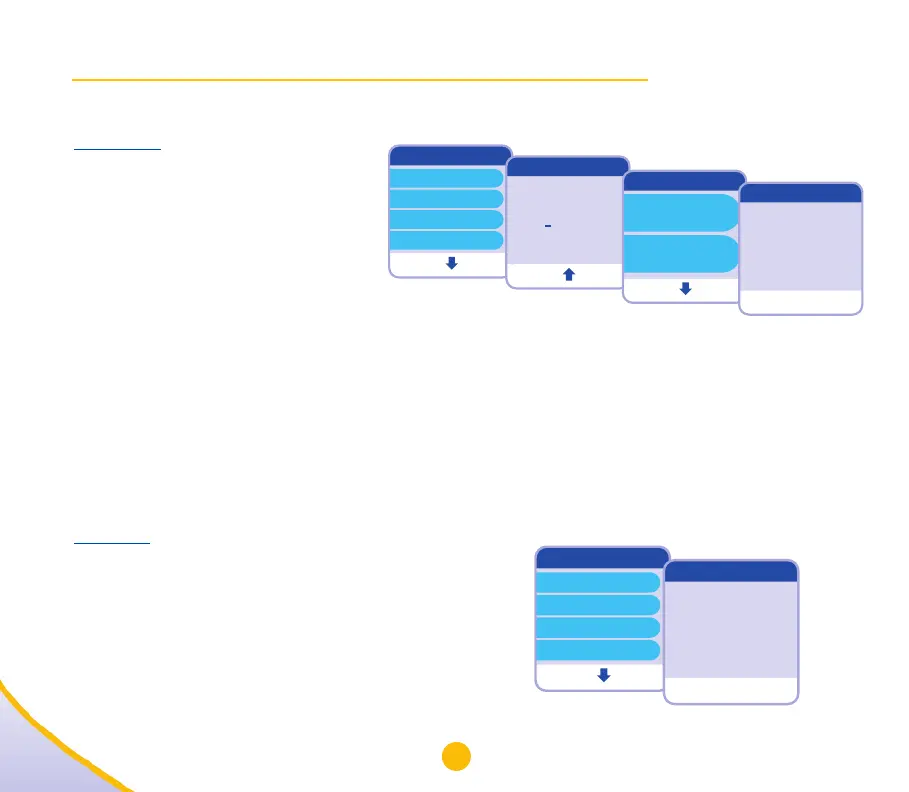
1. Open the “Dose settings”
menu (16a). “Input in mg” will
be highlighted.
2. Select “OK” to open “Daily dose”.
3. Use the “OK” key to move the
cursor under any number you
would like to change and use the
“” key to change the number (16b).
4. When the correct number appears, select “OK” to move to the next, until all numbers are correct.
5. Continue pressing “OK” until the “Frequency” menu appears.
6. Use the “” key to highlight “7 days/week” or “6 days/week” (16c).
7. Select “OK” and the “Dose confirmation” display will appear.
8. If the dose information is correct, select “OK” (16d), and the “Dose adjustment” menu will appear
(see page 18 for instructions). If the dose information is incorrect, select “Change” to return to the
“Dose settings” menu and repeat the steps.
By weight – dose per kg of body weight
1. Open the “Dose settings” menu and use the “”
key to highlight “By weight” (16e).
2. Select “OK” to open the “By weight” menu.
3. Select “OK” if the settings are correct, or select
“Change” to change the settings (16f).
4. Repeat steps 3 to 8 above (under “Input in mg”).
Dose settings
OK Back
Input in mg
By weight
By body surface
Check settings
Daily dose
OK Back
1.00 mg
Frequency
OK Back
7 days/week
6 days/week
Dose confirmation
OK Change Back
1.00 mg/day
7.00 mg/week
16a
16b
16c
16d
16e
Dose settings
OK Back
Input in mg
By weight
By body surface
Check settings
By weight
Dose:
Weight:
Pos:
Freq:
OK Change Back
16
16f


 To Next Page