28
Section 2. Delivering Saizen
®
[somatropin (rDNA origin) for injection] with easypod
™
Giving your daily injection in three steps
Step 3. Detach the needle
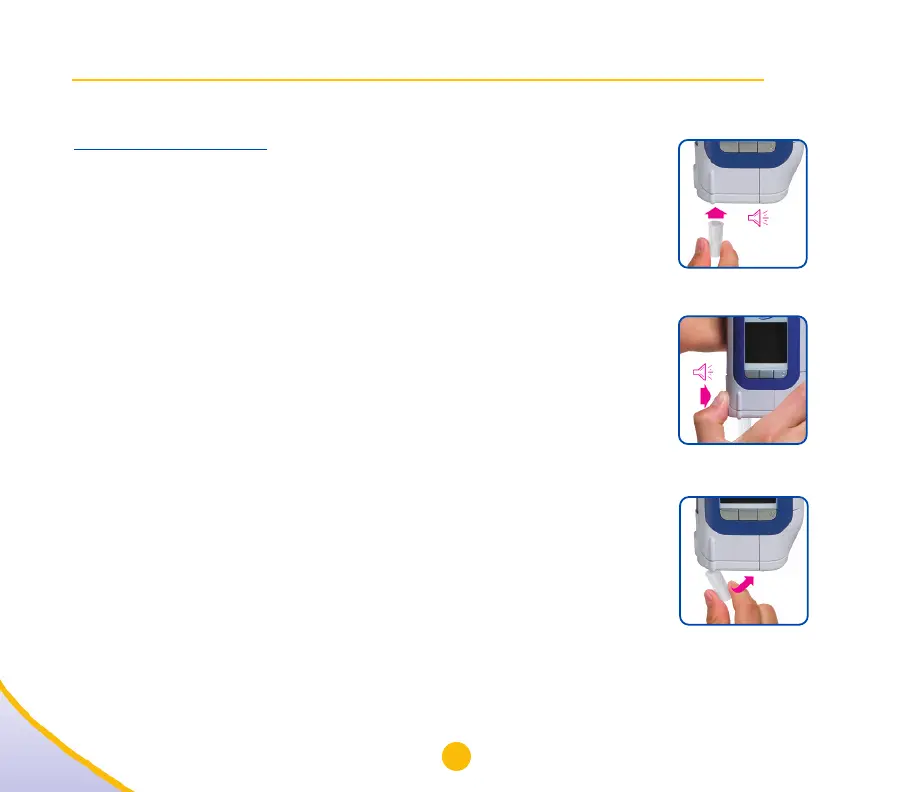
A. When the display reads “Place empty cap”, insert the empty
needle cap into the needle cavity until it locks into place (28a).
easypod will beep once.
IMPORTANT: Make sure you insert an empty cap. Do not
continue to hold the needle cap while easypod detaches
the needle.
B. When the display reads “Press needle button until beep”, press
and hold the needle button (28b) until easypod beeps twice. The
needle is now detached and inside the needle cap.
IMPORTANT: Releasing the needle button too quickly (before the
two beeps) may cause the needle to detach incorrectly and a
warning message to appear that reads “Check needle is
detached”. In this case, remove the cap and see if the needle is in
the cap. If so, select “OK”. If not, place the empty cap back onto
easypod, select “Repeat”, and follow the prompts.
C. When the needle cap is ready to be removed, the display will
read “Remove cap”. To remove the used needle and needle cap,
push the cap sideways (28c). Dispose of the used needle safely.
IMPORTANT: Remember to dispose of the used needle in a
suitable container, as recommended by your healthcare provider.
28a
28b
28c


 To Next Page