5
Section 1. Getting Started
First-time use of easypod™
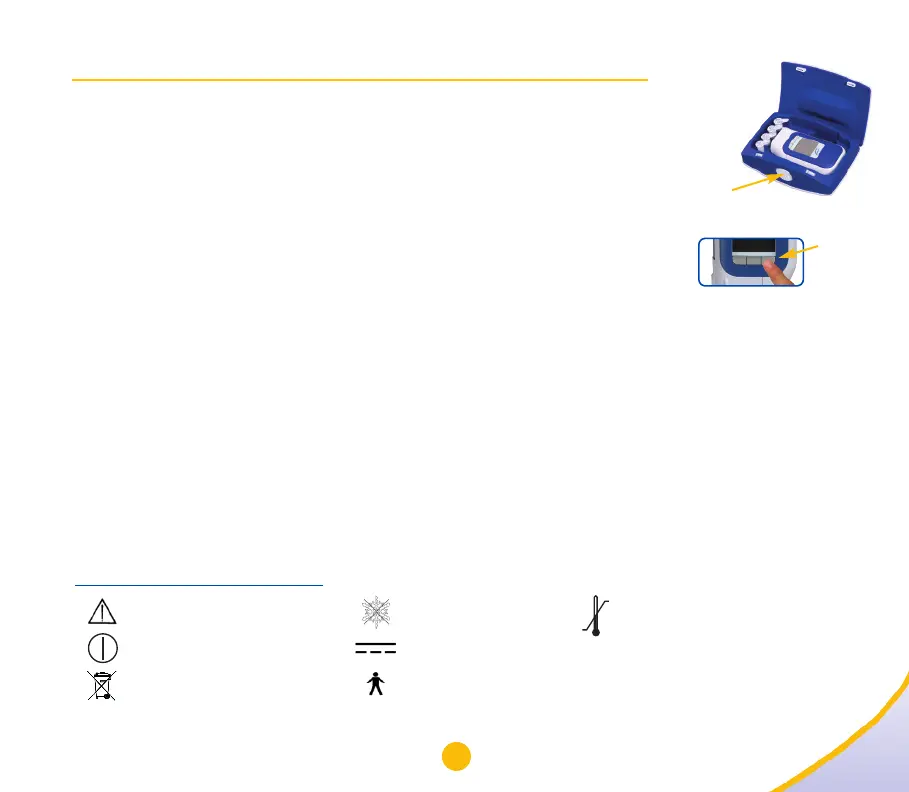
1. Open the storage case by pushing the sliding-release button to the left (5a).
2. Install four new ‘AAA’ batteries into easypod by unscrewing the
battery cover and placing the batteries as shown inside the cover.
3. Turn on easypod by holding down the power “
O
I “ button (5b)
until the Welcome screen appears.
4. You will be prompted to change the date and time using the international-
standard settings (day/month/year). Once reset, you may change the
date and time settings to US format. See “Date & Time”, page 11.
5. The default-language setting is English. If you prefer another language, see “Language”, page 13.
6. Saizen
®
[somatropin (rDNA origin) for injection] click.easy
®
cartridges have a 21-day expiration after recon-
stitution (mixing). Follow the directions under “Cartridge expiration”, page 23, to change the setting to
21 days. easypod will automatically notify you when the cartridge has been in use for 21 days.
7. Make sure the cartridge setting is correct according to your prescription (see “Cartridge”, page 21).
Then insert a new click.easy cartridge (see “Insertion of a new cartridge or change of an
empty/expired cartridge”, page 32).
IMPORTANT INFORMATION:
• Clinical settings should be changed only under guidance from your healthcare provider.
• Do not use the window on the cartridge door to gauge the amount of remaining solution in the cartridge.
Explanation of easypod symbols
Refer to accompanying
documents
Power on/off
Dispose of safely according
to your local regulations
Do not freeze
DC
Applied part type B
(electrical isolation)
Sliding-
release button
5a
5b
Power
button
“
O
I “
Refrigerate device
after use


 To Next Page