EMCS User Guide
- 24 -
9. Keys and Indicators
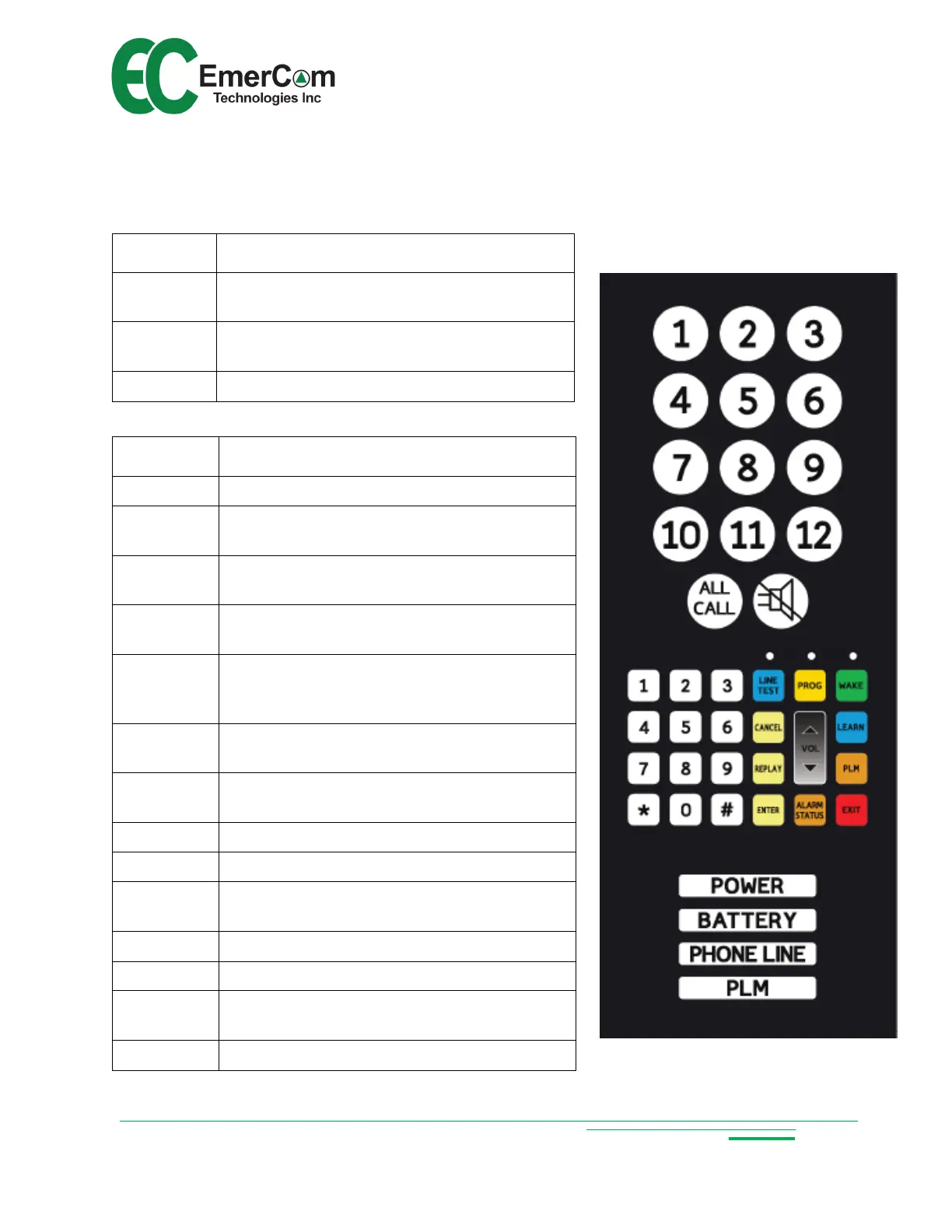
9.1 Keypad
Key + Icon
Description
1 - 12
Stations 1 to 12 (illuminated when door is
open if wired-up and configured)
ALL CALL
Pages all active cabs, allowing the operator
to broadcast a message
SILENCE Silences alarm buzzer
Key Description
0 - 9 Numeric keys 0 through 9
< * > < # >
Special characters used in program
command sequences
<WAKE>
Wake up keypad from sleep mode when
handset is off-hook (Wake LED turns on)
<PROG>
Enters program mode when handset is off-
hook and the keypad is awake (LED on)
<LINE
TEST>
When keypad awake, enables the handset
to call out to test the phone line (LED turns
on)
<CANCEL>
Clears/cancels current entry OR returns to
the program menu
<REPLAY>
Plays back entry if valid command # is
entered
<ENTER> Accepts current command or entry
<VOL ↑> Increments handset volume by one (up to 9)
<VOL ↓>
Decrements handset volume by one (down
to 1)
<LEARN> Auto-configuration quick key
<PLM> Quick configuration of cabs into PLM groups
<ALARM
STATUS>
Plays “NORMAL” or lists active alarms
<EXIT> Exits out of programming mode


 To Next Page