EasyManua.ls Logo

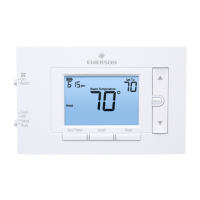
Emerson 80 Series - User Manual

Emerson 80 Series
55 pages
Print Icon
To Next Page IconTo Next Page
Loading...
80 Series Thermostats
1
Emerson 80 Series Thermostats

Table of Contents

Questions and Answers

  • A
    Angela DiazJul 27, 2025
    How to troubleshoot no heat on my Emerson Thermostat?
    • Q
      qlucasJul 28, 2025
      If your Emerson Thermostat is not producing heat, consider the following: * First, check that the system is set to Heat. * Second, make sure the thermostat and system wires are securely attached. * Third, a diagnostic is required. Set the system to Heat and raise the setpoint above room temperature. Within five minutes, the thermostat should make a soft click and “Heat On” should appear on the display. If the thermostat doesn't click, try the reset operation. If the thermostat clicks, contact the furnace manufacturer or a service person to verify the heating system is operating correctly.
  • M
    Mrs. Karen GonzalezAug 1, 2025
    What to do if my Emerson 80 Series is not cooling?
    • M
      Melanie MccormickAug 1, 2025
      If your Emerson Thermostat isn't cooling, check these items: * Ensure the system is set to Cool. * Verify the thermostat and system wires are securely attached. * Run a diagnostic: Set the system to Cool and lower the setpoint below room temperature. The thermostat should click within five minutes (there may be a delay if the compressor lock-out option is enabled) and the display should indicate “Cool On”. If it doesn't click, the thermostat may need replacing. If it clicks, have the cooling system checked by a qualified technician.
  • J
    John HarrisonAug 5, 2025
    What to do if my Emerson 80 Series Thermostat has no heat, no cool, and no fan?
    • E
      Elizabeth SheltonAug 5, 2025
      If your Emerson Thermostat isn't producing heat, cool air, or running the fan, here's what to check: 1. ) A blown fuse or tripped circuit could be the issue. Replace the fuse or reset the breaker. 2. ) Ensure the furnace power switch is turned to the ON position. 3. ) Make sure the furnace blower compartment door panel is correctly placed to engage the safety interlock or door switch. 4. ) Verify all connections to the thermostat and system are secure and tightened.
  • A
    Ashley NortonAug 10, 2025
    Why does the “Call for Service” icon appear on my Emerson Thermostat?
    • K
      Kevin JonesAug 10, 2025
      The “Call for Service” icon on your Emerson Thermostat indicates a few potential issues: 1. ) The heating system can't raise the room temperature to within 10 degrees of the setpoint in 2 hours. Refer to troubleshooting for 'No Heat'. 2. ) The cooling system can't lower the room temperature to within 10 degrees of the setpoint in 2 hours. Refer to troubleshooting for 'No Cool'. 3. ) If the display shows “—” for the room temperature, the thermostat needs replacing. 4. ) If no buttons are working, check that the keypad lockout isn't enabled. 5. ) If the “Call for Service” icon is flashing, there may be a problem with the outdoor unit. Contact a service person to check the outdoor equipment.
  • T
    travisdonaldAug 14, 2025
    Why does my Emerson 80 Series heat, cool, or fan run constantly?
    • D
      David JohnstonAug 14, 2025
      If the heat, cool, or fan runs constantly on your Emerson Thermostat, there might be a short in the wiring, thermostat, or the system itself. Check each wire connection to ensure they are not shorted or touching other wires. You can also try resetting the thermostat. If the problem continues, contact your HVAC service person.
  • C
    Cathy WillisAug 18, 2025
    Why is my Emerson 80 Series Thermostat cycling too fast or slow?
    • E
      Eduardo ReedAug 18, 2025
      If your furnace or air conditioner cycles too fast or slow with your Emerson Thermostat, the thermostat's location or the heating system's size might be the cause. Digital thermostats offer precise control and cycle faster than older models. To increase cycle time, select SLO (slow cycle) in the Installer menu. If the cycle rate is still not acceptable, contact your HVAC service person, as cycle rate depends on system sizing. Systems that are undersized or oversized might need adjustments to heating/cooling capacity or duct balancing.
  • S
    Stephanie MelendezAug 22, 2025
    How to adjust the temperature display on my Emerson Thermostat?
    • C
      cabrerakaylaAug 22, 2025
      If your Emerson Thermostat display and thermometer show different temperatures, the display requires adjustment. You can adjust the display +/-5 degrees in User Menu item 05.

Emerson 80 Series Specifications

General IconGeneral
Model80 Series
DisplayDigital
Power Source24 VAC or Battery
Temperature ControlAdjustable
TypeProgrammable
Series80 Series
MountingWall-mounted
MaterialPlastic
ColorWhite
ProgrammingProgrammable
ProgrammabilityProgrammable

Related product manuals