S600 Instruction Manual
Table 3-7. COM1-2 Pin Connections
Pin Function
1 GND
2 TX to R. Display
3 GND
4 SPEAKER OUT
5 N/C
6 TX to PC
7 RTS to PC
8 GND
9 RX from R. Display
10 CTS to R. Display
11 GND
12 N/C
13 N/C
14 RX from PC
15 CTS to PC
Connecting to the
S600
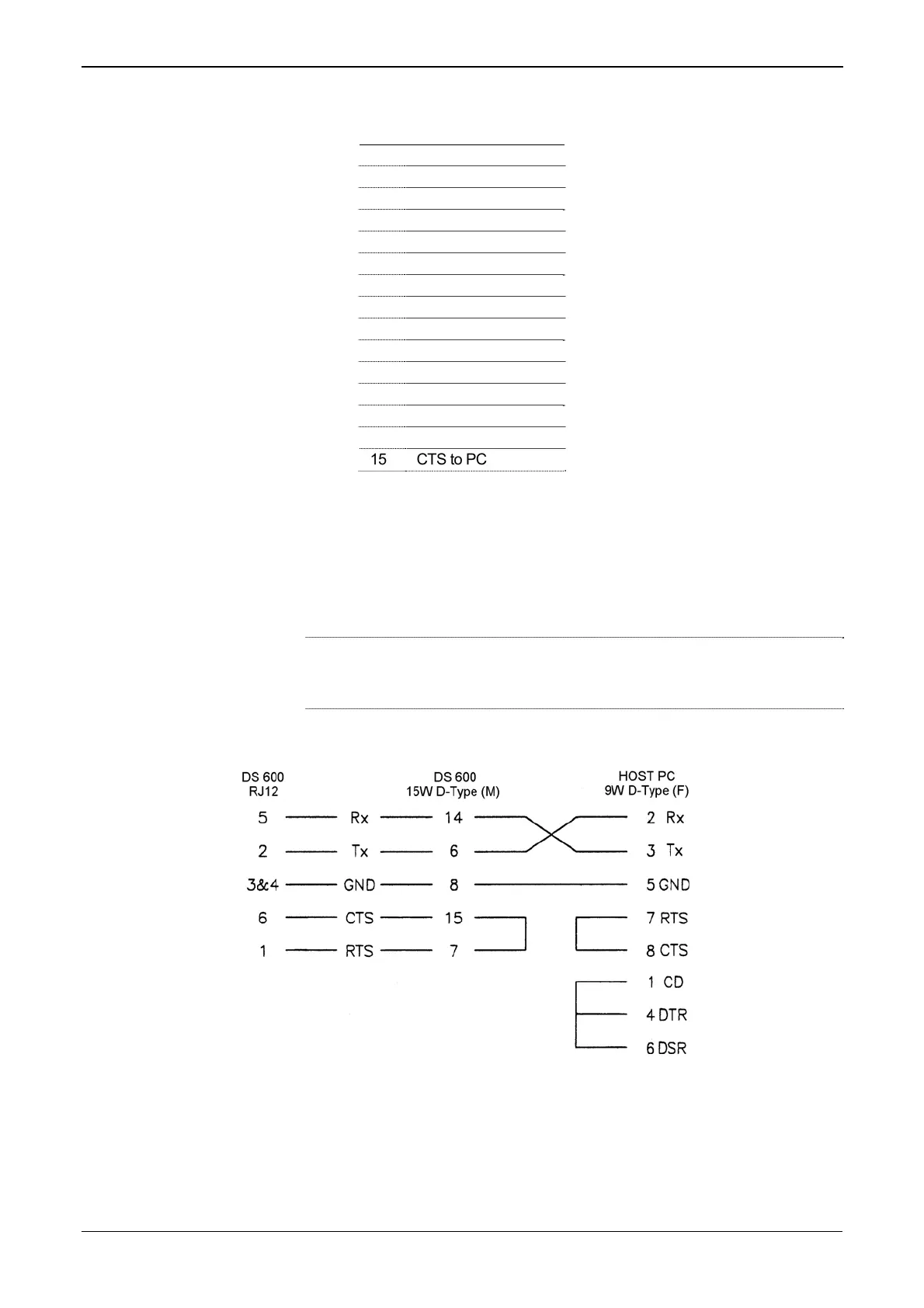
A special serial cable is required to connect the host PC to the FloBoss
S600 unit. A ready-made link cable is available for a PC with a 9-pin
serial port.
Alternatively, you may fabricate your own link cable using the wiring
details in Figure 3-4.
Note: Due to the high baud rate used for the communications between
the host PC and the S600, restrict the maximum cable length to 5 m
(15 ft).
Figure 3-5. Link Cable
3-8 CPU Revised Jan-07



 To Next Page
 Loading...