S600 Instruction Manual
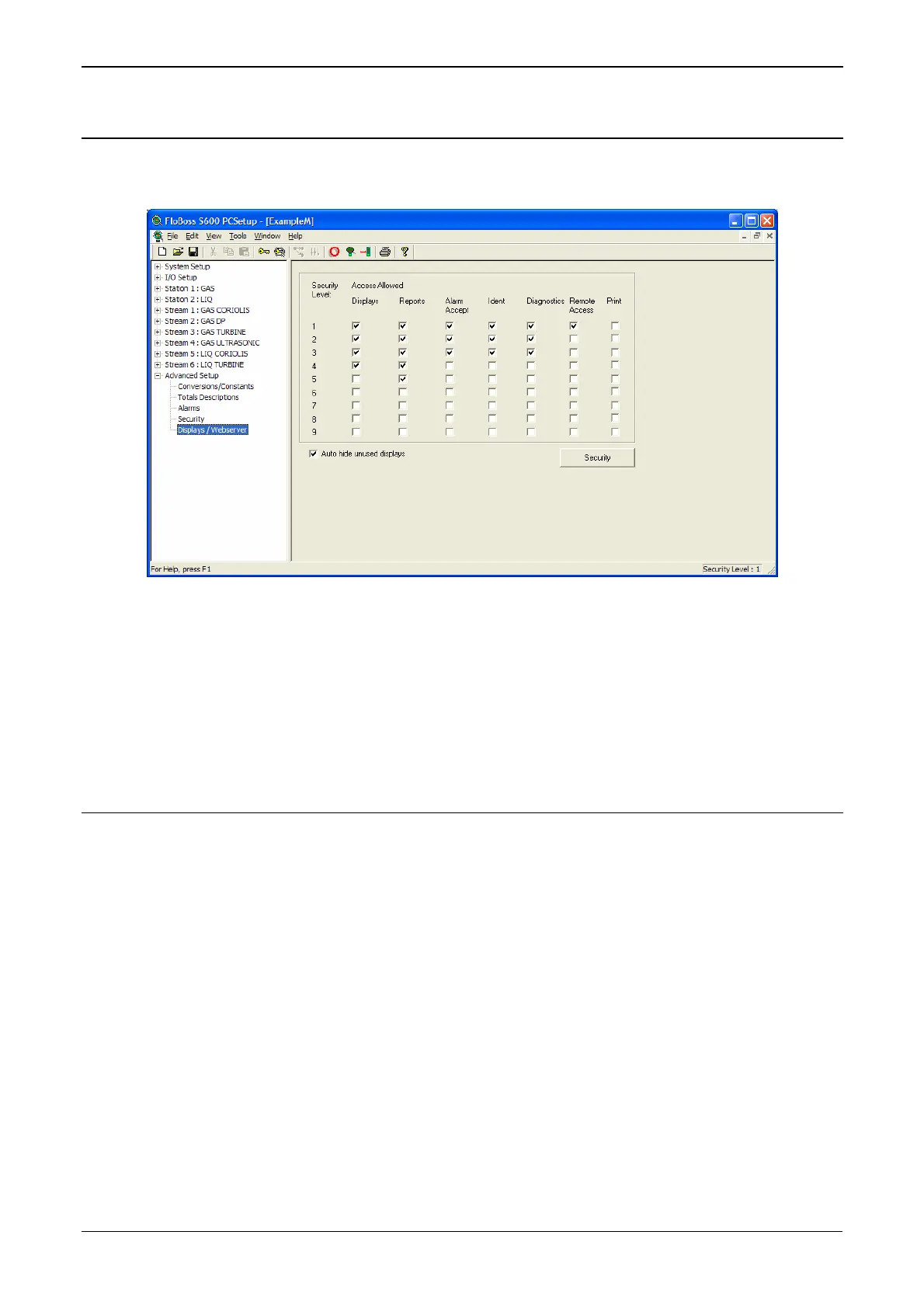
6.1 Defining Webserver Access
Using the Config600 software, you must first define the specific
content each security level can view.
Figure 6-1. PCSetup Webserver Access
For further information on using this screen, refer to Chapter 7,
Advanced Setup Configuration, in the Config600 Pro Software User
Manual (Form A6169).
Once you complete this security level-access matrix, you can access
the S600’s webserver over a TCP/IP connection.
6.2 Accessing the S600
One Control Point
The S600 web interface can support up to five concurrent webserver
sessions. However, it always allows only one control point.
Control is based on first access, whether you connect through the
S600’s front panel display or through a TCP/IP connection. Only the
user with control may change data. All other users (regardless of
access method) can only view data until the first user logs off.
Once the first user logs off, the S600 passes control to the next user
with sufficient security who “requests” that write permission. Since the
S600 automatically refreshes pages, the page refresh acts as the control
request.
1. Connect to the S600 using the standard communications port.
2. On a PC currently connected to the Internet, open the Windows
Internet Explorer browser (version 6 and greater).
3. Type the IP address of the S600 in the browser’s URL address bar
and press Enter.
6-2 Webserver Access Revised Jan-07



 To Next Page
 Loading...