28 Commander SK Getting Started Guide
www.controltechniques.com Issue Number: 9
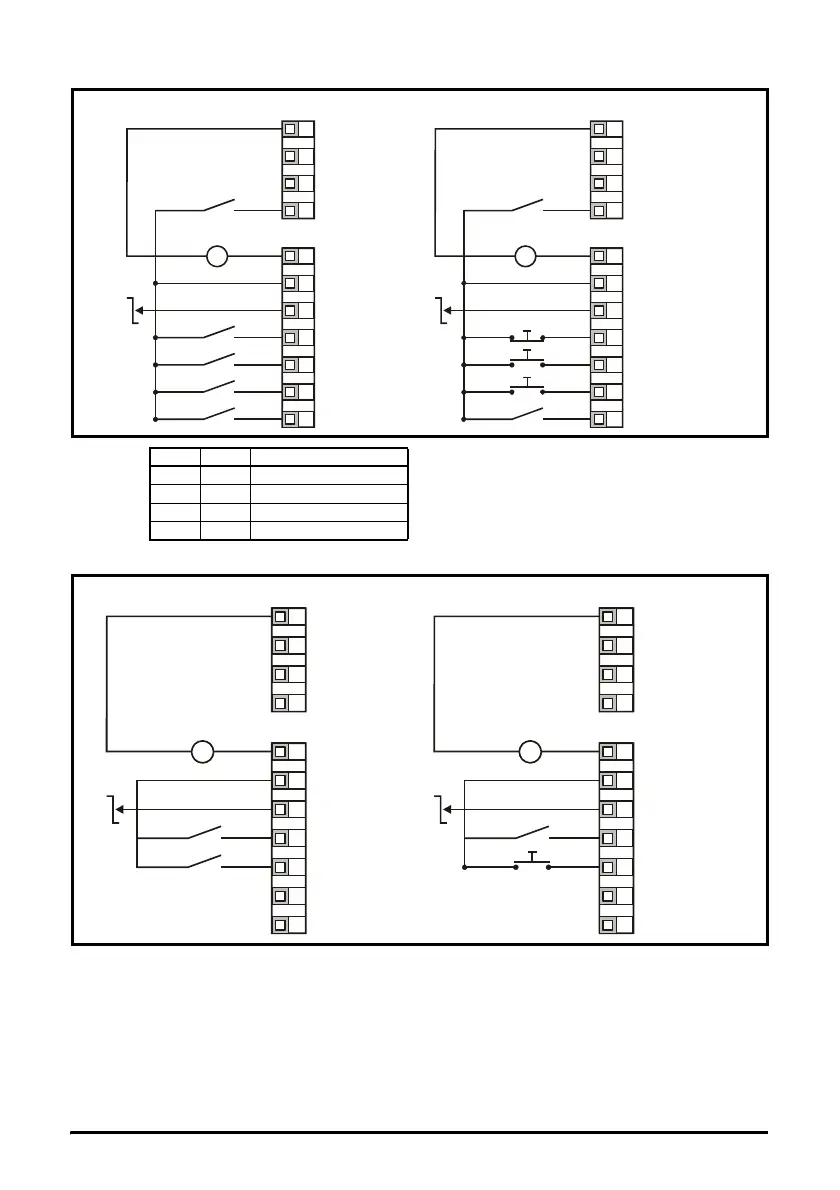
Figure 6-4 Pr 05 = Pr
Figure 6-5 Pr 05 = PAd
Setting-up a Forward/Reverse terminal in Keypad mode
From the drive’s display:
•Set Pr 71 to 8.23
•Set Pr 61 to 6.33
• Press the Stop/Reset key
Terminal B5 will now be set-up as a Forward/Reverse terminal
+24V output
Drive Enable/Reset
Run Forward
Run Reverse
V
_
+
+24V
0V
Eur USA
Analog output
(motor speed)
Digital output
(zero speed)
Reference select
Reference select
T4 B7 Reference selected
0 0 Preset 1
0 1 Preset 2
1 0 Preset 3
1 1 Preset 4
0V
+10V reference output
+24V output
Drive Enable/Reset
V
_
+
+24V
0V
Eur USA
Analog output
(motor speed)
Digital output
(zero speed)
Not used
Not used
Not used
Not used
0V
+10V reference output
+24V output
Drive Enable/Reset




 To Next Page