6.0 Operation mode
This chapter describes how to configure the way that your device connects to the
Internet. We will discuss the options in “Operation Mode”:
- Router ( Selected mode as default setting )
- Access Point ( AP )
- Repeater
In the following instructions we will inform you how to setup your router as Access
Point or Repeater.
6.1 Access Point ( AP )
Important! Before we change the operation mode to Access Point we need to
provide a static IP address to our network adapter, while the DHCP server from
the EM4700 will be disabled. If you did not have a static IP address you cannot
longer login to your router due to no IP address will be provided anymore from
your router. We will use Windows 10 to show you the instructions how to add a
static IP address to your network adapter.
1. Make sure your modem or router is not connected to your EM4700. Connect your
EM4700 via LAN port to your LAN port of your PC or Laptop by using a network
cable.
2. Click on the Windows start menu icon, type “Control Panel” in the search bar
and click on “Control Panel”. You will see the following screen:
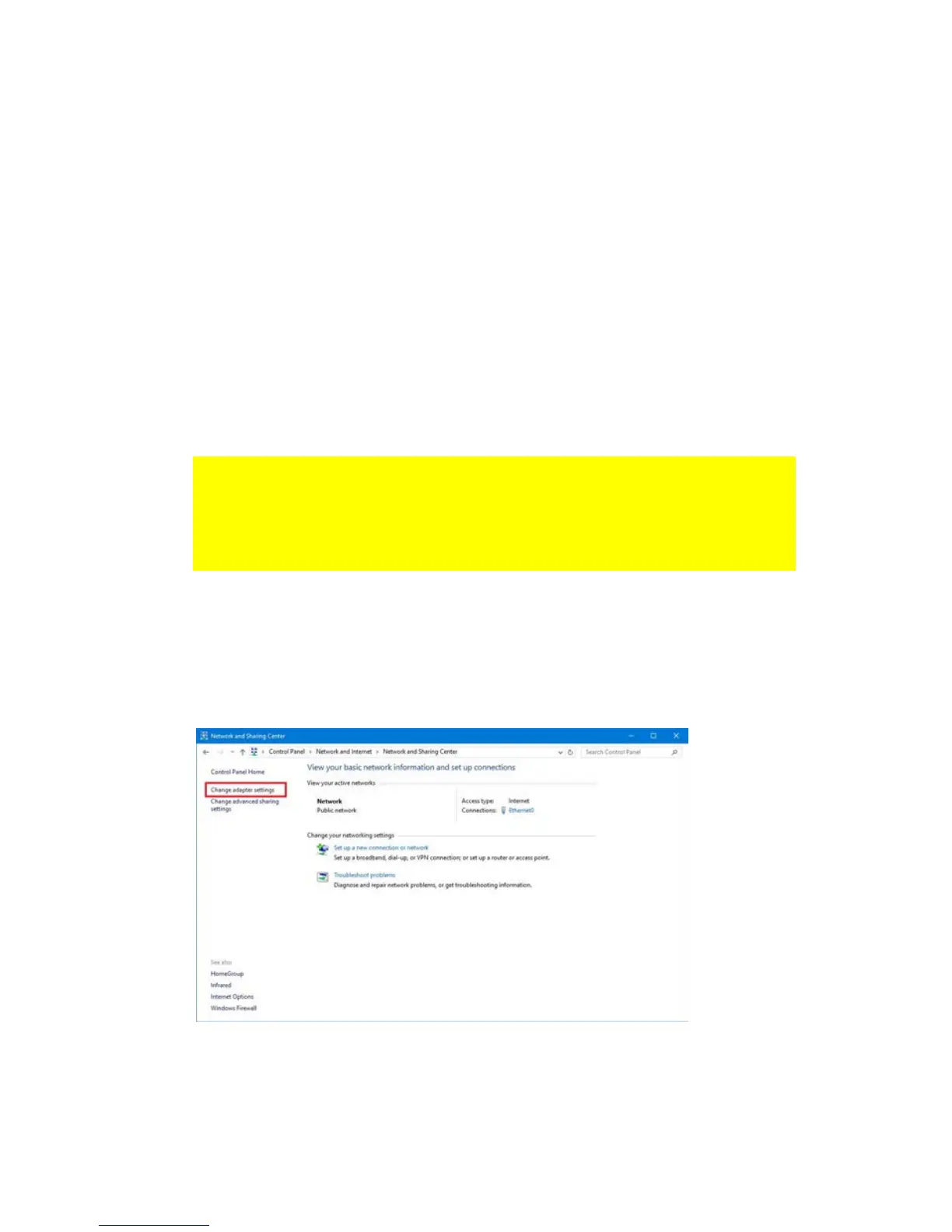
3. Click the link “View network status and tasks” under the “Network and
Internet” header. You will see the following screen:
4. Click on the link at the left side of the window labeled “Change adapter
settings”.
5. You will now see the available network adapters.



 To Next Page