2.9 Neuroheadset Set-Up
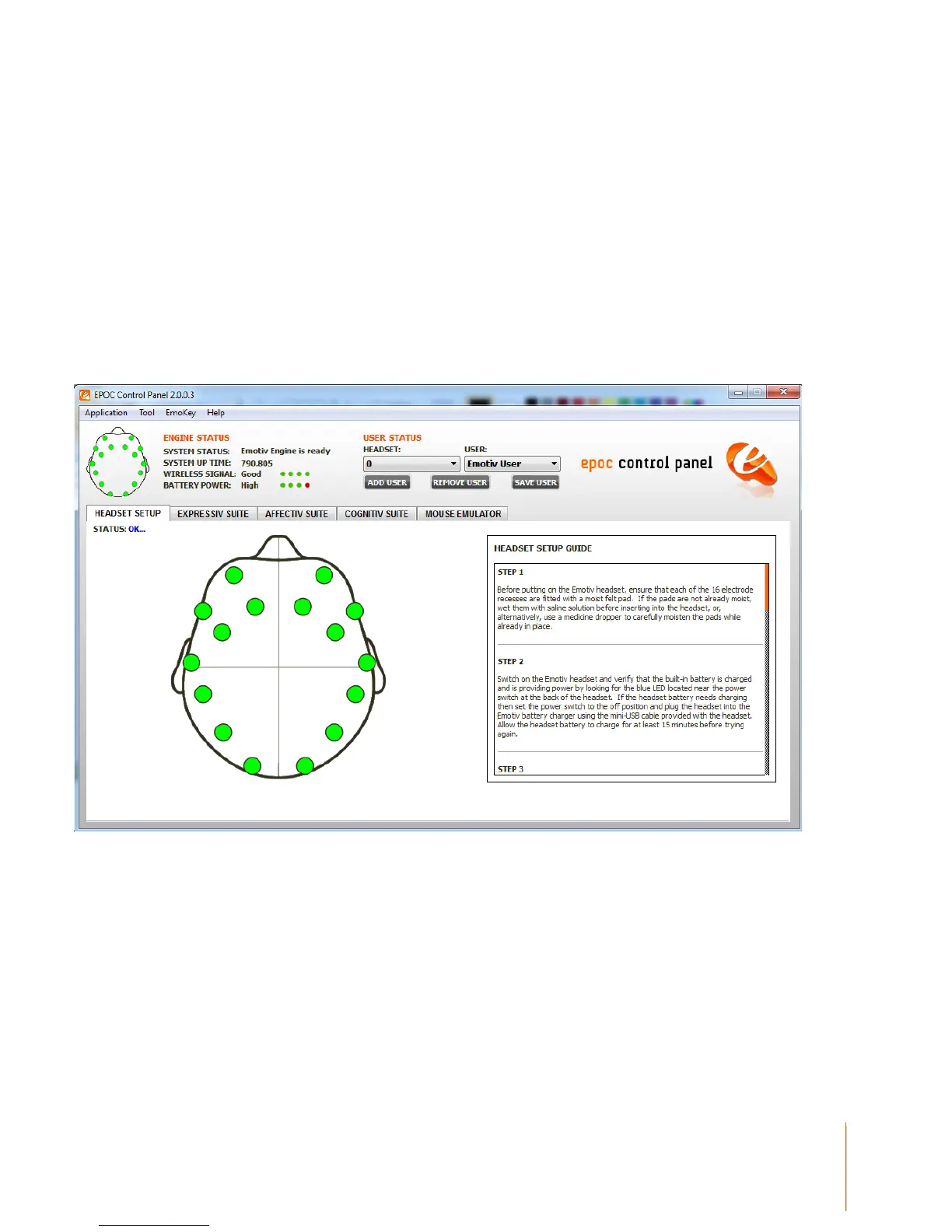
The Headset Setup panel is displayed by default when starting EPOC Control Panel. The main
function of this panel is to display contact quality feedback for the EPOC Neuroheadset’s sensors
and provide guidance to the user in fitting the EPOC Neuroheadset correctly. It is important for the
user to achieve the best possible contact quality before proceeding to the other EPOC Control
Panel tabs. Poor contact quality will result in poor Emotiv detection results, although the EPOC will
continue to perform moderately well with a small number of missing or lower quality sensors.
Figure 4 Neuroheadset Setup Panel
The image on the left side of the panel is a representation of the sensor locations when looking
down from above onto the user’s head. Each circle represents one sensor and its approximate
location when wearing the neuroheadset. The color of the sensor circle is a representation of the
contact quality. To achieve the best possible contact quality, all of the sensors should show as
green.
Other sensor colors indicate:
Black: No signal (Not Acceptable)


 To Next Page