3.3.7 EmoKey for Cognitiv Actions
EmoKey links the Emotiv technology to your applications by easily converting detected events into
any combination of keystrokes. EmoKey is a nonintrusive, lightweight, background process that
runs behind your existing games or applications. EmoKey lets you create mappings that define how
detections are converted to keystroke combinations. Your mappings can then be saved and shared
so you can use mappings that your friends have created for your favorite games and software.
EmoKey can be as complex as linking a "lift" command to a sequence of keystrokes that trigger a
levitation spell in a game.
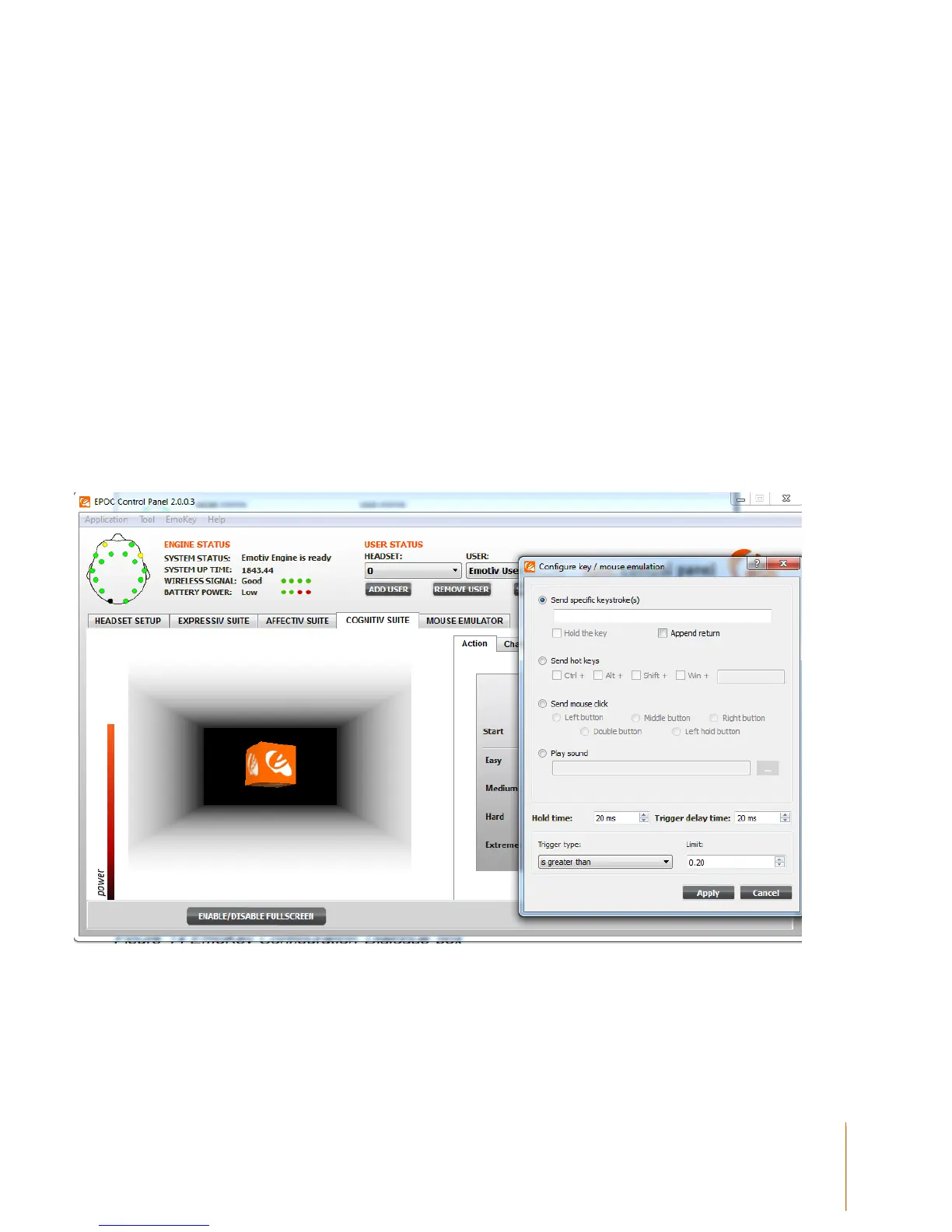
To configure a Cognitiv action to EmoKey, select the action you wish to link and click on the KEY
button to the far right of the Cognitiv Panel Display. This will bring up a Configuration Dialogue box
as shown in Figure 7. Type into the text box, the specific keystroke(s) you wish to send. You can
also make the facial expression send a continuous string of keys by checking the Hold the key box.
There are also options to further configure the Key hold time and Key trigger delay time. Once you
are satisfied with the settings, click the Apply button.
Figure 14 EmoKey Configuration Dialogue box
Once EmoKey is activated, the keystroke(s) allocated to the Cognitiv action will be marked in the
corresponding box. An orange highlight will flash in the box to the right of the description of the
action being triggered. Only actions that have keystrokes allocated will be sent to an application
window that is active. This is shown in Figure 14, where a pull triggers the keystroke “Z”. Make



 To Next Page