3.3.3 Cognitiv Training
The Cognitiv training process enables the EmoEngine to analyze your brainwaves and develop a
personalized signature which corresponds to each particular action, as well as the background
state, or “neutral”. As the EmoEngine learns and refines the signatures for each of the actions, as
well as neutral, detections become more precise and easier to perform.
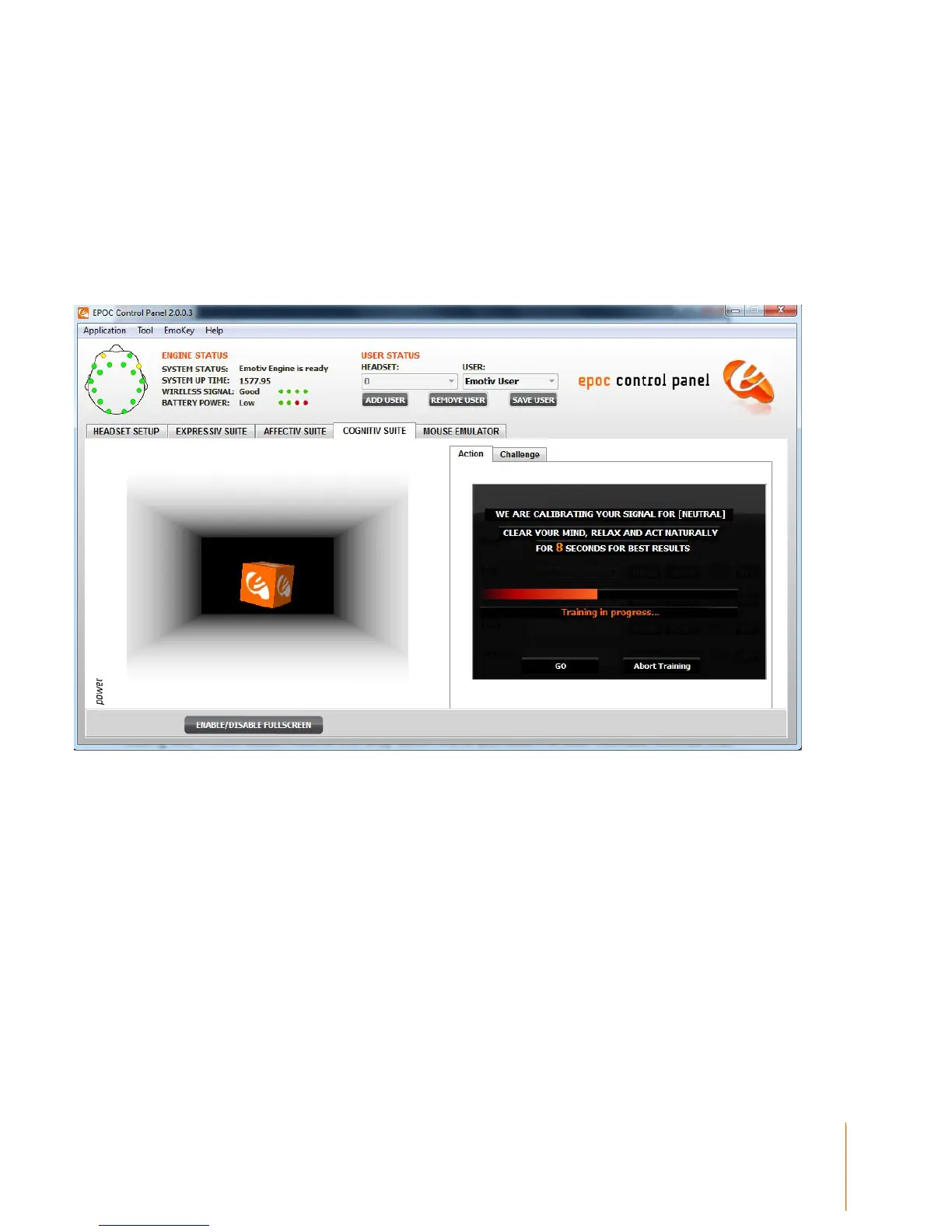
Figure 11 Cognitiv Neutral Training in action
Pressing the TRAIN button next to the drop down menu activates the user interface controls that
support the Cognitiv training process. The training process consists of three steps:
First, train a neutral state. Neutral training must be completed first before any actions can be trained
and activated. To train neutral, there is nothing in particular that you need to do. Simply relax, act
natural and clear your mind. Press the TRAIN button to bring up the training screen and press GO
when you are ready. A progress bar will appear as your brainwaves are observed. Once training is
complete, you will be asked to accept or reject the training session by pressing YES or NO. Once
you accept, you will be automatically returned to the Cognitiv Panel Display.



 To Next Page