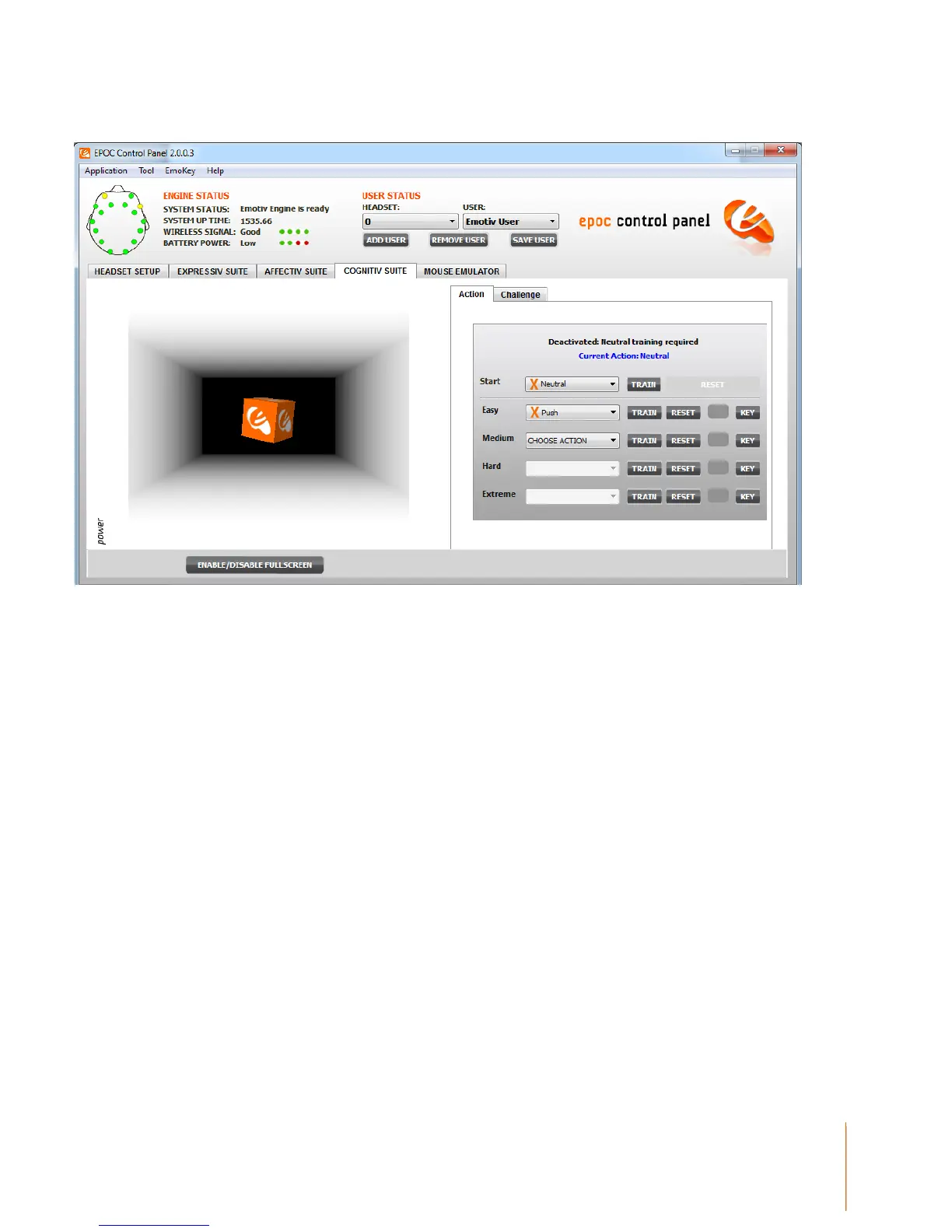
Figure 10 Cognitiv Suite Panel
3.3.2 Understanding the Cognitiv Panel Display
The Cognitiv Suite panel uses a virtual 3D cube to display an animated representation of the
Cognitiv detection output. This 3D cube is also used to assist the user in visualizing the intended
action during the training process. The Power gauge to the left of the 3D display is an indicator of
the “action power”, or relative certainty that the user is consciously visualizing the current action.
This information to the right displays the current state of the Cognitiv detection and allows the user
to define the current set of actions. In order to enable the Cognitiv detection, each chosen action,
plus the Neutral action must first be trained. For more information about the training process please
refer to Section 3.3.3 below.
A green checkmark is used to indicate that the corresponding action has been trained; an orange X
indicates a lack of training data. Remember, in order for the Cognitiv detection to be activated, all
actions, plus Neutral (the user’s background mental state) must be trained.
Use the drop down selection menu to modify the number and type of enabled actions.



 To Next Page