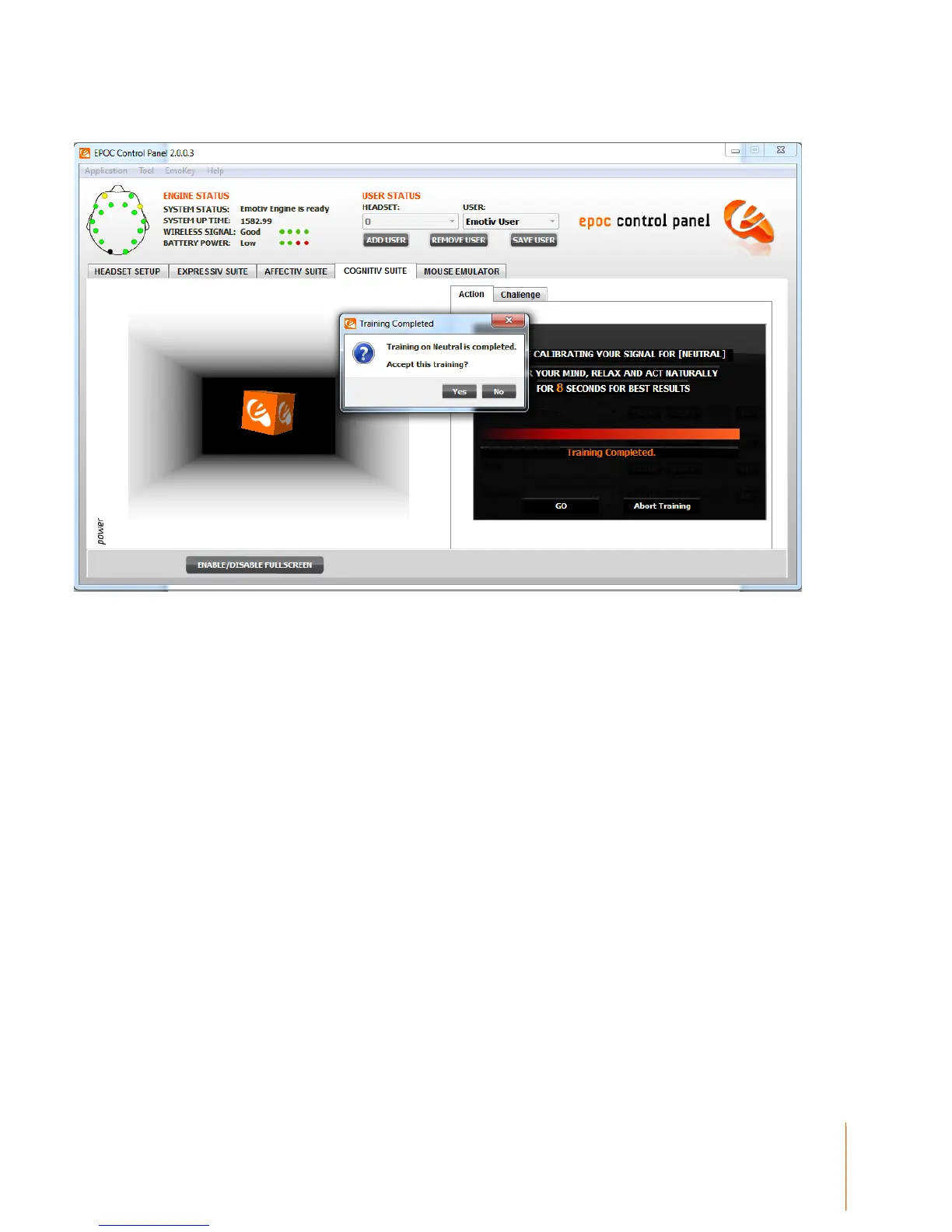
Figure 12 Accepting a Training Session
When you are ready to begin imagining or visualizing an action you wish to train, select the action
from the dropdown list. Actions that have already been trained are paired with a green checkmark;
actions with no training data are paired with an orange X.
During the training process it is very important to maintain your mental focus for the duration of the
training period (currently 8 seconds). Physical gestures, such as pushing an imaginary object with
one hand, may be used to heighten your focus on the intended action, but are not required. You
should also refrain from making substantial head movements or dramatic facial expressions during
the training period, as these actions can interfere with the recorded EEG signal.
Initially, the cube on screen will not move, as the system has not yet acquired the training data
necessary to construct a personalized signature for the current set of actions. After Neutral and
each enabled action have been trained at least once, the Cognitiv detection is activated and the
cube will respond to the Cognitiv detection, and your mental control, in real time.
Some users will find it easier to maintain the necessary mental focus if the cube is automatically
animated to perform the intended action as a visualization aid during training. If you think you will
benefit from this, then you may select the Animate cube according to training action checkbox.
Otherwise, the cube will remain stationary or, if you have already supplied training data and the
detection is active, will be animated by the current detection results for the action being trained,
while you supply new training data.


 To Next Page