eMKW-TD0054-21- Page 24
Additional Details
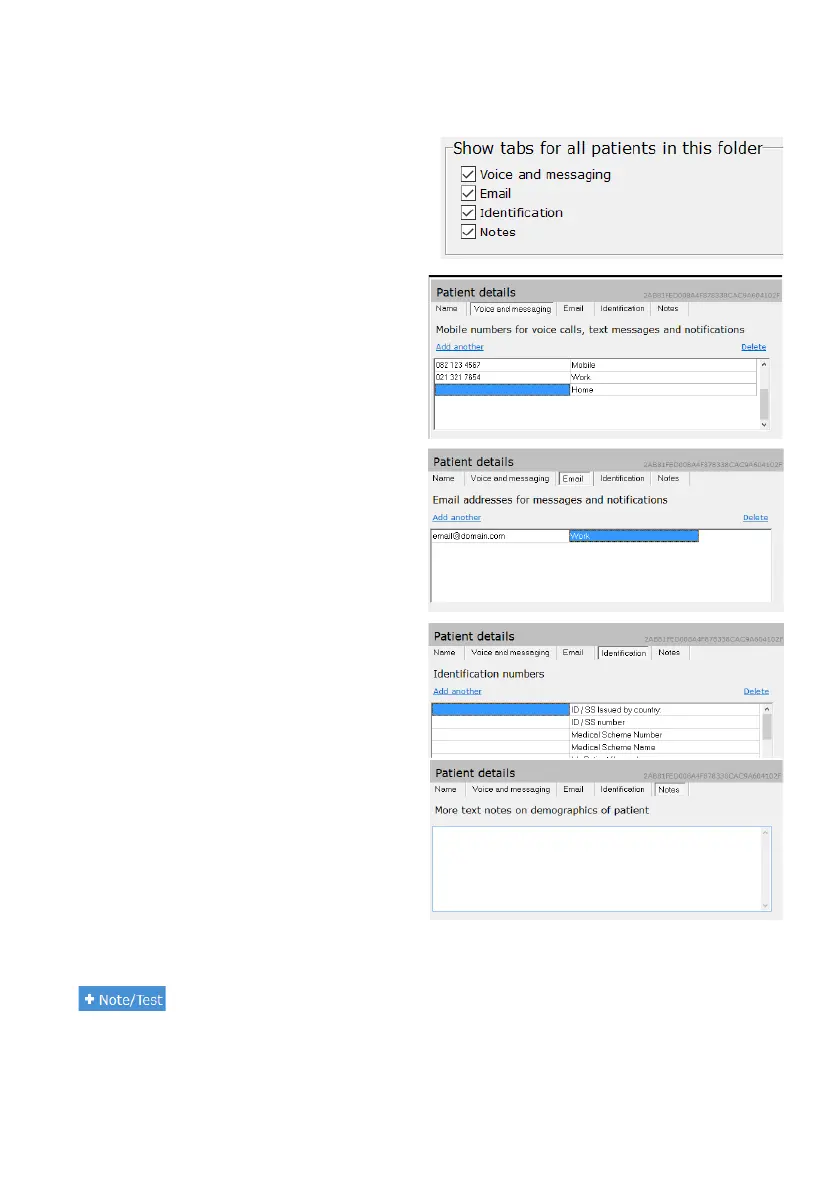
There are four additional tabs which can be added within the Patient Data Pane.
To add or remove these tabs from all patient files
within the folder selected, click on Records then click
on Smart folders in the top right hand corner of the
screen. Go to Required Fields and Tabs. Check the
box for each required tab in the patient file. Save the
folder settings and return to your patient file to
complete the information.
Voice and Messaging
Add the patients phone numbers in the fields
provided*. Select “Add another” to add additional
numbers, and “Delete” to remove.
*Note: Do not add + before the country code.
Email
Email addresses linked to your patient can be
stored here. Select the Email tab to add email
addresses. Select “Add another” to add additional
email addresses, and “Delete” to delete email
addresses.
Identification
Select Identification to add additional types of
identity details for the patient.
Add the identity details to the relevant field
provided, or click “Add another” to add additional
forms of identification, and “Delete” to remove
them.
Notes
Notes relating to the patient's demographics can
be added under the Notes tab. Notes regarding
tests are discussed later.
Notes and Tests
KUDUwave™ software bundles notes and tests within a single function. To add a new note or test click
on to get access to the following options:



 To Next Page