eMKW-TD0054-21- Page 60
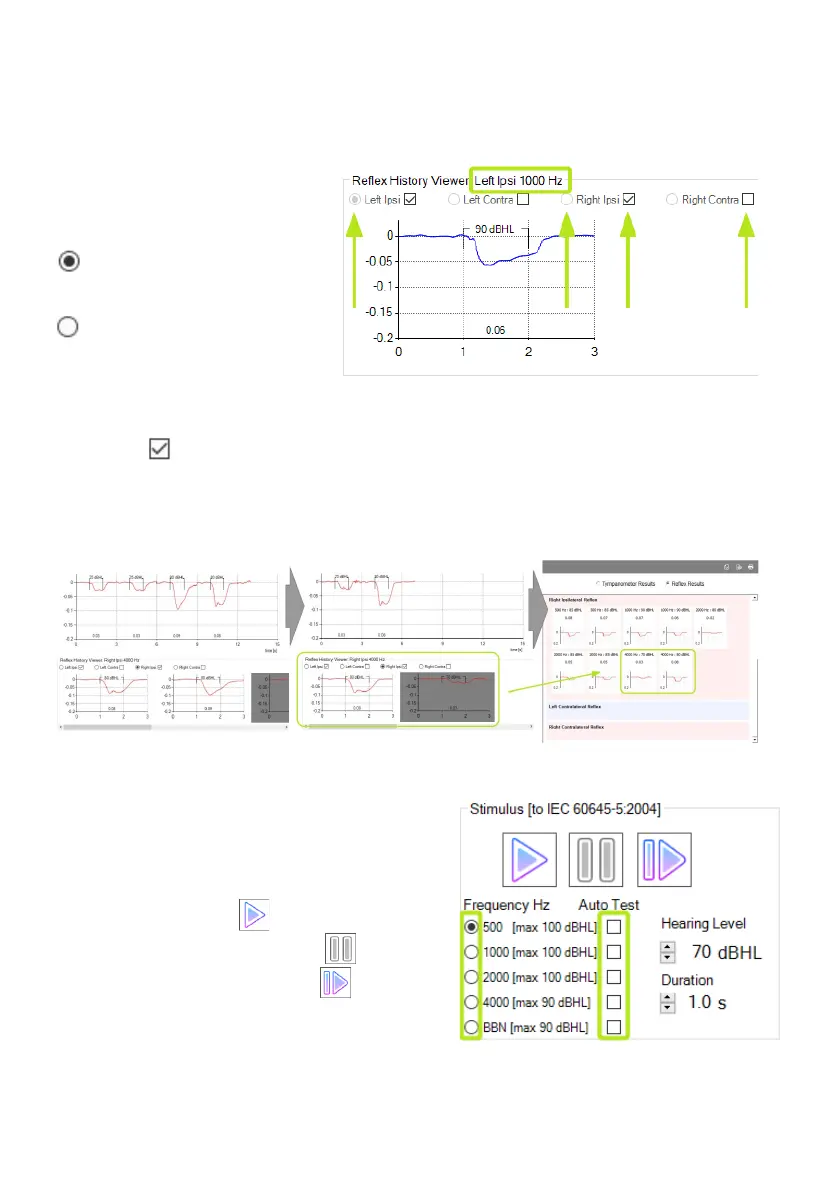
The lower right part of the reflex test page shows the reflex history. It contains all reflex tests which had
a measured reflex deflection greater than the history threshold selected at the Reflex Start page. In this
case note that only the 90 dBHL reflex measurement has gone into the reflex history since the others are
below the reflex history threshold. The reflex history shows tests chronologically with the most recent
test at the left.
The reflex type that is being tested
and displayed in the Reflex History
Viewer is selected in the Reflex
History Viewer by the radio buttons.
In this example it is Left Ipsi. To
view another reflex type in the history
click the corresponding radio button.
To view history for another
stimulus, select the radio button for
that stimulus at the stimulus
parameters.
When an automatic test mode has been selected the reflex types that will be tested are shown by the
check boxes . In this example Left Ipsi and Right Ipsi will be tested. To change the reflex types that
will be tested check or uncheck the relevant check boxes.
You can delete unnecessary reflex tests to prevent them from cluttering the saved report by clicking the
graph in the Reflex History Viewer and then pressing the “Delete” key.
Stimulus parameters and test controls
The lower left part of the reflex test page shows the stimulus parameters and test controls.
Automatic Reflex Test
In automatic modes the stimuli that will be tested are
selected by checking the checkboxes under “Auto
Test”. The start button starts or re-starts the
automatic test. The pause button pauses an
automatic test and the resume button will continue
the test from where it was last paused. The lower
Hearing Level that the automatic tests start out at is
selectable by the “Hearing Level” control.



 To Next Page