Diagnostic Outputs/Service Tool
© 2019 EMP, Inc. 14
Diagnostic Outputs
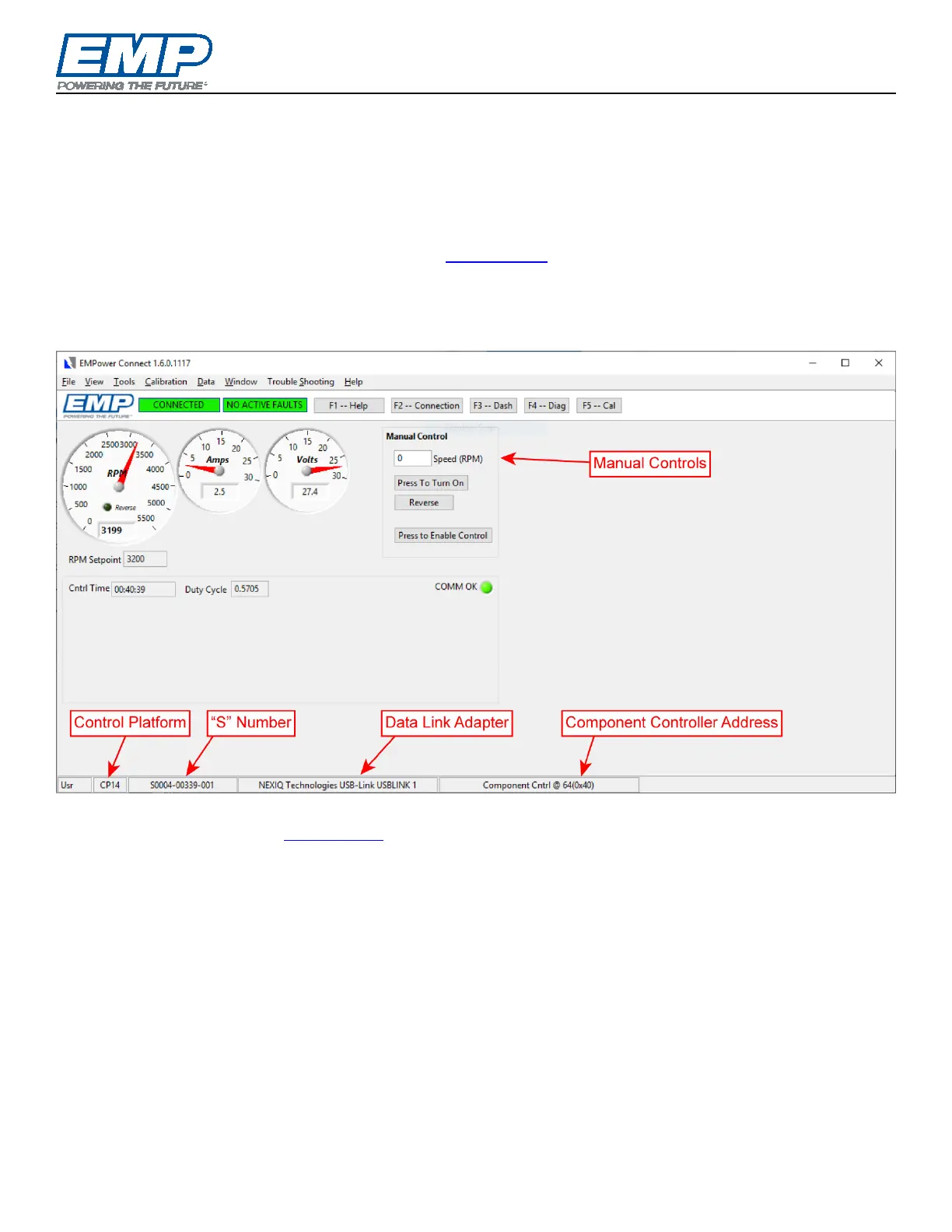
Operational and diagnostic information can be gathered using EMPower Connect™ service tool via an RP1210
compatible data link adapter. Components using SAE message formats have diagnostic outputs as defined in
section 4.2 of EMP document 9980001068.
EMPower Connect™ Service Tool
EMP Service Suite is available at no cost on the EMP website. To use the EMPower Connect service tool,
download and install the Service Suite software on your Windows PC. EMPower Connect software allows the
user to monitor operation, manually control the component and collect history data from the controller. Use
breakout harness 3170073176 to interface with the power and ground and communication connectors and an
RP1210 compatible data link adapter.
The Service Suite User Guide and Tutorial, including connection and control instructions, is embedded in the
software and available on the EMP website
.
To view diagnostic code lists or troubleshooting guides when not connected to a component, select the guide
matching the control platform of the component from the Trouble Shooting menu.



 To Next Page