1. Put on PPE. The minimum required equipment are safety goggles to protect from splashes and
nitrile gloves. Ensure your working area is clean to avoid chemical contamination and potential
exposure hazards.
2. Make sure the “O
2
VENT” has no tube or fitting attached to it.
3. The electrolyser must be in “Maintenance” mode and the internal electrolyte tank must be empty.
You can check this by looking at the status of LSL102D_in (Low electrolyte level) in the Cloud: it is
“false“ (red) if the tank is empty. If not – please contact the Enapter customer support team. Do
not leave the device powered on and unattended while in Maintenance mode.
4. Screw off the original cap from the electrolyte bag and replace it with the threaded puncture seal
cap. To connect the refilling pipe to the electrolyte bag, pull and hold the movable part of the
connector and push it against the electrolyte bag.
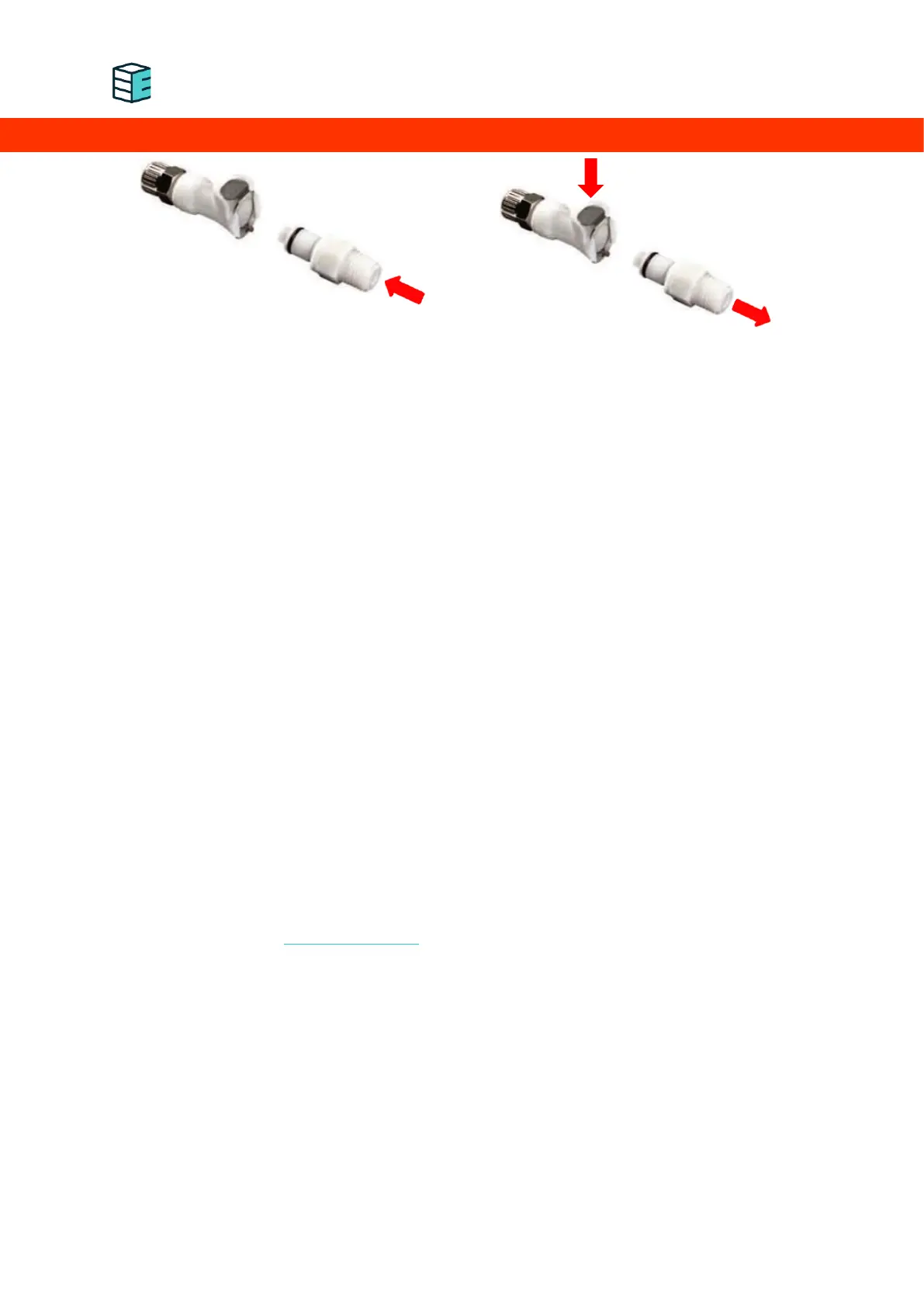
5. Fully insert the supplied male CPC quick connector into the “Fill/drain” port as shown in the left
picture above.
6. If you are using the mobile app, you can press “Start refilling” now.
7. Carefully raise the first-time filling solution above the device. Never lift the electrolyte above your
eye level. The solution will start filling immediately, if this does not occur, ensure the vent line is
not obstructed.
8. Follow the steps provided by the App: pour until the App shows full tank.
9. If the App prompts you to stop, stop filling immediately by lowering the bag below the electrolyser
and unplugging the connector as shown in the right picture above!
10. If it is not stopped quick enough, the electrolyte can exceed the maximum level. This will prompt
the electrolyser to go into error mode - if this happens, the tank must be drained, the electrolyser
must be put back in Maintenance Mode and the process needs to be repeated.
11. Ensure all the solution (2 L) has been filled into the device if not requested differently by the app.
12. Confirm finish of refilling by pressing the button in the App “Touch to Exit Maintenance Mode”.
13. To disconnect, push the button and pull the connector out of the bulkhead as shown in the right
picture above.
You are done!
The device is ready to be used and no other action is required. The electrolyser will automatically refill
demineralised water via the H
2
O In port whenever it needs it. Do not leave the device powered on and
unattended while in Maintenance mode.


 To Next Page