EasyManua.ls Logo

Ender 3 Series - 2. Understanding the Printer Screen; Printer Displayed Information; Navigating the Screen Menu

Ender 3 Series
12 pages
Print Icon
To Next Page IconTo Next Page
To Previous Page IconTo Previous Page
Loading...
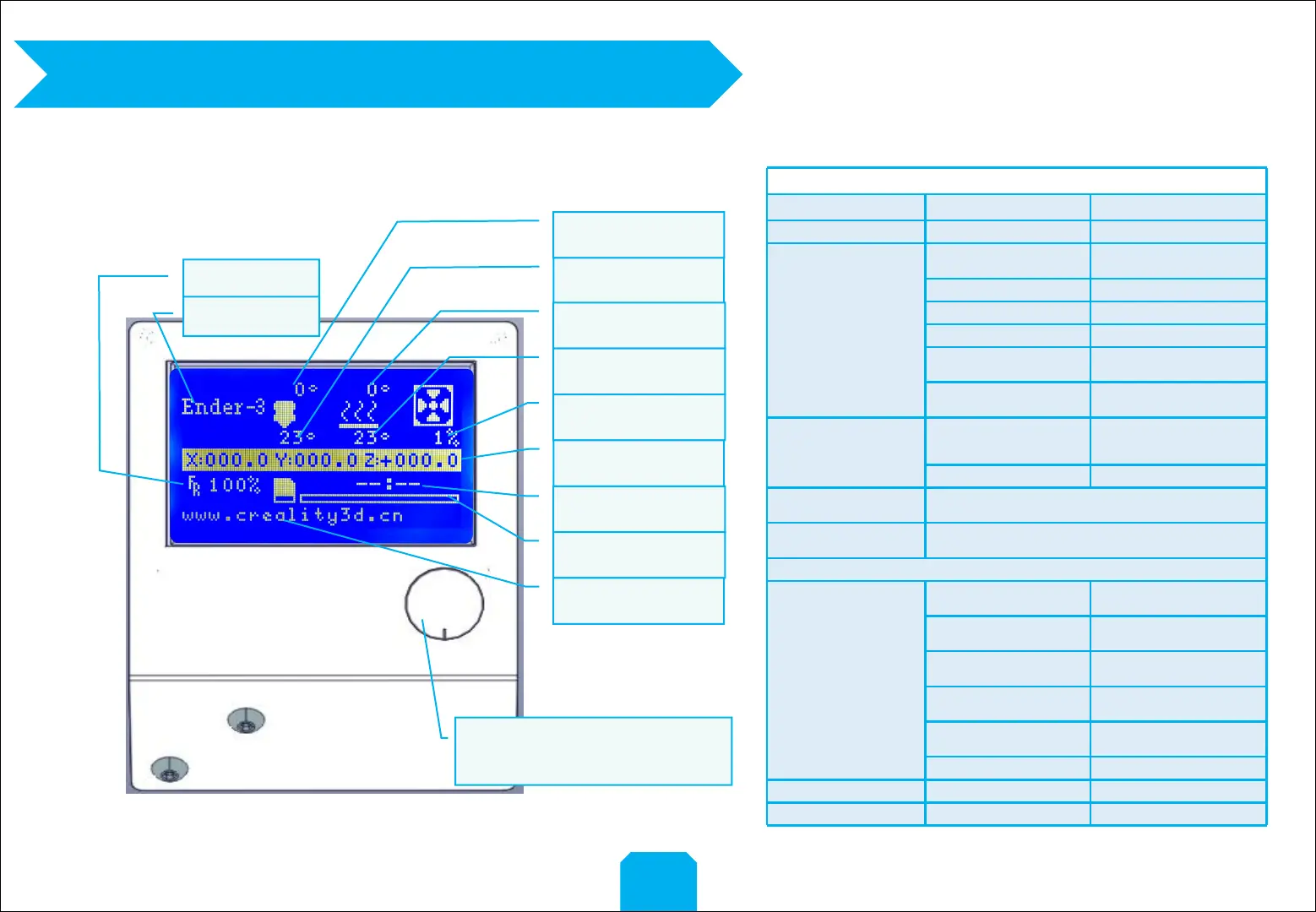
2. Screen Infromation
2
Information Displayed
Set temperature of the
Nozzle
Current temperature of
the Nozzle
Set temperature of the
Hot Bed
Current temperature of
the Hot Bed
Part Cooling Fan Speed
Current location of the
nozzle
Print time
Print progress
Prompt message
Print speed
Model
PushOK/Enter Sub Menu
TurnChange Option/Value
Screen Options
Menu
Sub Menu
Explanation
↑Info Screen↑
↑main↑
Return
Prepare
Disable Steppers
Moving X Y Z axis by your
hands
Auto Home
Return to the origin
Preheat PLA
Preheat ABS
Cooldown
Close and cooldown the
nozzle
Move Axis→
Moving X Y Z axis or
Extruder by given value
Control
Temperature→
Heat the nozzle and the bed
or change fan speed by given
value
Restore Failsafe
Restore factory setting
No card
/Print from SD
Select the printing model
Init.SD-Card
/Change SD-Card
Printing
Tune→
Speed
Change Printing Speed by
given value
Nozzle
Change the temperature by
given value
Bed
Change the temperature by
given value
Fan Speed
Change Fan Speed by given
value
Flow
Change filament flow by
given value
Change filament
Pause print
Stop print

Other manuals for Ender 3 Series

Related product manuals