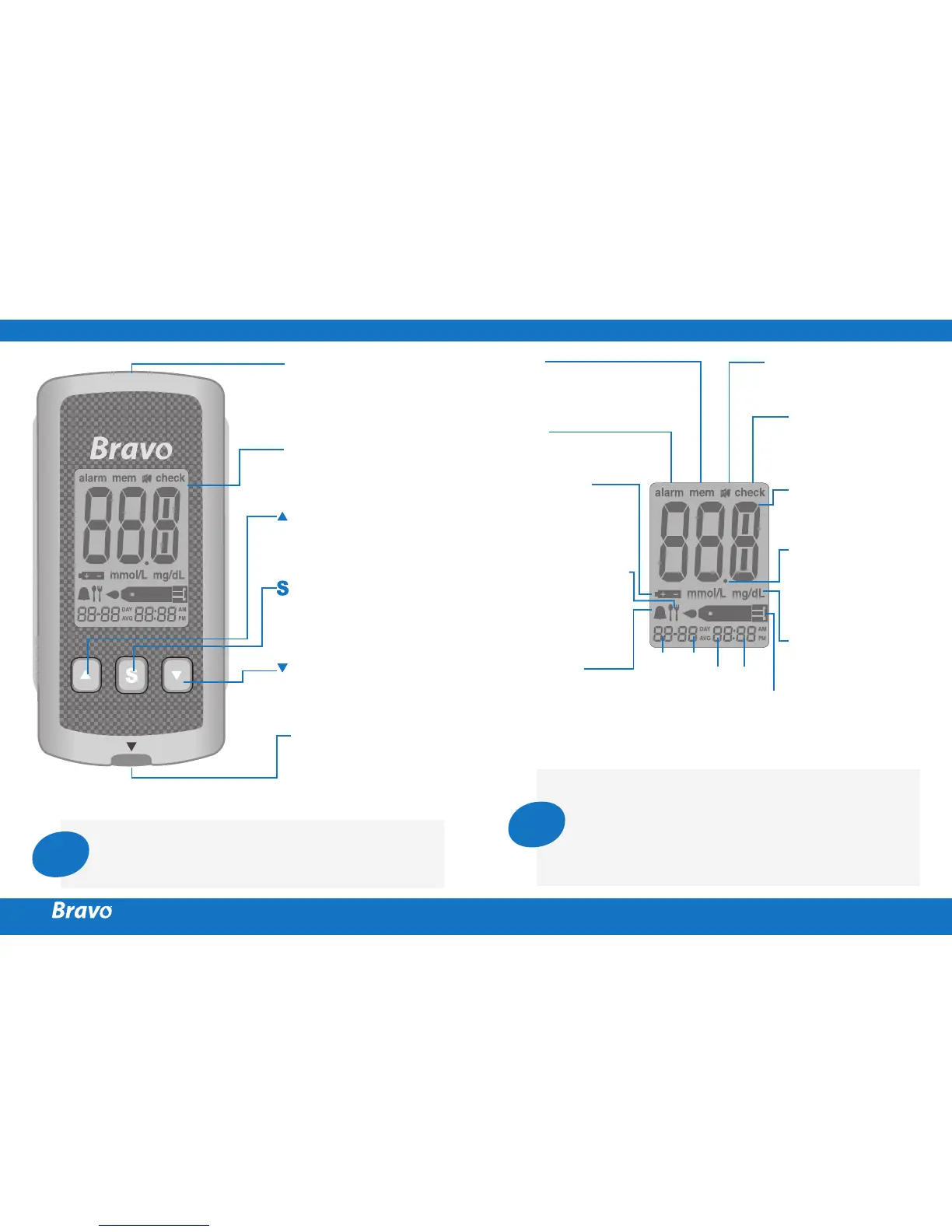
BRAVO™ GLUCOSE METER
Data Port
Used to transfer data
from the meter to a
computer with a cable
Display
Shows results,
messages
Test Strip Port
Insert test strip here
Button
Selects or changes
information
Button
Selects or changes
information
Button
Turns the meter on/off
and confirms
menu selections
Note
The cable for data transmission to PC can be
ordered
separately. Please contact your authorized
Endomedical™ sales representative or visit www.
endomedical.ca.
BRAVO™ BLOOD GLUCOSE METER DISPLAY
mem
appears when test results
stored in the memory are
displayed
Sound icon
appears only when the
sound is set to OFF
alarm
appears when the time
alarm has been set
check
appears when
test results have
not been saved
Battery icon
indicates meter
battery is running
low and needs to
be replaced
Test results
test results
displaying panel
Post-meal test flag
appears during
post-meal testing
and when post-
meal test results
are displayed
Decimal point
appears when
the blood glucose
measuring unit is
set to mmol/L
Alarm icon
appears when the
post-meal alarm
has been set
Month Day
MinuteHour
mmol/L, mg/dL
unit for measuring
blood glucose
Blood insertion icon
indicates meter is ready for
the application of a drop of
blood or control solution
Note
Your meter has been preset and locked to display
results in mmol/L (millimoles of glucose per liter).
In some countries, the meters are preset to display
unit in mg/dL (milligrams of glucose per deciliter).
Check your display to ensure that results are
being displayed in mmol/L. If they are not, contact
Endomedical at 1-800-282-6542.



 To Next Page