Long Range Wireless Access Point / Client Bridge Version 1.0
20
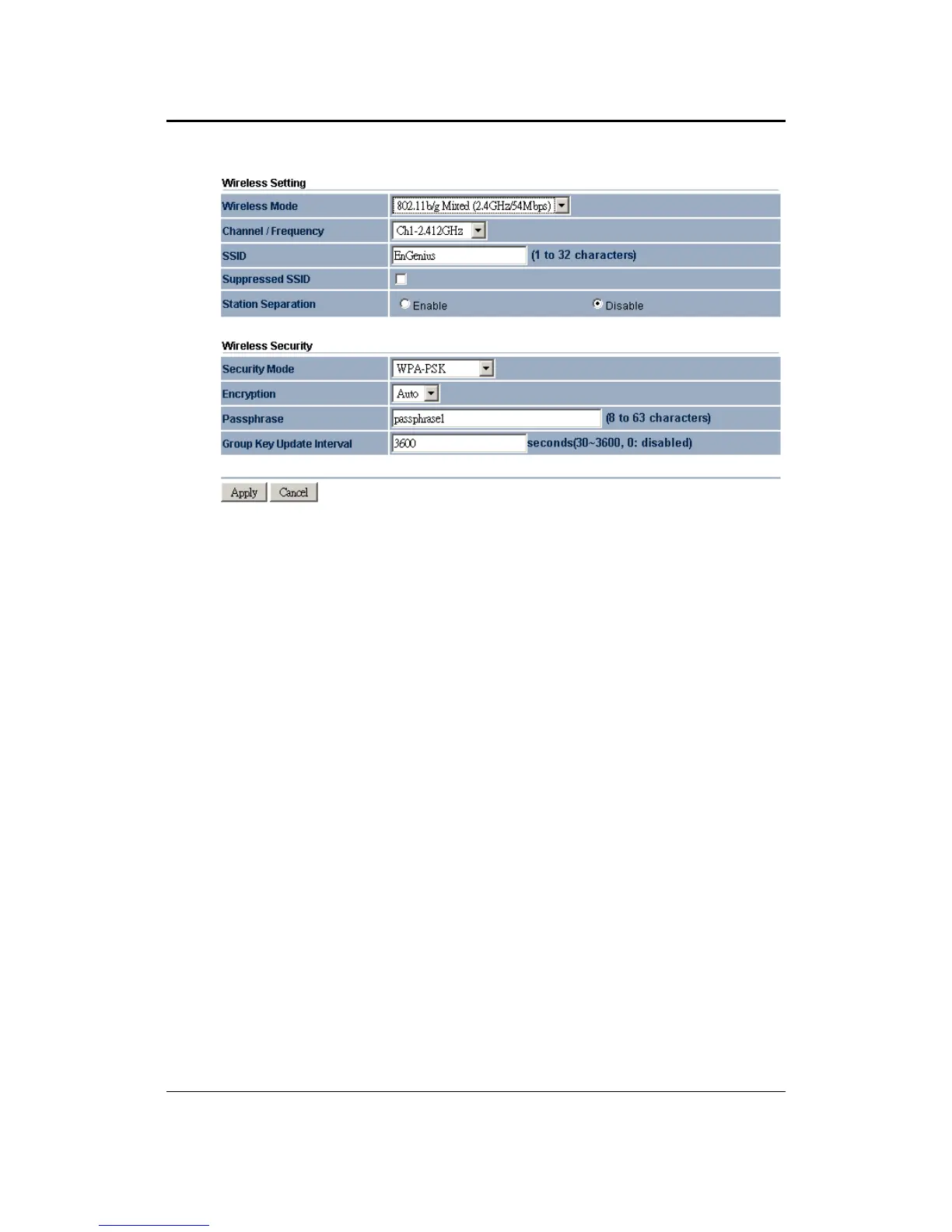
Encryption: Select TKIP or AES from the drop-down list if your wireless network
uses this encryption. WPA (Wi-Fi Protected Access) was designed to improve upon
the security features of WEP (Wired Equivalent Privacy). The technology is designed
to work with existing Wi-Fi products that have been enabled with WEP. WPA
provides improved data encryption through the Temporal Integrity Protocol (TKIP),
which scrambles the keys using a hashing algorithm and by adding an integrity
checking feature which makes sure that keys haven’t been tampered with.
Passphrase: Specify a passphrase that is shared amongst the Access Points and
clients.
Group Key Update Interval: Specify the number of seconds after which the Access
Point will probe the client for the passphrase.
Click on the Apply button to save the changes.
Wireless Security – WPA, WPA2
Security Mode: Select WPA or WPA2 from the drop-down list if your wireless
network uses WPA. WPA (Wi-Fi Protected Access) was designed to improve upon
the security features of WEP (Wired Equivalent Privacy). The technology is designed
to work with existing Wi-Fi products that have been enabled with WEP. WPA
provides improved data encryption through the Temporal Integrity Protocol (TKIP),
which scrambles the keys using a hashing algorithm and by adding an integrity
checking feature which makes sure that keys haven’t been tampered with.



 To Next Page