31
MN-37072 • Rev 2 • 05/16 • Designer Series Blanket Warmer
Troubleshooting
Serial number is required for all inquiries.
Always include both model and serial number(s) in any
correspondence regarding the appliance.
Model: ______________________________________________
Serial Number: ______________________________________________
Purchased From: ______________________________________________
Date Installed: ____________________ Voltage: _____________
Troubleshooting Guide
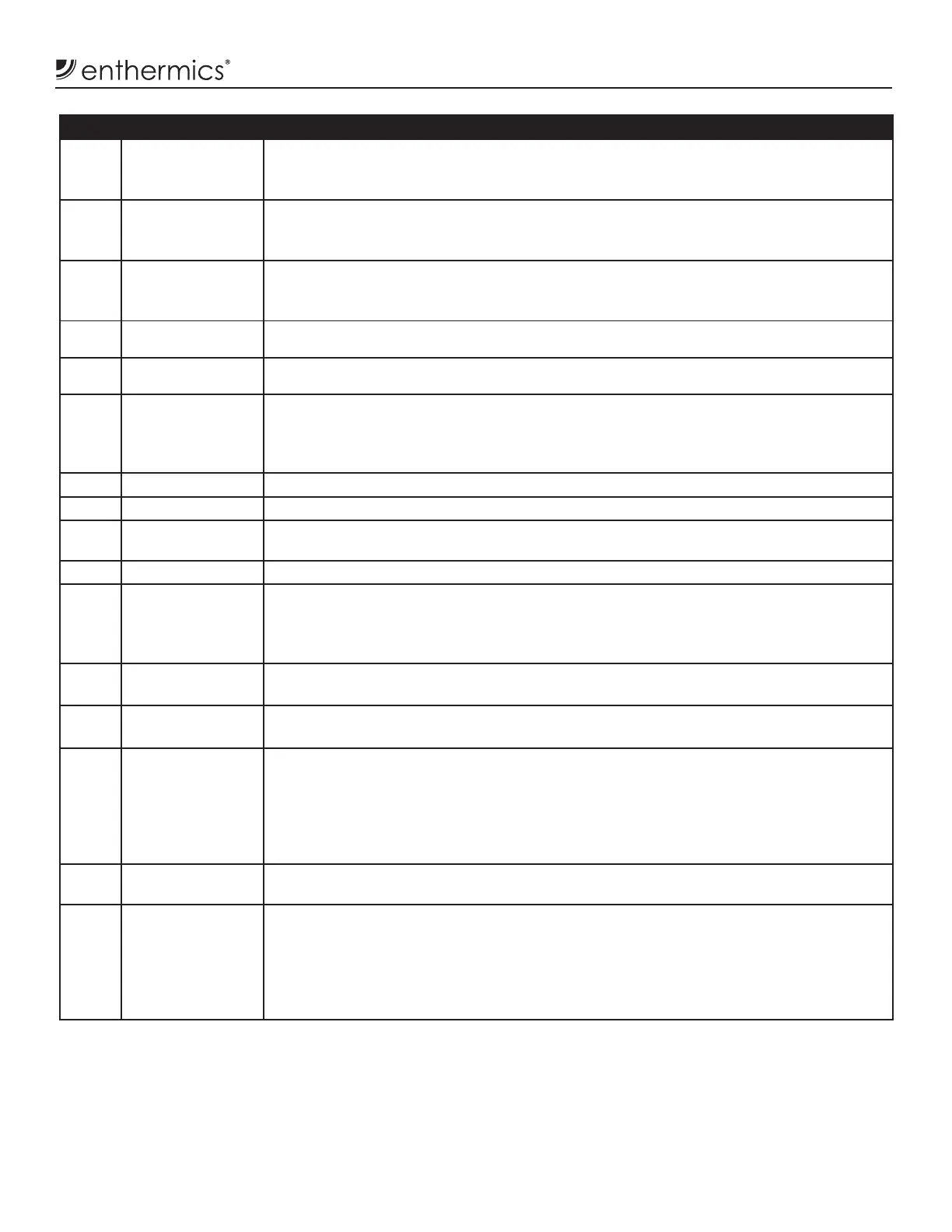
Code Refers to Action Required
E-10
ES10
ES20
ES30
ES40
ES50
ES60
ES70
Cavity sensor
Sensor 1
Sensor 2
Sensor 3
Sensor 4
Sensor 5
Sensor 6
Sensor 7
Sensor is shorted. So ware disengages heating pads. Acknowledge error by pressing on/
off button. If error persists, a qualifi ed service technician should test the sensor.
• Test the sensor. Detach the sensor from appliance. Use an Ohm meter to measure the
resistance of the sensor. Check the sensor at 25°C (77°F). If the reading is 10 KOhm ±1.5
KOhm, replace the display. If the reading is ±2 KOhm, replace sensor.
• Check the wires for integrity. Check for proper and secure connections at the control
and terminal block. If necessary, re-secure the faulty connections.
• Call service if error persists.
E-11
ES11
ES21
ES31
ES41
ES51
ES61
ES71
Cavity sensor
Pad sensor 1
Pad sensor 2
Pad sensor 3
Pad sensor 4
Pad sensor 5
Pad sensor 6
Pad sensor 7
Sensor is open. So ware disengages heating pads. Acknowledge error by pressing on/off
button. If error persists, a qualifi ed service technician should test the sensor.
• Test the sensor. Detach the sensor from appliance. Use an Ohm meter to measure the
resistance of the sensor. Check the sensor at 25°C (77°F). If the reading is 10 KOhm ±1.5
KOhm, replace the display. If the reading is ±2 KOhm, replace sensor.
• Check the wires for integrity. Check for proper and secure connections at the control
and terminal block. If necessary, re-secure the faulty connections.
• Call service if error persists.
P130
P230
P330
P430
P530
P630
P730
Pad 1
Pad 2
Pad 3
Pad 4
Pad 5
Pad 6
Pad 7
Heating pad has not reached set-point temperature. Acknowledge error by pressing on/
off button. If error persists, a qualifi ed service technician should test the heater pad(s).
• Turn appliance off and unplug it from AC power.
• Use Ohm meter to measure resistance between L:(Line) & N:(Neutral) leads of a cold
heater pad.
• The Ohm readings shall be:
black to black wire = 251 to 291 Ohms
black to white wire = 126 to 145 Ohms
• Call service if error persists.
*E-31 Cavity sensor
• Sensor reading is above temperature set-point. [Blanket Warmer triggers at 15° over set
point. Fluid Warmers trigger at 5° over set point.]
• Call service.
P131
P231
P331
P431
P531
P631
P731
Pad sensor 1
Pad sensor 2
Pad sensor 3
Pad sensor 4
Pad sensor 5
Pad sensor 6
Pad sensor 7
Heater pad over-temp error
• So ware disengages heating pads.
• Acknowledge error by pressing on/off button.
• Allow appliance to cool.
• Call service if error persists.
*E-33 Cavity sensor • Sensor reading is above maximum allowable temperature set-point and over temp
value. [Blanket Warmers trigger at 82°C (180°F). Fluid Warmers trigger at 71°C (160°F).]
• Contact service
*E-50 Analog to Digital
Convertor Error
• Remove inventory, discard if necessary, and allow appliance to cool down.
• If error persists a er cool down and reset, the control assembly should be replaced by
a qualifi ed service technician. Contact service.
E-60 Real Time Clock
Checksum Error
(Blanket Warmers Only)
Real time clock rechargeable battery backup has discharged.
• Plug appliance into outlet for 30 minutes.
• See Timer Control Feature section in blanket manual to reset clock.
*E-61 Real Time Clock
(Blanket Warmers Only)
Real time clock not responding. Call service if error persists.
E-62 Real Time Clock
(Blanket Warmers Only)
Timer overlay is present, but no real time clock is detected. Call service.
*E-70 Pad Count Error More heater pads detected than set for. Hold On/Off button for 12 seconds until display
shows "PAd#” (# = number of pads selected [3-7]). Press up or down arrow to adjust to
correct number of pads. [Blanket Warmers: 1.5
3
, 2.5
3
= 3 pads, 3.5
3
, 4.0
3,
7.5
3
= 4 pads.
Fluid Warmers: 2.5
3
& 4.0
3
= 3 pads]
*E-71 Personality Error Call service
E-80 EEPROM Error EEPROM not responding. Call service if error persists.
*E-81 Calibration
not locked
Call service
*E-83 EEPROM Error Call service for help resetting the control.
E-87 EEPROM Error Stored offsets corrupted. Offsets reset to 0.
• Control may need to be recalibrated.
• Possible bad EEPROM.
• Call service if error persists.
E-90 Button stuck A button has been held down for >60 seconds. Adjust control. Error will reset when the
problem has been resolved.
E-95 Factory Test pin
short detected.
Ensure that debris is not causing a short between the test pins. If the pins are good,
replace the control.
*E-98 Temperature
Delta Error
Temperature of the cavity sensors 1 and 2 differ by more than 1.7ºC (3ºF).
• Remove product and allow the appliance to cool down.
• Verify that the product sensor is clean and operating correctly.
• Press the power button to clear error code.
• If error persists, the sensor switch assembly should be replaced by a qualifi ed service
technician. Contact service.
E-99
Hardware
Over Temp
• Inspect the connections and condition of high limit bimetal thermostat.
• If error continues call service.
*EFAn
Fan or Fan
Sensor Failure
(Fluid Warmers Only)
• If the fan is operating, make sure the lens on the sensor is not blocked or dirty.
• If error persists a er the sensor is cleaned, use an Ohm meter to ensure that the sensor
wires are good. A good wire will have a reading of <1 Ohm.
• If the wires are good, replace the sensor.
• If the error persists a er replacement, check the sensor mount location.
• If the error still persists, replace the control.
Code Refers to Action Required
E-10
ES10
ES20
ES30
ES40
ES50
ES60
ES70
Cavity sensor
Sensor 1
Sensor 2
Sensor 3
Sensor 4
Sensor 5
Sensor 6
Sensor 7
Sensor is shorted. So ware disengages heating pads. Acknowledge error by pressing on/
off button. If error persists, a qualifi ed service technician should test the sensor.
• Test the sensor. Detach the sensor from appliance. Use an Ohm meter to measure the
resistance of the sensor. Check the sensor at 25°C (77°F). If the reading is 10 KOhm ±1.5
KOhm, replace the display. If the reading is ±2 KOhm, replace sensor.
• Check the wires for integrity. Check for proper and secure connections at the control
and terminal block. If necessary, re-secure the faulty connections.
• Call service if error persists.
E-11
ES11
ES21
ES31
ES41
ES51
ES61
ES71
Cavity sensor
Pad sensor 1
Pad sensor 2
Pad sensor 3
Pad sensor 4
Pad sensor 5
Pad sensor 6
Pad sensor 7
Sensor is open. So ware disengages heating pads. Acknowledge error by pressing on/off
button. If error persists, a qualifi ed service technician should test the sensor.
• Test the sensor. Detach the sensor from appliance. Use an Ohm meter to measure the
resistance of the sensor. Check the sensor at 25°C (77°F). If the reading is 10 KOhm ±1.5
KOhm, replace the display. If the reading is ±2 KOhm, replace sensor.
• Check the wires for integrity. Check for proper and secure connections at the control
and terminal block. If necessary, re-secure the faulty connections.
• Call service if error persists.
P130
P230
P330
P430
P530
P630
P730
Pad 1
Pad 2
Pad 3
Pad 4
Pad 5
Pad 6
Pad 7
Heating pad has not reached set-point temperature. Acknowledge error by pressing on/
off button. If error persists, a qualifi ed service technician should test the heater pad(s).
• Turn appliance off and unplug it from AC power.
• Use Ohm meter to measure resistance between L:(Line) & N:(Neutral) leads of a cold
heater pad.
• The Ohm readings shall be:
black to black wire = 251 to 291 Ohms
black to white wire = 126 to 145 Ohms
• Call service if error persists.
*E-31 Cavity sensor
• Sensor reading is above temperature set-point. [Blanket Warmer triggers at 15° over set
point. Fluid Warmers trigger at 5° over set point.]
• Call service.
P131
P231
P331
P431
P531
P631
P731
Pad sensor 1
Pad sensor 2
Pad sensor 3
Pad sensor 4
Pad sensor 5
Pad sensor 6
Pad sensor 7
Heater pad over-temp error
• So ware disengages heating pads.
• Acknowledge error by pressing on/off button.
• Allow appliance to cool.
• Call service if error persists.
*E-33 Cavity sensor • Sensor reading is above maximum allowable temperature set-point and over temp
value. [Blanket Warmers trigger at 82°C (180°F). Fluid Warmers trigger at 71°C (160°F).]
• Contact service
*E-50 Analog to Digital
Convertor Error
• Remove inventory, discard if necessary, and allow appliance to cool down.
• If error persists a er cool down and reset, the control assembly should be replaced by
a qualifi ed service technician. Contact service.
E-60 Real Time Clock
Checksum Error
(Blanket Warmers Only)
Real time clock rechargeable battery backup has discharged.
• Plug appliance into outlet for 30 minutes.
• See Timer Control Feature section in blanket manual to reset clock.
*E-61 Real Time Clock
(Blanket Warmers Only)
Real time clock not responding. Call service if error persists.
E-62 Real Time Clock
(Blanket Warmers Only)
Timer overlay is present, but no real time clock is detected. Call service.
*E-70 Pad Count Error More heater pads detected than set for. Hold On/Off button for 12 seconds until display
shows "PAd#” (# = number of pads selected [3-7]). Press up or down arrow to adjust to
correct number of pads. [Blanket Warmers: 1.5
3
, 2.5
3
= 3 pads, 3.5
3
, 4.0
3,
7.5
3
= 4 pads.
Fluid Warmers: 2.5
3
& 4.0
3
= 3 pads]
*E-71 Personality Error Call service
E-80 EEPROM Error EEPROM not responding. Call service if error persists.
*E-81 Calibration
not locked
Call service
*E-83 EEPROM Error Call service for help resetting the control.
E-87 EEPROM Error Stored offsets corrupted. Offsets reset to 0.
• Control may need to be recalibrated.
• Possible bad EEPROM.
• Call service if error persists.
E-90 Button stuck A button has been held down for >60 seconds. Adjust control. Error will reset when the
problem has been resolved.
E-95 Factory Test pin
short detected.
Ensure that debris is not causing a short between the test pins. If the pins are good,
replace the control.
*E-98 Temperature
Delta Error
Temperature of the cavity sensors 1 and 2 differ by more than 1.7ºC (3ºF).
• Remove product and allow the appliance to cool down.
• Verify that the product sensor is clean and operating correctly.
• Press the power button to clear error code.
• If error persists, the sensor switch assembly should be replaced by a qualifi ed service
technician. Contact service.
E-99
Hardware
Over Temp
• Inspect the connections and condition of high limit bimetal thermostat.
• If error continues call service.
*EFAn
Fan or Fan
Sensor Failure
(Fluid Warmers Only)
• If the fan is operating, make sure the lens on the sensor is not blocked or dirty.
• If error persists a er the sensor is cleaned, use an Ohm meter to ensure that the sensor
wires are good. A good wire will have a reading of <1 Ohm.
• If the wires are good, replace the sensor.
• If the error persists a er replacement, check the sensor mount location.
• If the error still persists, replace the control.


 To Next Page
 Loading...