27
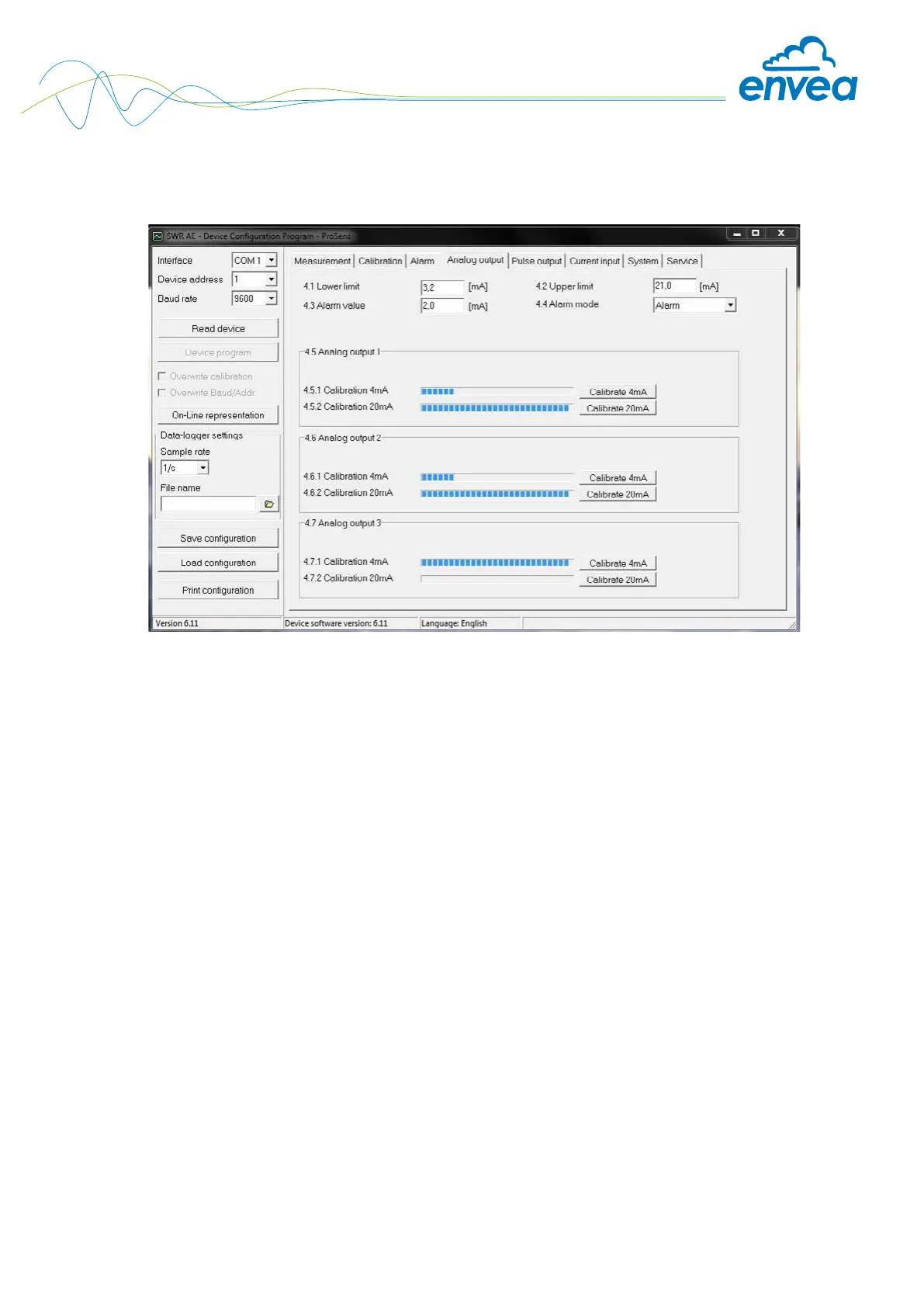
Tab 4: Analogue output
Setting and calibrating the analogue output.
4.1 Lower limit Input: 0 … 22 mA Standard setting: 3.2 mA
4.2 Upper limit Input: 0 … 22 mA Standard setting: 21 mA
4.3 Alarm value Input: 0 … 22 mA Value to be output at pending alarm
(Standard setting 2 mA)
4.4 Alarm mode Selection: Alarm: Alarm is output.
Hold alarm / output Measurement value drops to 0, or current
measurement value.
Hold output: Last measurement value
remains pending until fault rectication at
the output signal.
4.5 Analogue output 1 Submenu
4.5.1 Calibration 4 mA Selection: Key functions can be used to set the current
Setting the output current and equalise it to the receiver side.
4.5.2 Calibration 20 mA Selection: Key functions can be used to set the current
Setting the output current and equalise it to the receiver side.
4.6 Analogue output 2 Submenu
4.6.1 Calibration 4 mA Selection: Key functions can be used to set the current
Setting the output current and equalise it to the receiver side.
4.6.2 Calibration 20 mA Selection: Key functions can be used to set the current
Setting the output current and equalise it to the receiver side.


 To Next Page