❏ Mac OS X
Select Go > Applications > EPSON
Soware
> Epson Scan 2 Utility.
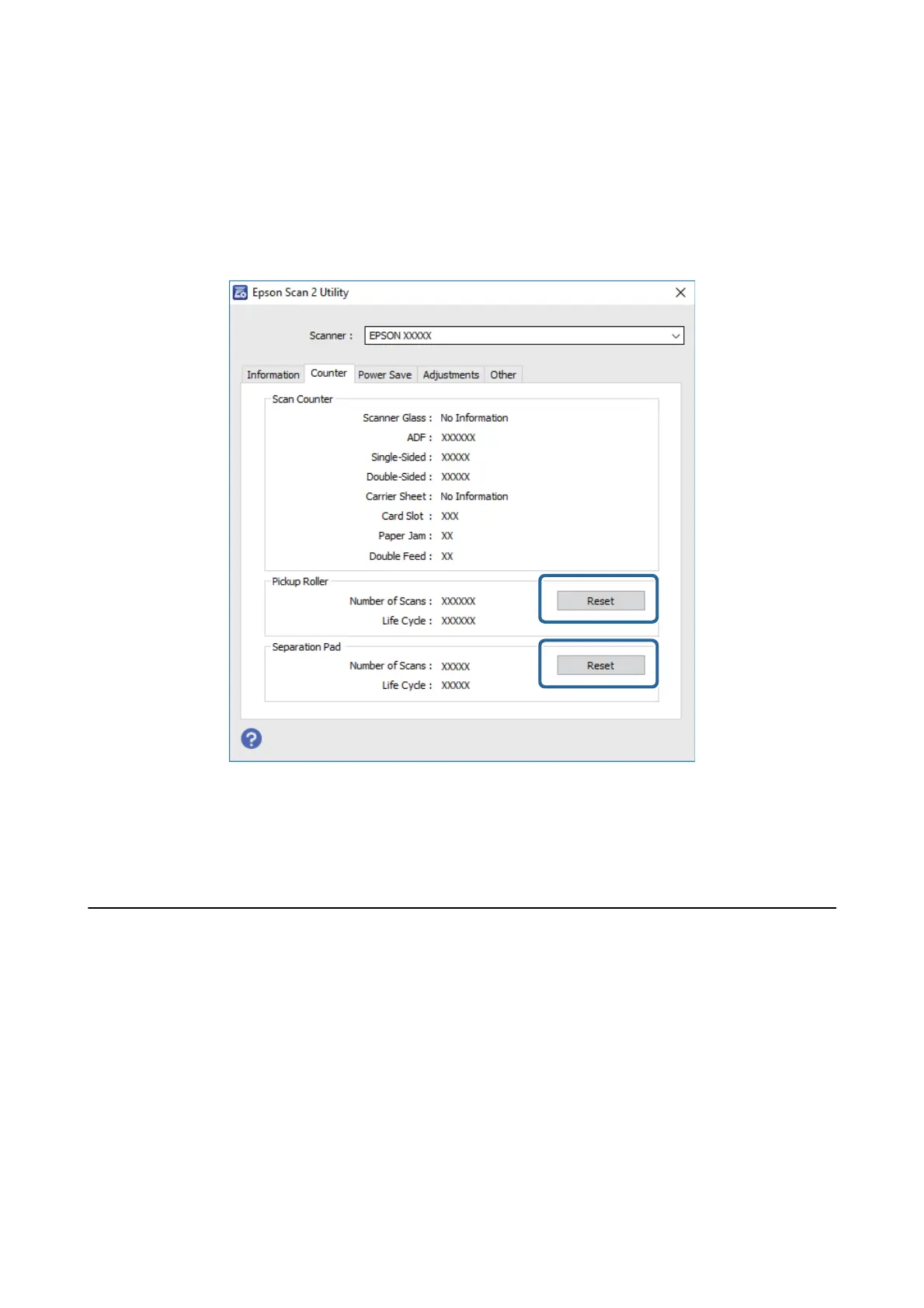
3. Click the Counter tab.
4.
Click Reset for the pickup roller or the separation pad.
Related Information
& “Pickup Roller Codes” on page 15
& “Separation Pad Codes” on page 16
Energy Saving
You can save energy by using the sleep mode or auto power o mode when no operations are performed by the
scanner. You can set the time period before the scanner enters sleep mode and turns
o
automatically. Any
increase will
aect
the product’s energy
eciency.
Consider the environment before making any changes.
1. Start Epson Scan 2 Utility.
❏ Wi nd ows 10
Click the start button, and then select All apps > EPSON > Epson Scan 2 > Epson Scan 2 Utility.
❏ Windows 8.1/Windows 8/Windows Server 2012 R2/Windows Server 2012
Start screen > Apps > Epson > Epson Scan 2 Utility.
User's Guide
Maintenance
86


 To Next Page