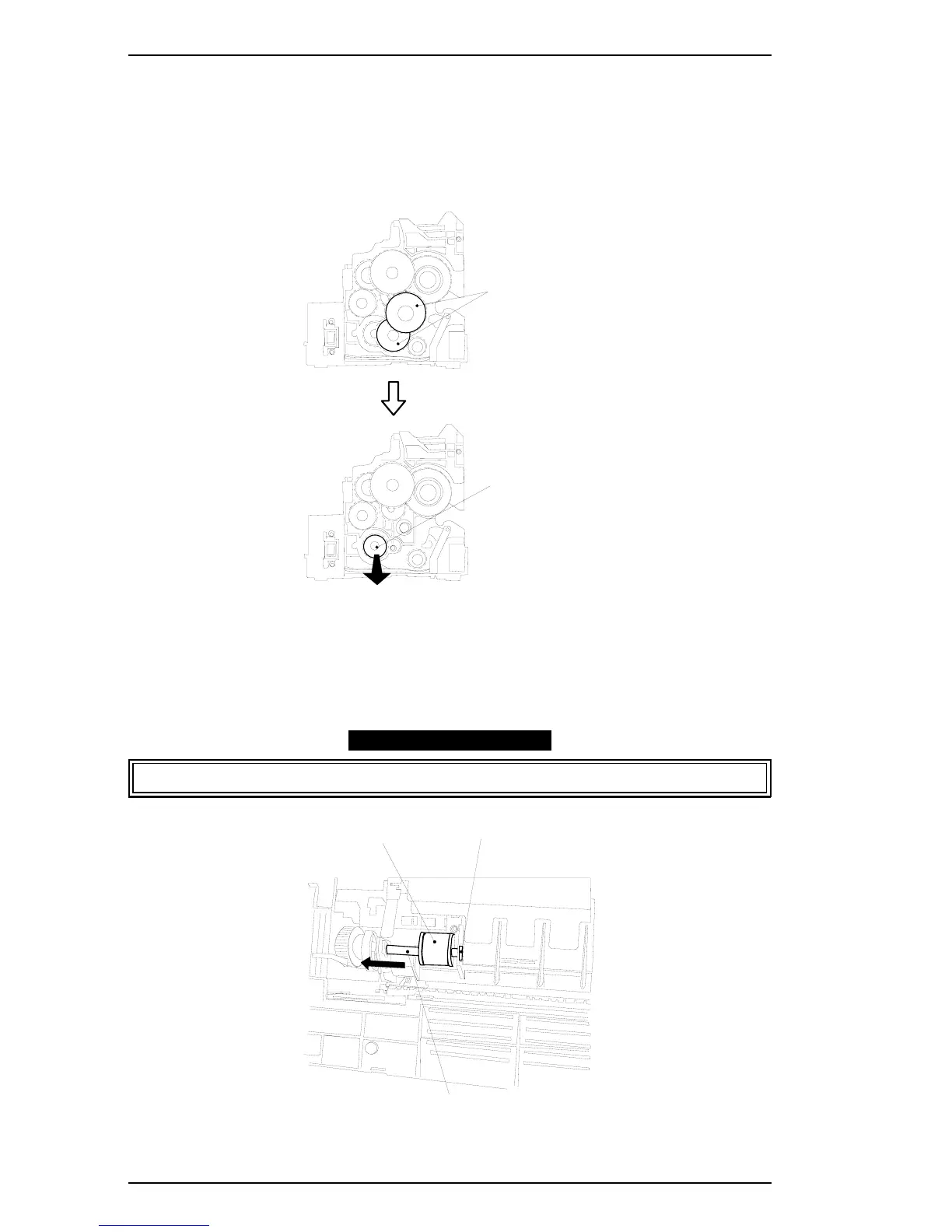
3.2.3.10 Paper Take-Up Roller Removal
1. Remove the main motor. (Refer to Section 3.2.3.8.)
2. Remove the paper guide assembly. (Refer to Section 3.2.3.9.)
3. Remove the 6 screws (#4:2, #5:4), and remove the left frame.
4. Remove the 2 gears (GEAR 29/65T, GEAR 22/57T), specified in the figure below.
5. At the bottom of the printer, remove the E-ring fixing the paper take-up roller shaft.
6. Unhock the paper take-up roller and slide the shaft to the end of the shaft where the driven
gear is attached, then remove the paper take-up roller.
When removing the paper take-up roller from the shaft, be sure not to lose the pin.
Remove Gears (2)
Paper Take-up Roller Shaft
Slide out
Figure 3-34. Removing the Gears
Paper Take-up Roller
E-Ring
Paper Take-up Roller Shaft
Figure 3-35. Removing the Paper Take-Up Roller
Disassembly and Assembly EPL-5500 Service Manual
3-22 Rev. B



 To Next Page