REV.-A
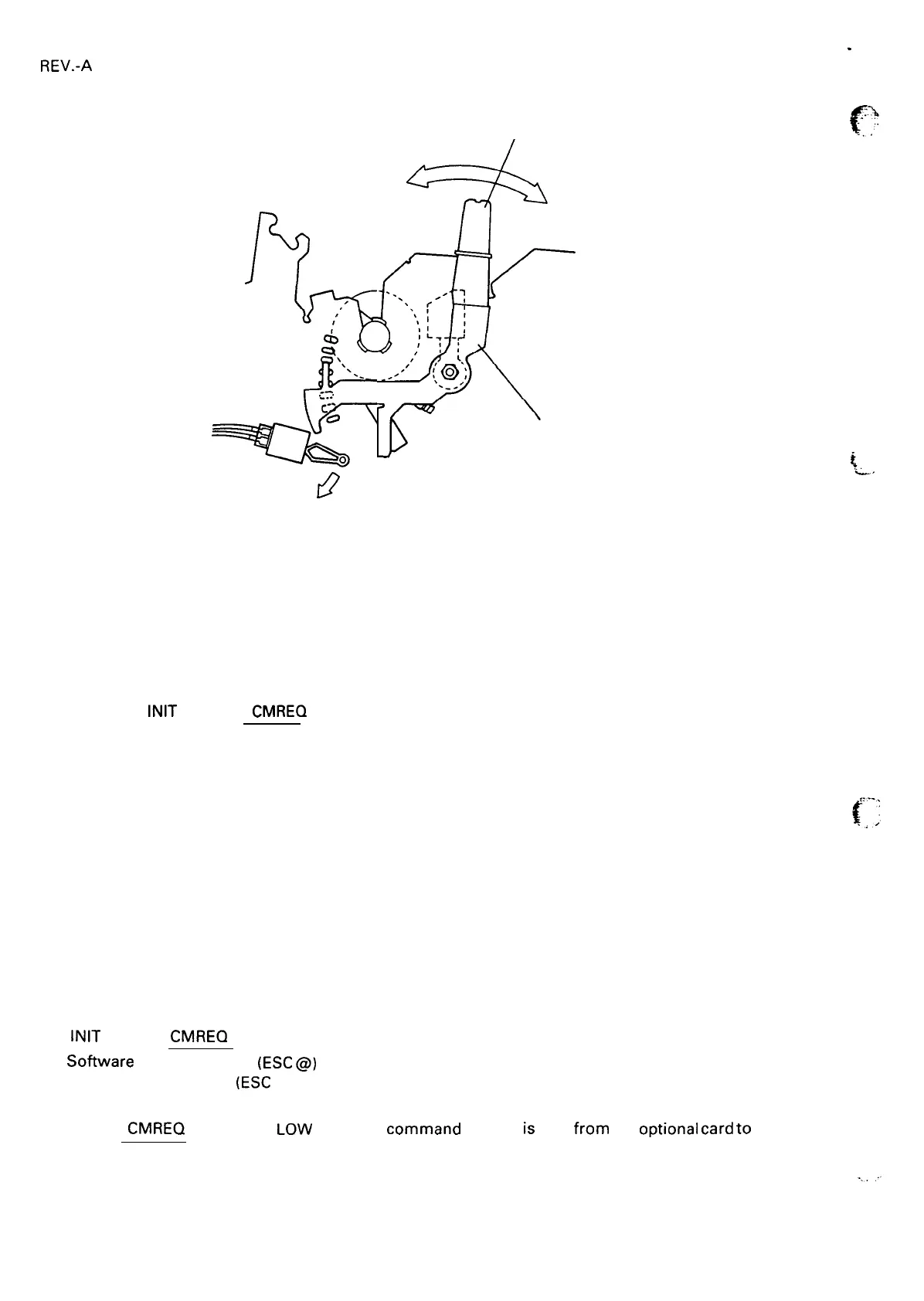
Position 1 (3rd step)
$
\
\
.
.
-=.
&’”
r’
Platen Gap Adjust Lever
Q
Figure 1-10. Lever Positions
1.5.12 Printer Initialization
The printer is initialized in the following cases.
(1) When the printer is turned on.
(2) When the
INIT
signal
or
CMREQ
(optional l/F ) is input.
When the printer is initialized, it performs the following functions:
● The printhead returns to the leftmost position (carriage home).
● The READY LED lights.
● The printer clears the print buffer and input data buffer.
● The line spacing is set to 1/6 inch.
● The page length and skip over perforation settings are returned to their default values.
● All vertical tab positions are cleared.
● The horizontal tab positions are set to every 8 columns.
● The print mode is set to the default value set from the control paneI and stored in non-volatile memory.
TOF position will be reset in the following cases.
(1) Power on
(2)
INIT
signal or CMREQ (optional I/F)
(3) Sofiware reSet command
(ESC
@)
(4) Page length command
(ESC
C)
4.-
NOTE: The
CMREQ
signal goes
Low
when the command request
is
sent from the
optional
card
to
the main
system.
1-26



 To Next Page