REV.-A
3.2.5.13 Disassembling the Tractor Unit
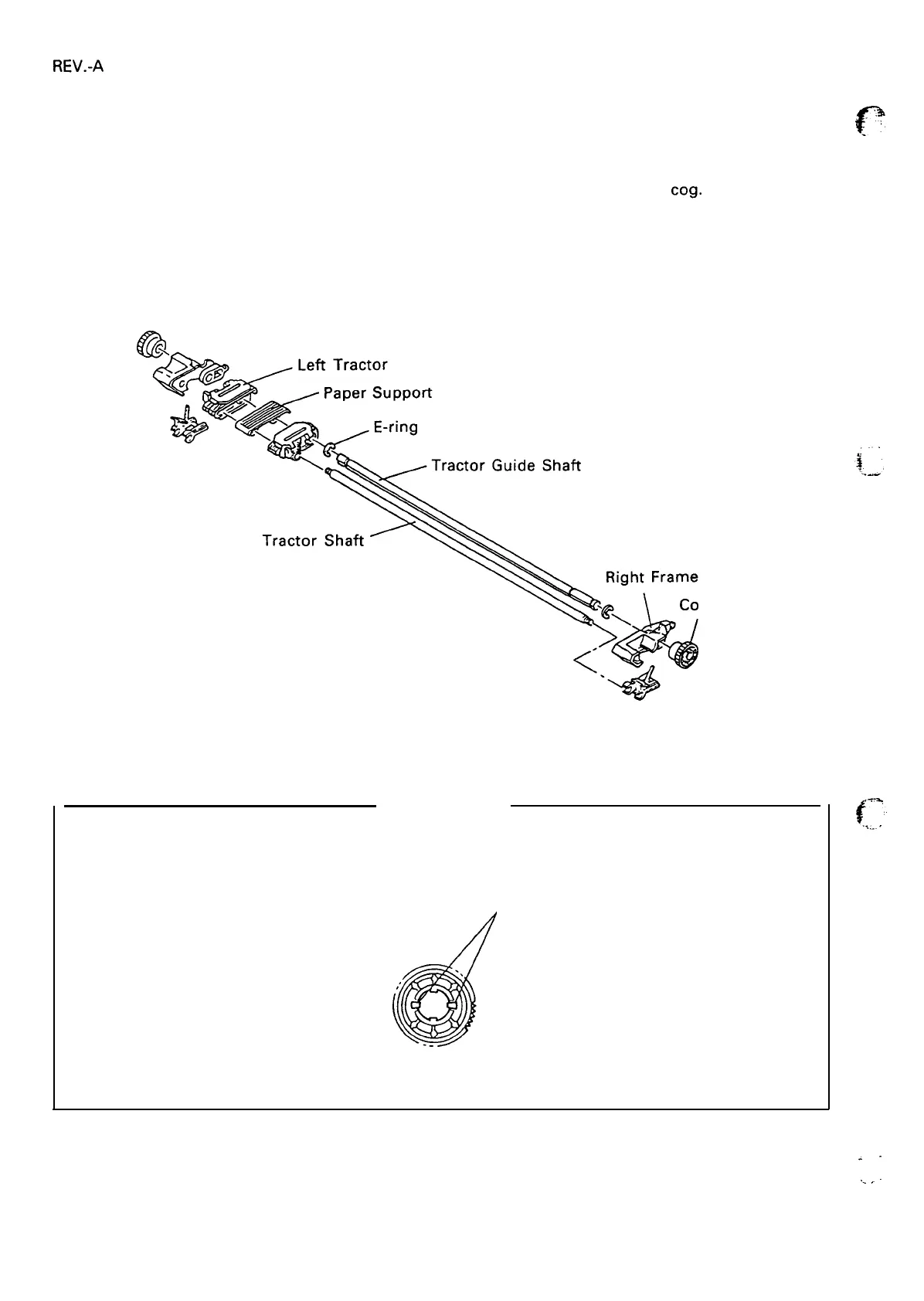
[STEP
11
Remove the PAPER GUIDE ASSEMBLY, top cover, front cover, paper eject cover, and tractor unit.
(See Section 3.2.1.)
[STEP 21
Release the two clips of the cog (17) from the tractor shaft. Remove the
co9.
[STEP 31
Remove the right tractor frame from the tractor shaft and the tractor guide shaft.
[STEP 41
Remove the E-ring from the tractor shaft.
[STEp 51
Remove the right tractor, the paper support unit, and the left tractor from the tractor shaft and
tractor guide shaft.
9
Figure 3-23. Disassembling the Tractor Unit
(17)
Assembly Note
When reassembling the tractor unit, be sure to snap the clips of the cog (17) onto the tractor shaft.
Clips
Figure 3-24. Position of the Cog
f?
.
.
,.
.
.
3-22



 To Next Page