Checking the Number of Sheets of Paper Fed
You can check the number of sheets of paper fed from the printer driver.
Click the Printer and Option Information button on your printer driver’s Maintenance window (for Windows) or on
the Epson Printer Utility 4 (for Mac OS X).
Cleaning the Product
Cleaning the exterior of the product
To keep your product operating at its best, clean it thoroughly several times a year by using the following instructions.
c
Important:
Never use alcohol or thinner to clean the product. These chemicals can damage the product.
❏ Use a soft, dry, clean cloth to clean the LCD screen. Do not use liquid or chemical cleaners.
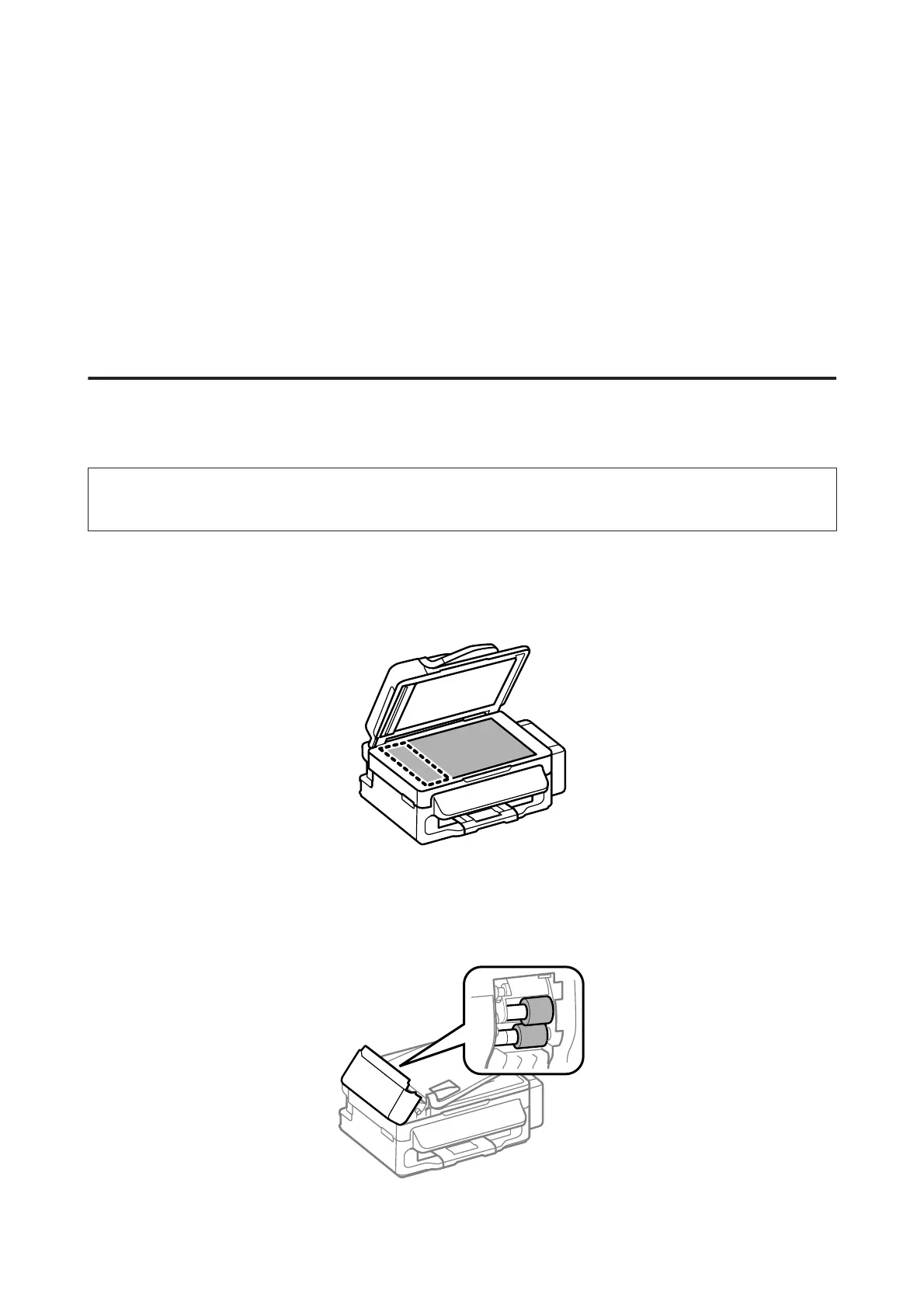
❏ Use a soft, dry, clean cloth to clean the surface of the scanner glass.
If straight lines appear in the printout or the scanned data, clean the left side of the scanner glass carefully.
❏ If the glass surface is stained with grease or some other hard-to-remove material, use a small amount of glass
cleaner and a soft cloth to remove it. Wipe off all remaining liquid.
❏ Open the ADF cover and use a soft, dry, clean cloth to clean the roller and the interior of the ADF.
User’s Guide
Maintaining Your Product and Software
91



 To Next Page