Making Settings in Windows
A
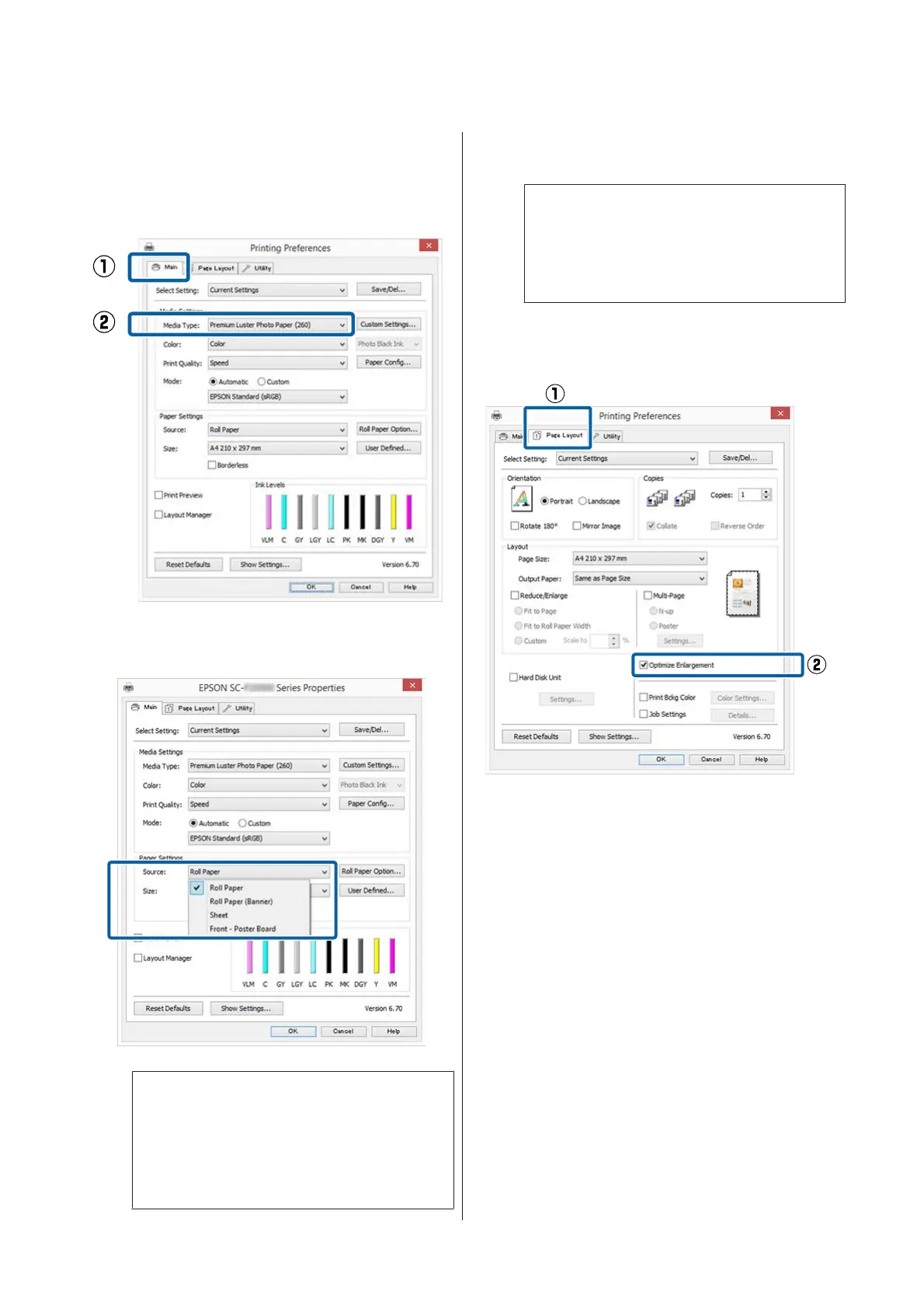
In the printer driver's Main screen, select
Media Type.
U “Printing (Windows)” on page 57
B
Select Roll Paper or Roll Paper (Banner) from
the Source list.
Note:
❏ You can only use Roll Paper (Banner) for
applications that support banner printing.
❏ Selecting Roll Paper (Banner) sets the top
and bottom margins of the paper to 0 mm.
C
Click User Defined and match the paper size to
the size of the data if necessary.
Note:
If you are using applications that support banner
printing, you do not need to set User Defined
Paper Size if you select Roll Paper (Banner) as
the Source.
D
On the Page Layout screen make sure the
Optimize Enlargement check box is selected.
E
Check other settings, and then start printing.
Making Settings for Mac OS X
A
When the Print screen is displayed, select the
size of the data created with the application in
Paper Size.
If page setting options are not available in the
application's print dialog, display the page
settings dialog.
SC-P20000 Series/SC-P10000 Series User's Guide
Printing Varieties
103


 To Next Page
 Loading...