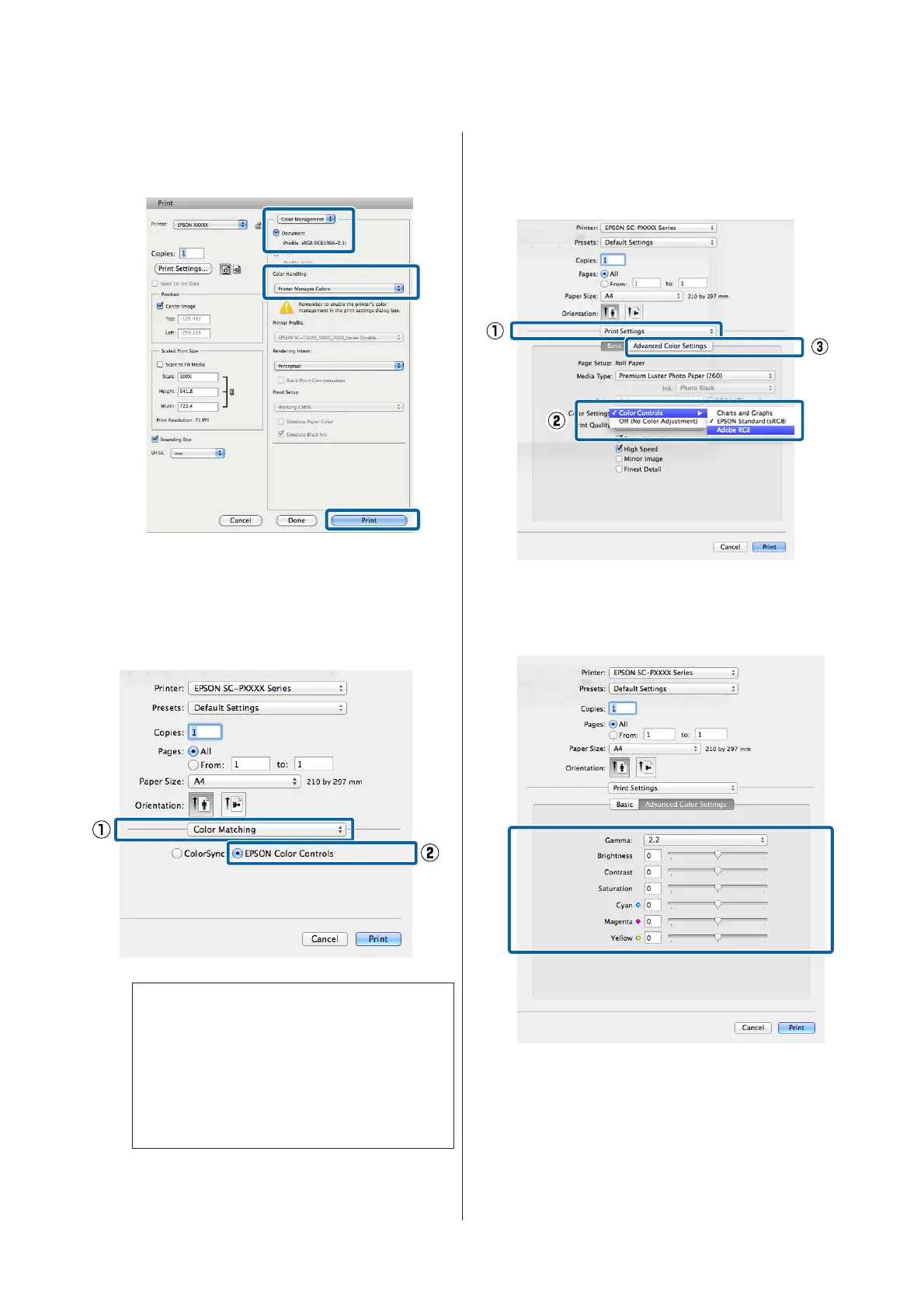
Select Color Management and then Document.
Select Printer Manages Colors as the Color
Handling setting, and then click Print.
B
Display the Print screen.
U “Printing (Mac OS X)” on page 49
C
Select Color Matching from the list, and then
click EPSON Color Controls.
Note:
EPSON Color Controls will not be available in the
following applications if Step 1 is omitted.
❏ Adobe Photoshop CS3 or later
❏ Adobe Photoshop Lightroom 1 or later
❏ Adobe Photoshop Elements 6 or later
D
Select Print Settings from the list, and then select
Color Controls as the Color Settings setting.
When adjusting the parameters manually, click
Advanced Color Settings.
E
Make the necessary settings.
See the printer driver help for more details on
each item.
F
Check other settings, and then start printing.
SC-P9000 Series/SC-P7000 Series/SC-P8000 Series/SC-P6000 Series User's Guide
Printing Varieties
74


 To Next Page
 Loading...