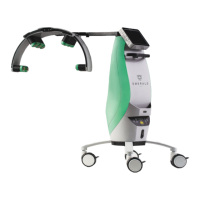
The Erchonia® EVRL™ is a prescription home-use, non-invasive laser device designed for adjunctive use in providing temporary relief of diabetic peripheral neuropathy foot pain in previously diagnosed individuals aged 18 years or older. This device utilizes patented and clinically proven low-level laser technology to promote local blood flow in the foot, activating repair mechanisms and producing anti-inflammatory properties to reduce nerve irritation and inflammation, thereby providing pain relief.
Usage Features:
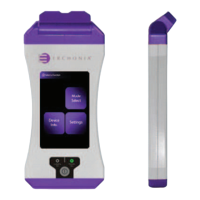
The EVRL™ device is straightforward to operate, with a user-friendly touchscreen interface. To power on the device, the user presses and holds the Power Button (labeled as item #1 in the diagram) for 3 seconds until the "POWER ON" light illuminates green. After powering on, a loading screen will display for 30-45 seconds before the device is ready for use.
The touchscreen serves as both a display for information and an input panel for operating the device. Users should exercise caution not to use sharp objects like pencil points or ballpoint pens on the touchscreen, as this may cause damage. Abrasives, including paper towels, should also be avoided when cleaning the screen.
To begin a treatment, the user first enters a passcode (the factory set code is "1234") on the "Passcode Screen" and then presses the "SIGN IN" icon. From the "Function Screen," the user selects the "Mode Select" icon (ITEM #2). On the subsequent "Mode Select Screen," the "User Protocol Mode" icon (ITEM #3) is chosen. Finally, on the "User Protocol Mode Screen," the "Neuropathy" icon (ITEM #4) is pressed to access the "Neuropathy Treatment Screen."
Before starting treatment, it is crucial to put on the provided laser safety goggles to protect the eyes from laser light energy. The EVRL™ is classified by the FDA/IEC as a Class 2 laser device, indicating a chronic viewing hazard if the laser beam is pointed directly into the eye for an extended period. Therefore, proper use of the safety glasses is mandatory. Users should also remove any shoes and socks before treatment.
Once on the "Neuropathy Treatment Screen," the "START" icon initiates the EVRL™ treatment. The device is preprogrammed to treat for a total of 5 minutes. The treatment time display will count down automatically, and the lasers will power off when the display reaches 0:00. During the 5-minute session, the EVRL™ device should be held stationary at a distance of approximately 3 to 6 inches from the skin surface, aiming over the top of the foot with the laser beams emitting lengthwise in the same direction as the foot. The laser lights are designed to cover the top of the ankle to the end of the toes.
The treatment protocol requires administering 42 treatments over 3 weeks, meaning 2 treatments per day for 3 consecutive weeks. Each treatment session involves a 5-minute application to each foot. After the 5-minute treatment on one foot, steps 4-7 of the protocol are repeated for the opposite foot. Once both feet have been treated, the session is complete, and the safety glasses can be removed.
The "Neuropathy Treatment Screen" also includes "PAUSE" and "STOP" icons. The "PAUSE" icon allows the user to temporarily halt the treatment during a session and resume it later by pressing "PAUSE" again. The "STOP" icon will completely reset the treatment time if pressed.
To power off the device, the user presses and releases the Power Button (ITEM #1) from any screen. This action prompts the "Power Down Device Screen," where the "Power Down Device" icon is touched. The "Powering Down Screen" will then display until the device properly shuts down.
Maintenance Features:
Proper maintenance ensures the EVRL™ laser operates efficiently for years. Users are advised to perform routine visual inspections and cleaning.
Routine User Maintenance:
- Clean the external surfaces of the device: Weekly, or as needed, using a cloth dampened with a non-caustic cleaning solution such as mild soap and water, isopropyl alcohol, or a "hospital-grade" disinfectant. The device should then be dried with a clean cloth or allowed to air dry. It is crucial not to permit any foreign materials or liquids to enter the device, as this can cause damage, malfunction, electrical shock, fire, or personal injury. To protect against spilled or splashed liquids, the device should be unplugged from the power supply and thoroughly dried before operation.
- Clean the touch screen display: Weekly, or as needed, by applying an alcohol-based cleaner to a soft cloth. Cleaning agents should not be sprayed or poured directly onto the device or touchscreen to avoid damaging the console, touchscreen, and system electronics.
- Clean laser optics: Weekly, or as needed, using only lens paper or a lens cloth. Abrasive materials could cause laser light beam fragmentation, reducing treatment effectiveness.
- Clean Laser glasses: Between each patient use, using only mild soap.
General Maintenance and Inspection:
- Regular visual inspections: Check for any external damage beyond normal wear and tear. Inspect the Touch Screen for cracks or malfunctions. If any concerns are identified, the manufacturer should be contacted.
- Performance changes: If a change in device performance is noticed while it is ON, contact the manufacturer.
- Internal components: Internal components do not require user maintenance. If an issue arises that alters performance, the device must be sent to the manufacturer for service.
- Charger Base and Power Supply: Inspect the Charger Base and Power Supply for signs of damage (e.g., cuts in insulation or fraying). Replace if damaged.
Recharging the Battery:
The EVRL™ device, when fully charged, can operate continuously for approximately 4 to 5 hours, depending on usage. A battery indicator on the touchscreen displays the charge status. When the battery meters show a low charge, the device needs to be recharged immediately.
To recharge:
- Plug the Power Supply Connector into the Charger Base Connector Port.
- Connect the detachable Power Supply Cord into the Power Supply, then insert the Power Supply cord into a 110-220V electric outlet. The charger base power light will illuminate and remain lit if connected correctly.
- Place the laser device onto the Charger Base with the touchscreen facing up and lasers facing away from the Charger Base LED lights. The docked light on the charger base will turn ON if the device is docked correctly.
- For a full charge, leave the laser device on the charger base for at least 2.5 hours continuously. While charging, the docked light on the Charger Base will flash ON and OFF. The battery indicator meter on the touchscreen will show the charge status, displaying full bars when fully charged.
- Docking the laser device between uses is recommended, and shorter charging periods are possible.
The battery is an internal, non-accessible unit and can only be replaced by the manufacturer. The EVRL™ contains a unique battery system designed for consistent power delivery and portability. The internal battery is sealed by the vendor and encased within the device housing. The external power supply used with the charger base is an IEC 60601 3rd Ed. certified unit. If the power supply is lost or damaged, a replacement can be purchased from Erchonia Corporation.
A warning is issued regarding the battery: mistreatment (disassembly, heating above 100°C (212°F), or incineration) may present a risk of fire or chemical burn. The manufacturer should be contacted for battery replacement, as using another battery may pose a risk of fire or explosion.
Troubleshooting:
A troubleshooting guide is provided to help resolve common issues:
- Device does not power on: Possible cause is that it may not be charged. To resolve, recharge the device for 2.5 hours by placing it in the inductive charger base.
- Charge base indicator lights do not come on when device is docked: Possible cause is that the device may be placed incorrectly in the charge base or the power supply is not plugged in correctly. To resolve, place the device in the charger base with the touchscreen facing up and the laser heads in the opposite end of the charger base indicator lights.
- Device is not responding: Possible cause is that the internal computer may need to be reset. To resolve, hold the ON/OFF button down until the device powers off, then restart it.
For any difficulties operating the device after reviewing the guide, or for service and repair inquiries, customers can contact Erchonia Customer Care. When requesting service, provide the device serial number, a description of the problem, and contact information. For returning a device for service, an SO (service order) number must be obtained from the service representative, and the device should be packed in its original or equivalent packaging with the SO number clearly marked on the package.


 To Next Page
 General