ESAB CUTMASTER 60i
INSTALLATION Manual 0-5488
3-4
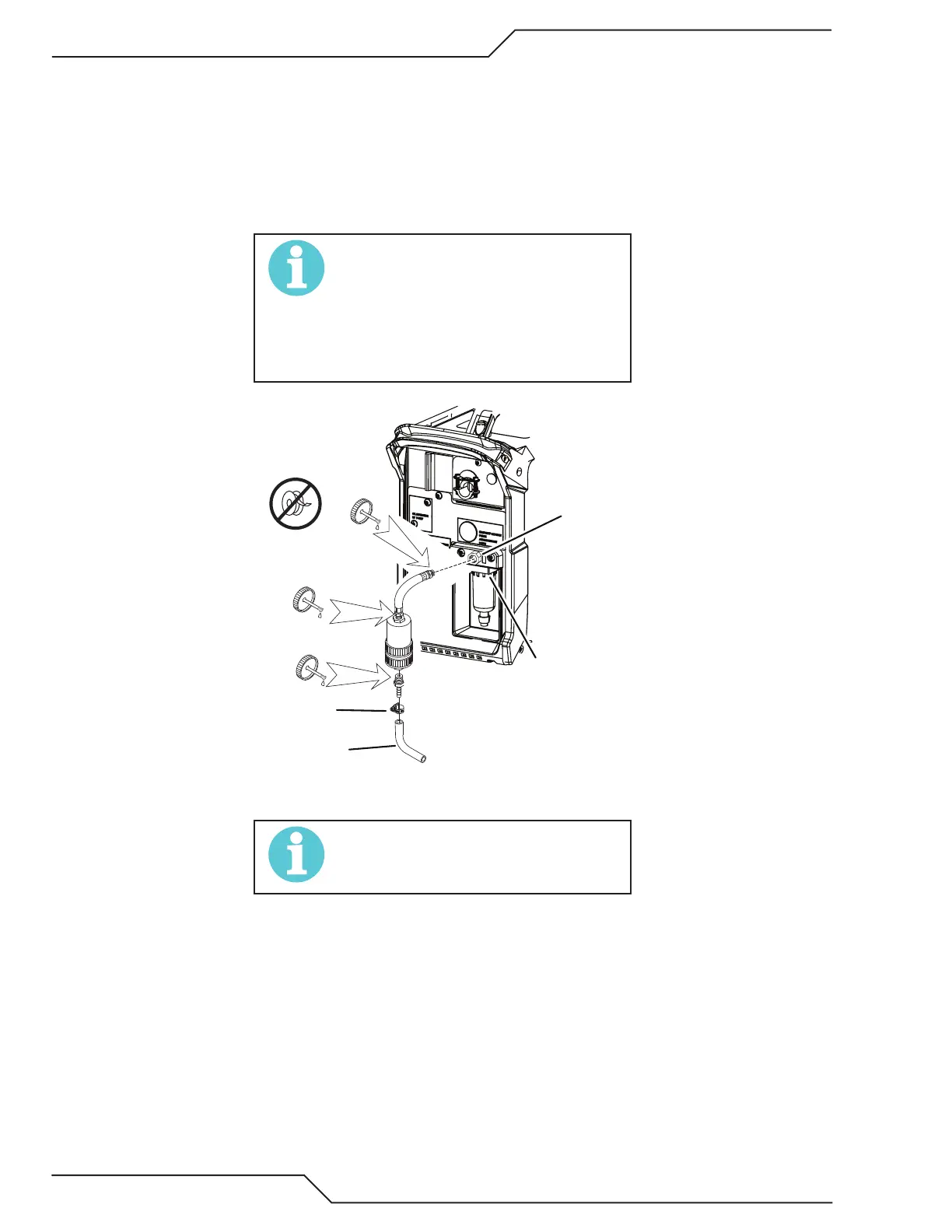
Installing Optional Single - Stage Air Filter
An optional filter kit (7-7507) is recommended for improved filtering with compressed air, to keep moisture and
debris out of the torch.
1. Attach the Single - Stage Filter Hose to the Inlet Port 1/4" NPT of the system filter.
2. Attach the Filter Assembly to the filter hose.
3. Connect the air line to the Filter using the 1/4" NPT. The illustration shows typical fittings as an example.
NOTE!
For a secure seal, apply thread sealant to
the fitting threads, according to manufac-
turer’s instructions. Do not use Teflon tape
as a thread sealer, as small particles of the
tape may break off and block the small air
passages in the torch.
Hose Clamp
System Filter
Assembly
1/4 NPT
Inlet Port
Gas Supply
Hose
Art # A-13261
Optional Single - Stage Filter Installation
NOTE!
Filter replacement part numbers can be
found in Section 6 of this manual




 To Next Page