1
2
3
4
5
6
7
8
9
1
2
3
4
5
6
7
8
9
1
2
3
4
5
6
7
8
9
1
2
3
4
5
6
7
8
9
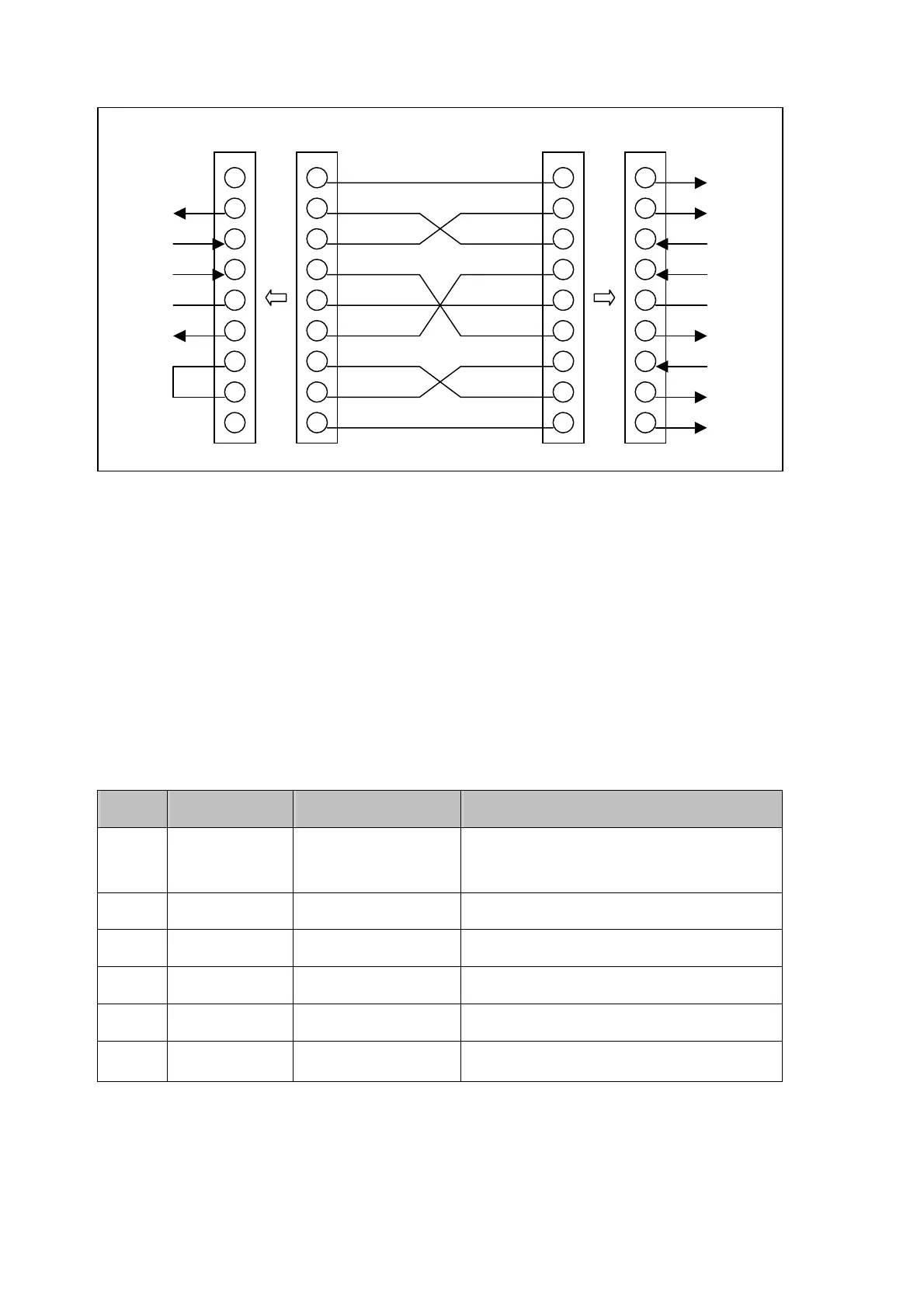
DCD
RXD
TXD
DTR
GND
DSR
RTS
CTS
RI
RXD
TXD
GND
Null Modem Cable Meter
PC
Figure 6-1. RS-232 connecting diagrams between the meter and a PC
Setup Procedures for RS-232 Parameter
User may select computer interface and set RS-232 interface on Setup
Mode. To ensure the remote interface will operate appropriately,
user may
need to configure the remote interface parameters. Please refer to operation
procedures of Section 3-9 Entering Setup Mode.
Table 6-1. RS-232 Interface Parameters
Item Parameter Factory Setting Selectable Parameter
1 Baud Rate 9600
9600, 4800, 2400, 1200, 600,
and 300
2 Parity None None, Odd or Even
3 Data Bit 8 7 or 8
4 Stop Bit 1 1 or 2
5 ECHO OFF ON or OFF
6 Printer-Only OFF ON or OFF
50


 To Next Page