9
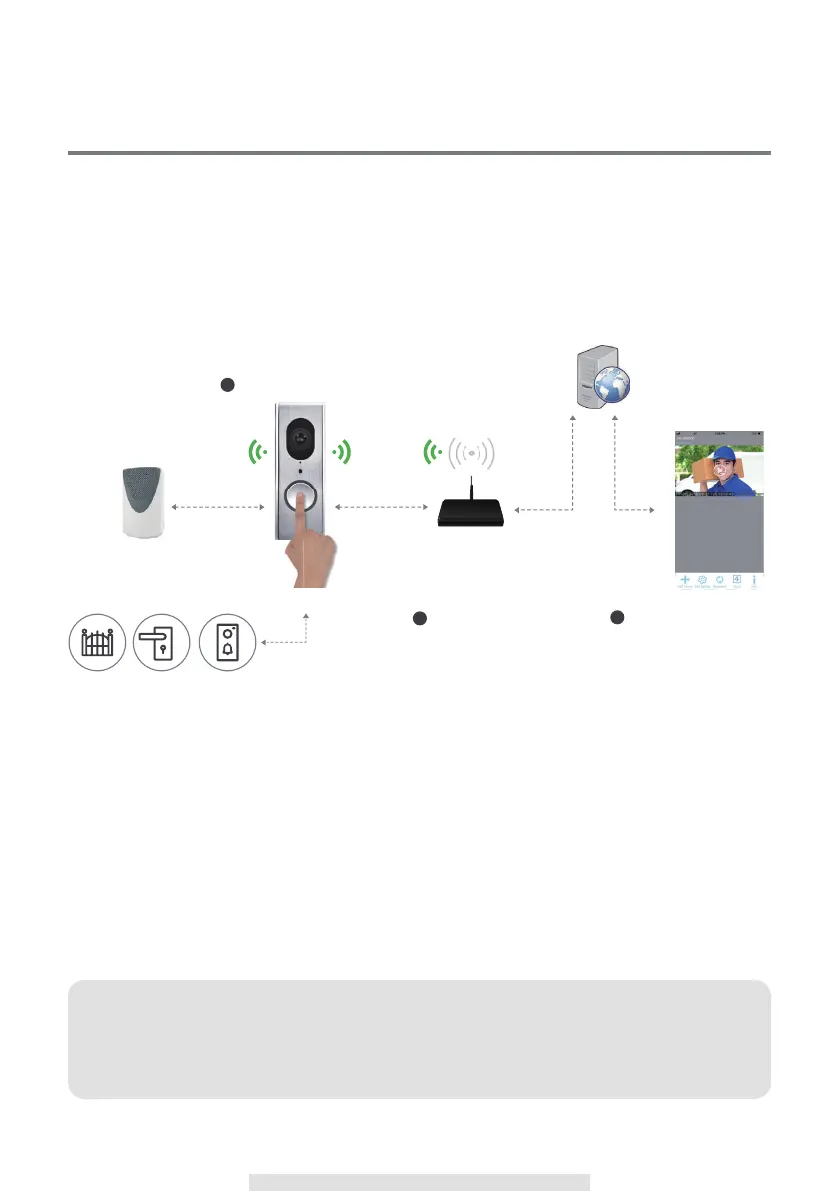
OPERATION DIAGRAM
The Remote View Door Phone (RVDP) is designed to deliver live video directly to your smart mobile
devices after visitor have pressed the communication button on the door unit. The RVDP app will
allow you to see live video, speak to the visitor, manually capture snapshot/video and even open the
door (3rd party door lock device required) for the visitor.
Activate Doorbell Music & App
Notification Alert
•Auto Visitor Video Record
Receiving Notification
Visitor Press Push button
3rd Party
Door Chime
JSW Connectivity Server
Field Proven Secure Technology
• Push Notification Management
• Direct/Relay Connectivity Management
Wi-Fi Router
Connection with
Wi-Fi Network
•Live-Video w/Incoming Audio
•Two-Way PTT Audio
•Video Event List
•Remote Door Unlock Trigger
(3rd party device)
2
3
Note:
If you have changed the Wi-Fi or wish the camera could connect to different router, please
remove the camera from the device list first and reset the camera to default. Follow the
installation process and setup as new camera.
3rd Party
Door Chime
3rd Party
Door Lock
Wi-Fi Router
APPVideo Door Phone
Door Chime
Connection with
Wi-Fi Network
Wi-Fi 2.4GHz
Connect
Cable Connection
Control Notify
868 / 916 Hz
3rd Party
Gate
JSW Connectivity Server
Field Proven Secure Technology
• Push Notification Management
• Direct/Relay Connectivity Managemen
Visitor Press Push button
1
Activate Doorbell Music & App
Notification Alert
•Auto Visitor Video Record
2
Receiving Notification
•Live-Video w/Incoming Audio
•Two-Way PTT Audio
•Video Event List
•Remote Door Unlock Trigger
(3rd party device)
3



 To Next Page