30
SETTING THE WATER TEMPERATURE
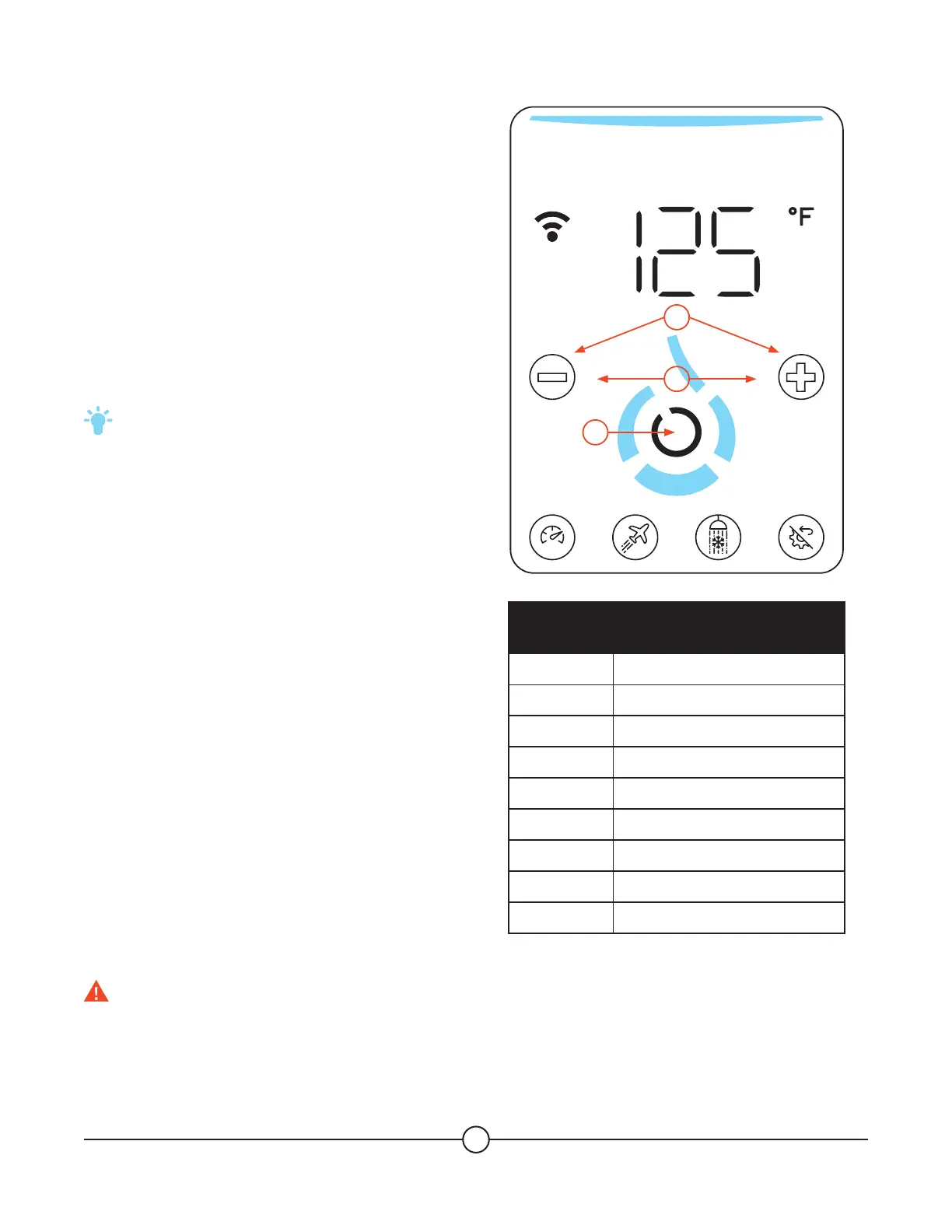
To set the temperature, use the + and – buttons on
the touchscreen until the desired temperature is
shown, and press the “confirm” button.
1. To set the temperature, press and hold the (-) or
(+) button.
2. Once the temperature indication flashes, press
the (-) button to decrease the temperature OR
press the (+) button to increase the temperature.
3. Press and hold the (Confirm) button until
temperature setting validation.
TIP: Press the (Multi Function) button to
cancel.
WATER TEMPERATURE SET POINT
Water temperatures above 125°F can cause severe
burns or death from scalding. Be sure to read and
follow the warnings outlined in this manual and on
the label on the water heater.
The electronic control allows the water temperature
to be set from 104°F to 132°F. Please note that
this is the temperature of the water delivered at the
outlet of your water heater, but not the temperature
of the static water stored inside the tank (this
temperature is defined by the mode you chose to
operate in).
Decreasing the setpoint won’t save energy, only the
mode chosen is able to do so.
Refer to the chart as a guide to determine the
maximum water temperature for your application.
1
2
SMART
3
APPROXIMATE TIME/TEMPERATURE
RELATIONSHIP IN SCALDS
Temperature Time To Produce a Serious Burn
120°F More than 5 minutes
125°F 1½ to 2 minutes
130°F About 30 seconds
135°F About 10 seconds
140°F Less than 5 seconds
145°F Less than 3 seconds
150°F About 1½ seconds
155°F About 1 second
Table courtesy of Shriners Burn Institute
DANGER! Water temperatures over 125° F can cause severe burns or scalding. Households with small
children, disabled, or elderly persons may require a 120°F or lower temperature setting to prevent
contact with HOT water.
NOTICE: in case of very hard water, setting the temperature at more 125°F can increase the risk of scale
build-up.


 To Next Page