32
TEMPORARY FUNCTIONS
The water heater features a number of temporary functions (also available in the App), which allow you to
temporarily override the active heating mode for a selected period of time. At the end of the selected period
of time, the water heater will return automatically to the initial setting.
A temporary function can be interrupted at any time before the end of the selected period by selecting
OFF. To do so, select the appropriate temporary function (Boost / Vacation / Water Saver) and press the (-)
button until OFF is displayed. Then press the (Confirm) button.
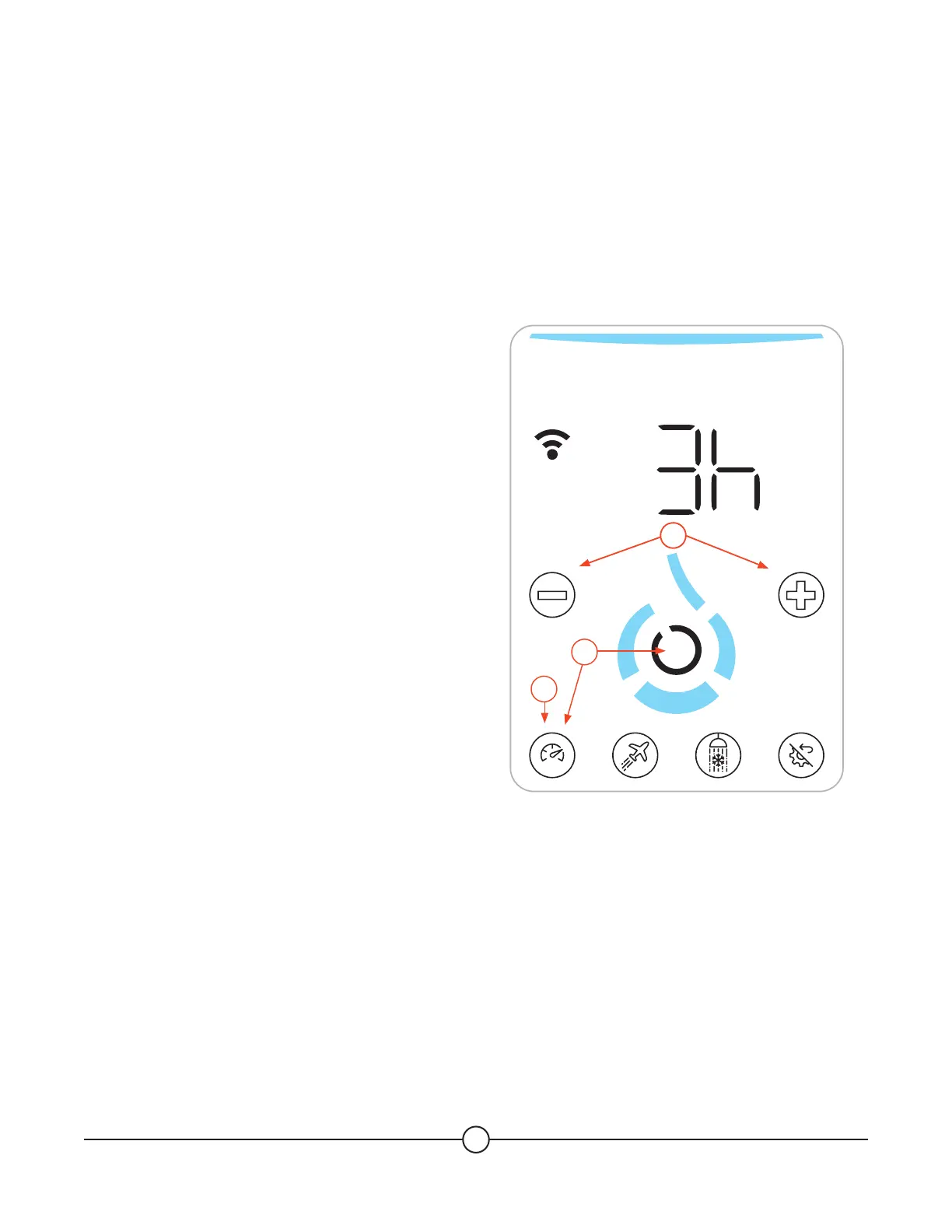
BOOST
The boost temporary function will heat up the tank
to its maximum temperature and will keep it hot until
the function is deselected.
1. Press the (Boost) button to activate the boost
temporary function.
2. Press the (+) button to increase the number of
hours wanted in boost mode OR press the (-)
button to reduce the number of hours wanted in
boost mode.
3. Press the (Confirm) button to validate the
number of hours and to launch the boost mode
OR press the (Boost) button to exit the boost
menu without activating the temporary function.
4. The (Boost) button will blink to indicate that the
boost function is active.
The default time is set to 3 hours and can be
increased up to 48 hours. The boost temporary
function is deactivated by changing the time to OFF.
To do so, press the (-) button until OFF is displayed.
Then press the (Confirm) button.
SMART
1
3
2


 To Next Page