33
VACATION
The vacation function aims to keep the tank at low
temperature to save energy while preventing water
from freezing. In this mode, only the low heating
element is used to keep the tank at a minimum fixed
temperature. Vacation mode can be programmed by
the user for a fixed duration in days or for an infinite
period of time.
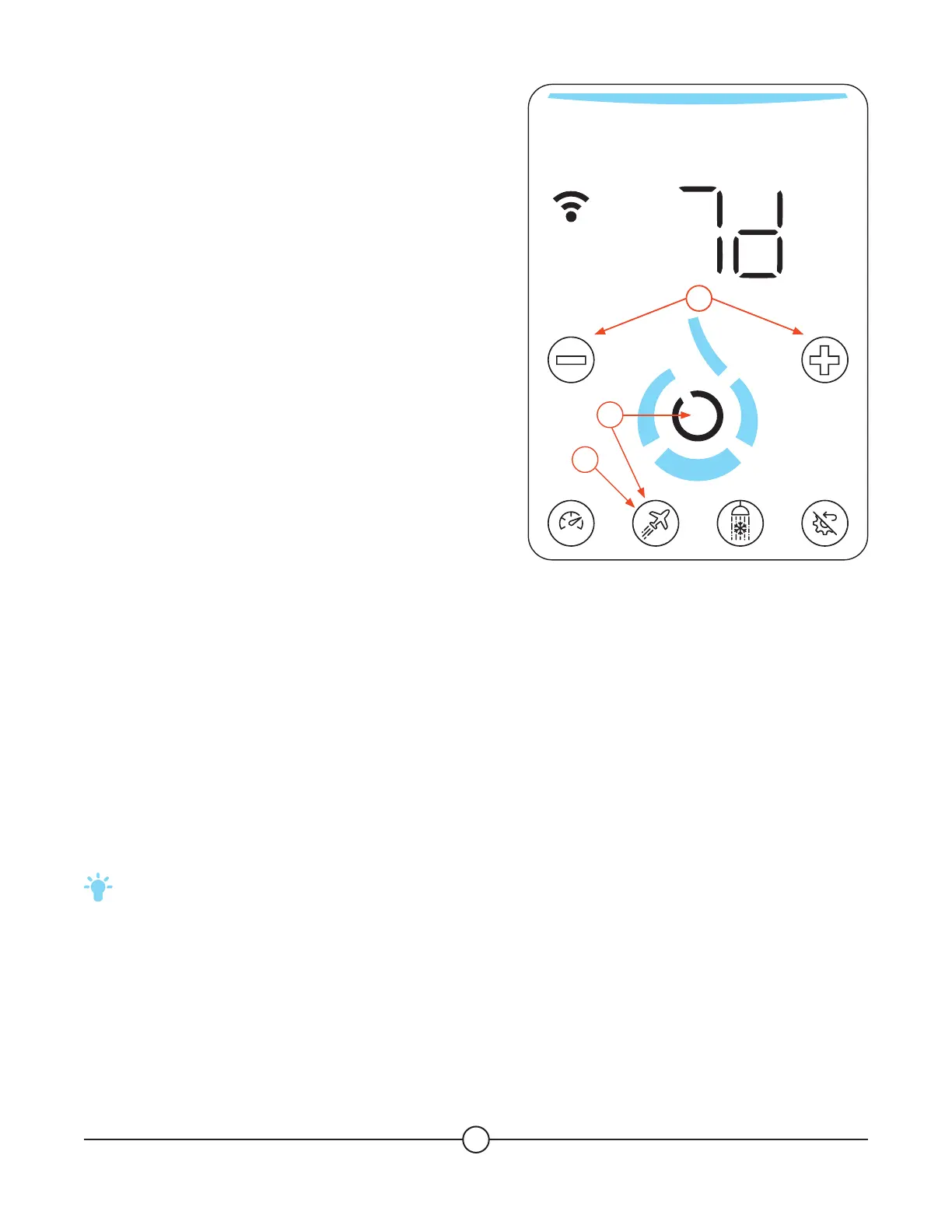
1. Press the (Vacation) button to activate the
vacation temporary function.
2. Press the (+) button to increase the number of
the days wanted in vacation temporary function
OR press the (-) button to reduce the number of
the days wanted in vacation temporary function.
3. Press the (Confirm) button to validate the
number of days and to launch the vacation
temporary function OR press the (Vacation)
button to exit the vacation menu without
activating the temporary function.
4. The (Vacation) button will blink to indicate that
the vacation function is active.
To ensure that hot water is available when you get back home, make sure to program the end 3 hours before
your return. If any doubt, as the touchscreen timer can only be set in days, program 1 day less than your
absence.
The default time is set to 7 days, and can be incremented to 99 days or infinite (INF). The vacation
temporary function is deactivated by changing the time to OFF. To do so, press the (-) button until OFF is
displayed. Then press the (Confirm) button.
TIP: We highly recommend to use the Essency App to program the Vacation function with a better
accuracy (date to date).
SMART
1
3
2


 To Next Page