34
WATER SAVER
This function is intended to limit the time spent
in the shower by an overly indulgent user. It was
specifically designed for parents of teenagers, to
act like a remote control to turn o the hot water if
they’re spending too much time in the shower. It is
not only a matter of peace at home, but also of water
and energy conservation, hence its name.
Activating the water saver temporary function will
gradually reduce the hot water temperature for 1
minute until reaching cold water. By default, the hot
water will return only 5 minutes later, but can also
be manually set between 1 and 30 minutes using the
(+) or (–) buttons while in the function.
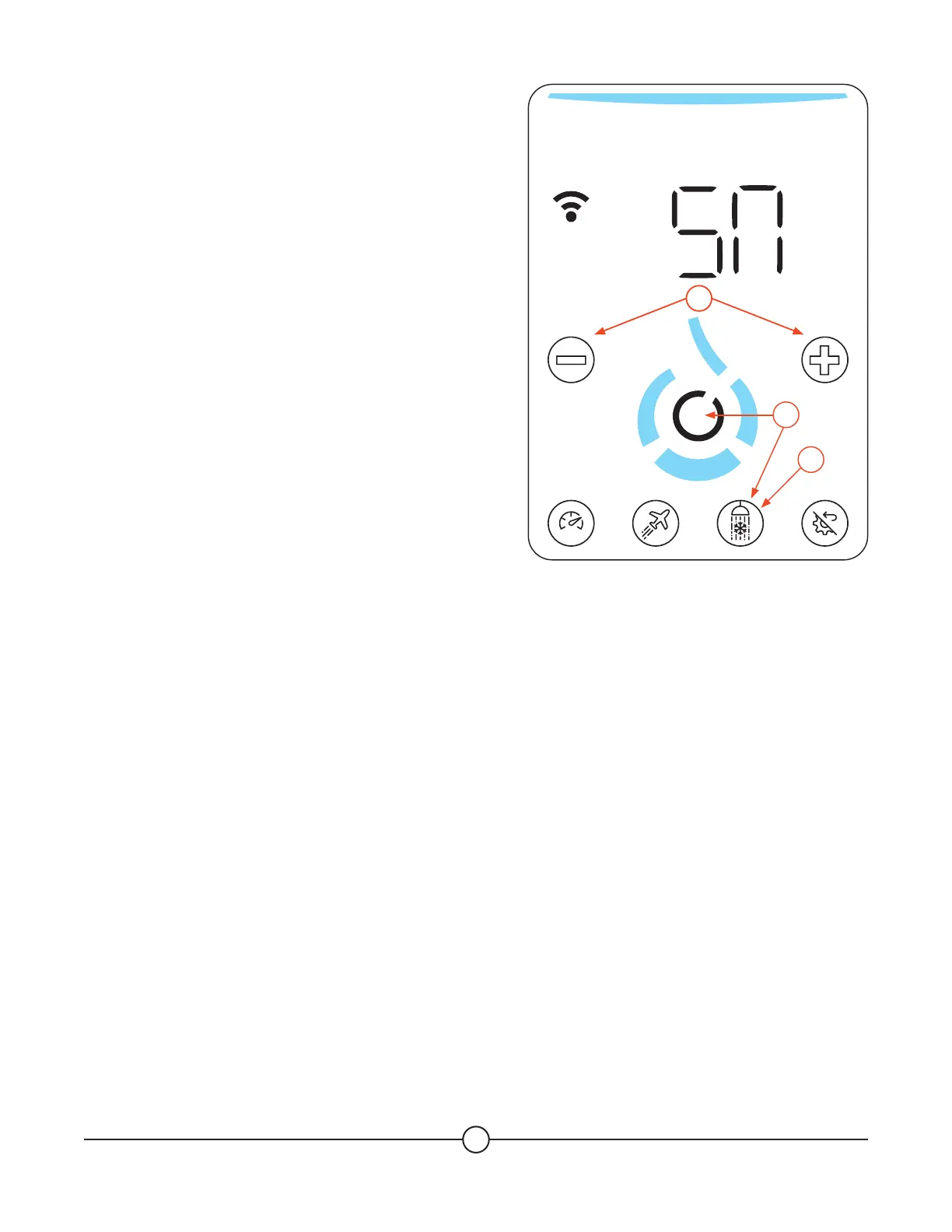
1. Press the (Water Saver) button to activate the
water saver temporary function.
2. Press the (+) button to increase the number
of minutes without hot water OR press the
(-) button to decrease the number of minutes
without hot water.
3. Press the (Confirm) button to validate the
number of minutes and to launch the water saver
temporary function OR press the (Water Saver)
button to exit the water saver menu without
activating the temporary function.
4. The (Water Saver) button will blink to indicate that
the water saver function is active.
Please note that there will be no hot water in the
house during the time selected, unless you cancel
the function at any time by setting it to OFF.
SMART
1
3
2


 To Next Page