11
Connecting to the command station Configuration on the command station
8. Configuration on the command station
After connecting the ECoSDetector to the command station the
module is automatically detected and linked to the system.
Please make sure that your ECoS has firmware 3.4.1 or higher.
Otherwise the ECoSDetector is not recognised.
The configuration takes place on the command station. Each
ECoSDetector is displayed with its name in a list called “ECoSlink
devices”.
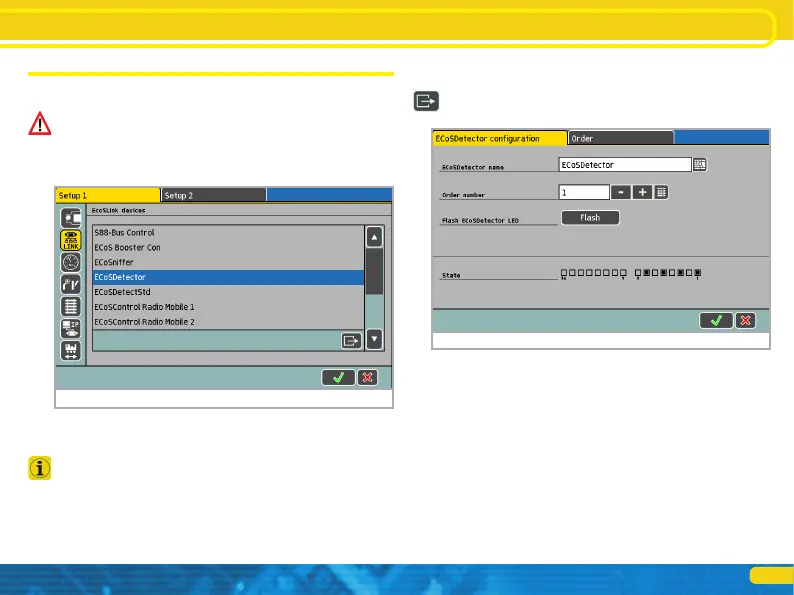
In figure 11 the “ECoSDetector” is displayed by its name. This is
the factory default value and should be changed by you as soon as
you have more than one ECoSDetector module.
If you wish to use more than one ECoSDetector module it is best
to connect them one after another. This practically eliminates the
possibility of confusing the modules during configuration.
8.1. Name and indenture number
Select the first ECoSDetector from the list as shown in figure 11
and press “Edit”. A configuration dialogue opens for this ECoS-
Detector module.
ECoSDetector Name: Assign a distinct name for each module,
e.g.: “Main Station” or “Storage Yard” to assure that you al-
ways know its function respectively the part of your layout that
is monitored by it.
ECoSDetector Number: In order to enable operation of the
ECoSDetector parallel to the known s88 feedback modules each
ECoSDetector must have a “number” similar to the s88 modu-
les. In this manner it is easily possible to differentiate between
the individual modules. The number can be any number bet-
ween 1 and 100. When using several ECoSDetector modules it is
not absolutely necessary to use continuous numbers. There may
be gaps in your numbering sequence.
Figure 11: ECoS Setup: Geräte im System
Figure 12: ECoSDetector Konfiguration


 To Next Page