13
9. Utilising feedback information
The feedback information provided by the ECoSDetector can be
used exactly as described in chapter 15 of the ECoS manual. Of
course, now the choice is not limited to s88 modules but also
offers ECoSDetector feedback contacts.
9.1. Setting routes
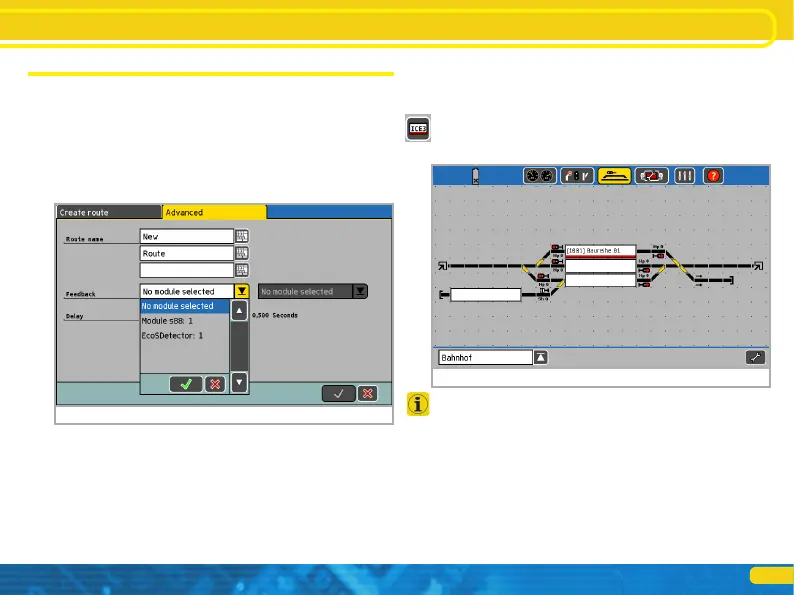
If you wish to set a route you can now also select the ECoSDetec-
tor modules from the list of the feedback modules. Please note
that the modules are sorted by increasing indenture number.
Utilising feedback information
Figure 15: Select a module
Figure 16: Display of loco address in the track control diagram
9.2. Track control diagram
You can display locomotive numbers read out with RailCom® on
the track control diagram. For this purpose a new icon has been
introduced in the setup of the track control diagram. After pres-
sing the button shown on the left you can locate a display module
that displays both the locomotive address and its name as soon as
a valid address has been detected in this track sector.
If you touch the display field either on the left or right side the
locomotive is automatically assigned to the corresponding throttle
of the ECoS and the display automatically changes to the train
control mode


 To Next Page