32E40-27
NOTE: RRT Setting and Reset RRT are not user adjustable settings.
Menu Adjustments
In the Lock menu, you may block television and movie programming based on TV ratings and Motion Picture Association
guidelines. To gain access and select your preferences within the Parental menu make certain your input is set to TV.
How to Navigate:
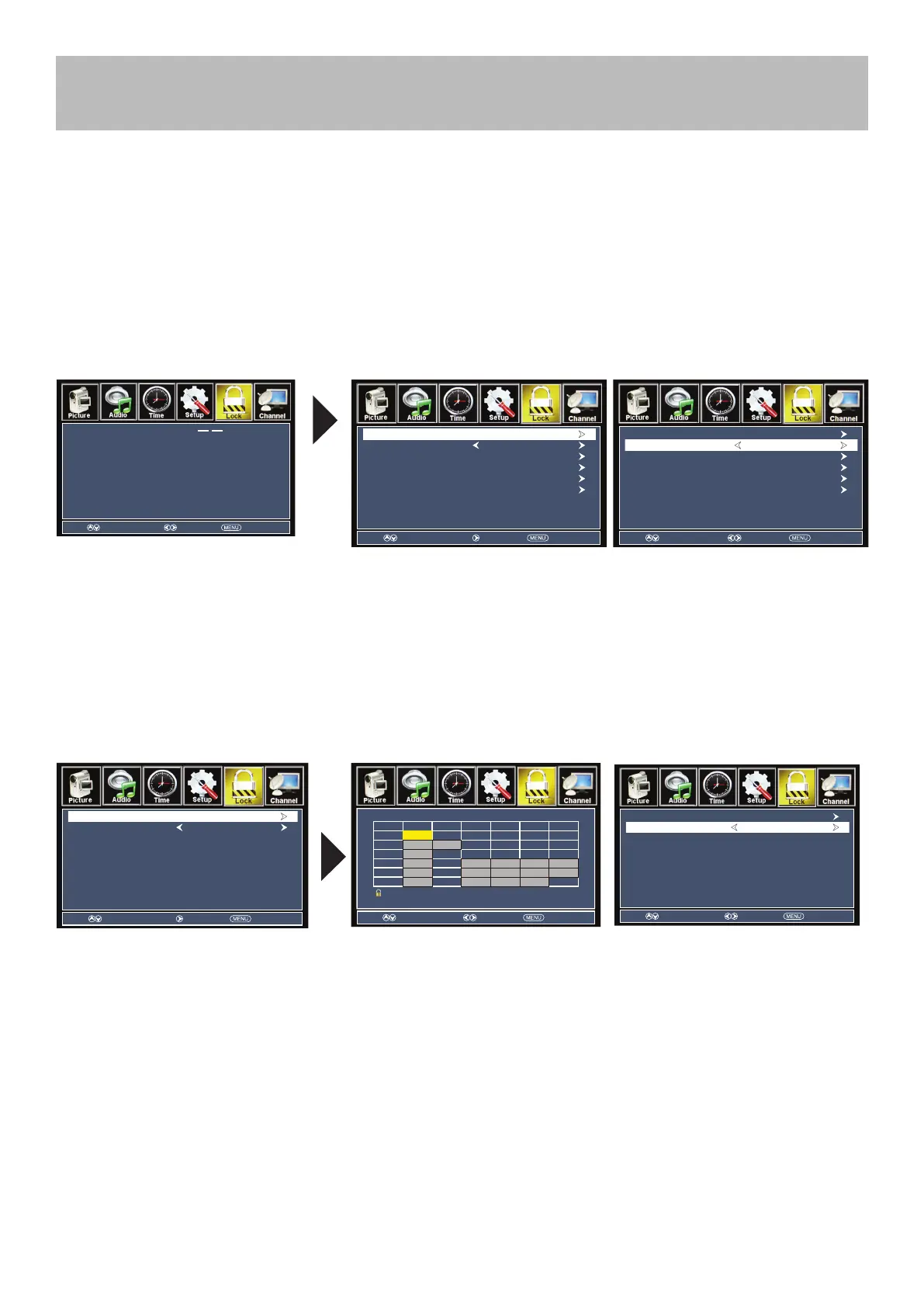
Press the MENU button on the remote control. Navigate using arrow buttons to select Lock. Gain access to
parental rating options by pressing the down arrow button to highlight Enter Password. Enter your 4 digit code
(factory default code is “0000”) unless previously changed.
• To change the password, press
arrow button to display a screen
to enter your new password, then
conrm again. (Not illustrated)
• To make changes to parental
controls, highlight System Lock
then press the arrow button to
select On or OFF.
• To set parental controls for television
programming or DVD movies, press
the arrow buttons to highlight US.
Navigate using the buttons to
highlight TV/MPAA menu.
• Highlight TV, then press the
arrow button to enter the TV Ratings
menu and select your preference.
• Highlight MPAA, then press the
arrow button repeatedly to select
your movie rating preference.
TV-Y Appropriate for all children
TV-Y7 Appropriate for all children over 7
TV-G General Audience
TV-PG Parental Guidance Suggested
TV-14 Parents Strongly Cautioned
TV-MA Mature Audience Only
G General Audience
PG Parental Guidance Suggested
PG-13 Parents Strongly Cautioned
R Restricted
NC-17 No One Under 17 Permitted
X Adults Only
N/A Not applicable
Parental Control
Select Move
Enter Password
Exit
Move Next Return
Change Password
System Lock
US
Canada
PRT Setting
Reset RRT
Off
Move Select Return
Change Password
System Lock
US
Canada
PRT Setting
Reset RRT
On
Move Next Return
TV
MPAA N/A
Move Next Return
TV RATING
Press ENTER to Lock or Unlock: Lock
ALL FV
V S L D
TV-Y
TV-Y7
TV-G
TV-PG
TV-14
TV-MA
Move Select Return
TV
MPAA G



 To Next Page