9 Generator G11
Generator G11 Operator’s Manual
Note: Only the MIN power level setting is adjustable� The MAX power level setting is always set to 5�
Volume
Adjust the volume using the plus or minus button� Default volume setting is 5�
Shutdown
Turn off the generator using the On/Off switch on the front panel of the unit�
The shutdown sequence cannot be initiated during power activation� During shutdown, the generator clears content from the screen, informs
the user if 10 or fewer hand piece uses remain for the attached hand piece and displays the shutdown animation�
Ready Screen Features
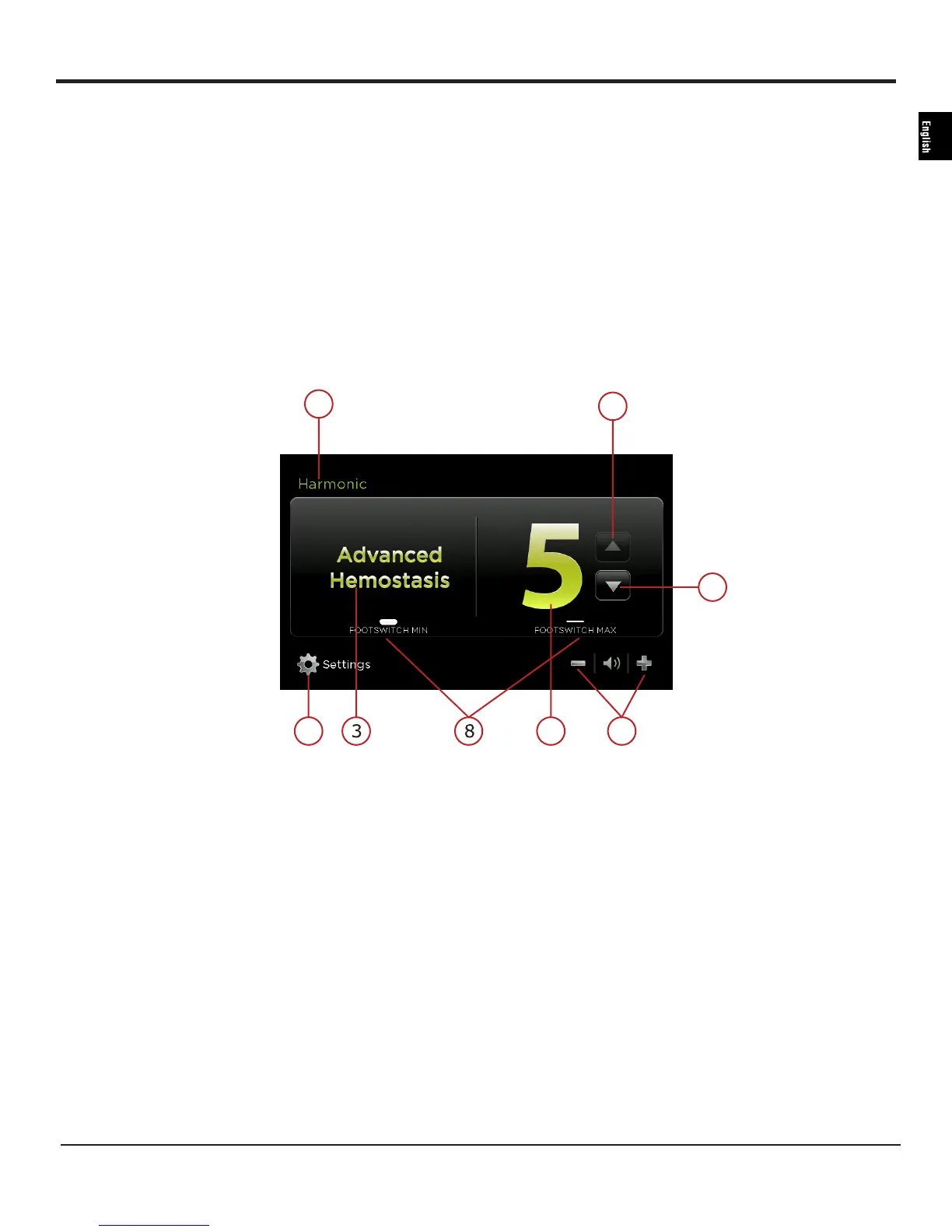
Some HARMONIC ready screens have the following features� The instrument name will be displayed after HARMONIC on the screen�
Figure 6B
1 SETTINGS Touch this button to go to the system settings�
2 INSTRUMENT
SPECIFICATION
Indicates the instrument in use�
3 ADVANCED
HEMOSTASIS
Indicates the Advanced Hemostasis Mode if available on the connected instrument� Min button of the footswitch
is used to activate Advanced Hemostasis functionality when this screen is displayed�
4 MAX Indicates the adjustable power level setting between 1 and 5� The power level may be adjusted when the
generator is ready� The maximum power is always 5� When this power level is activated (by footswitch or
handswitch) the ‘MAX’ indicator will flash�
5 POWER LEVEL
INCREASE
Touch this button to increase the maximum (MAX) power setting to the desired level (from 1 to 5)� The level
chosen will be shown on the screen� The power level may be adjusted when the generator is ready�
6 POWER LEVEL
DECREASE
Touch this button to decrease the maximum (MAX) power setting to the desired level (from 1 to 5)� The level
chosen will be shown on the screen� The power level may be adjusted when the generator is ready�
1
2
5
6
4 7


 To Next Page