15 Generator G11
Generator G11 Operator’s Manual
Settings
Basic Navigation
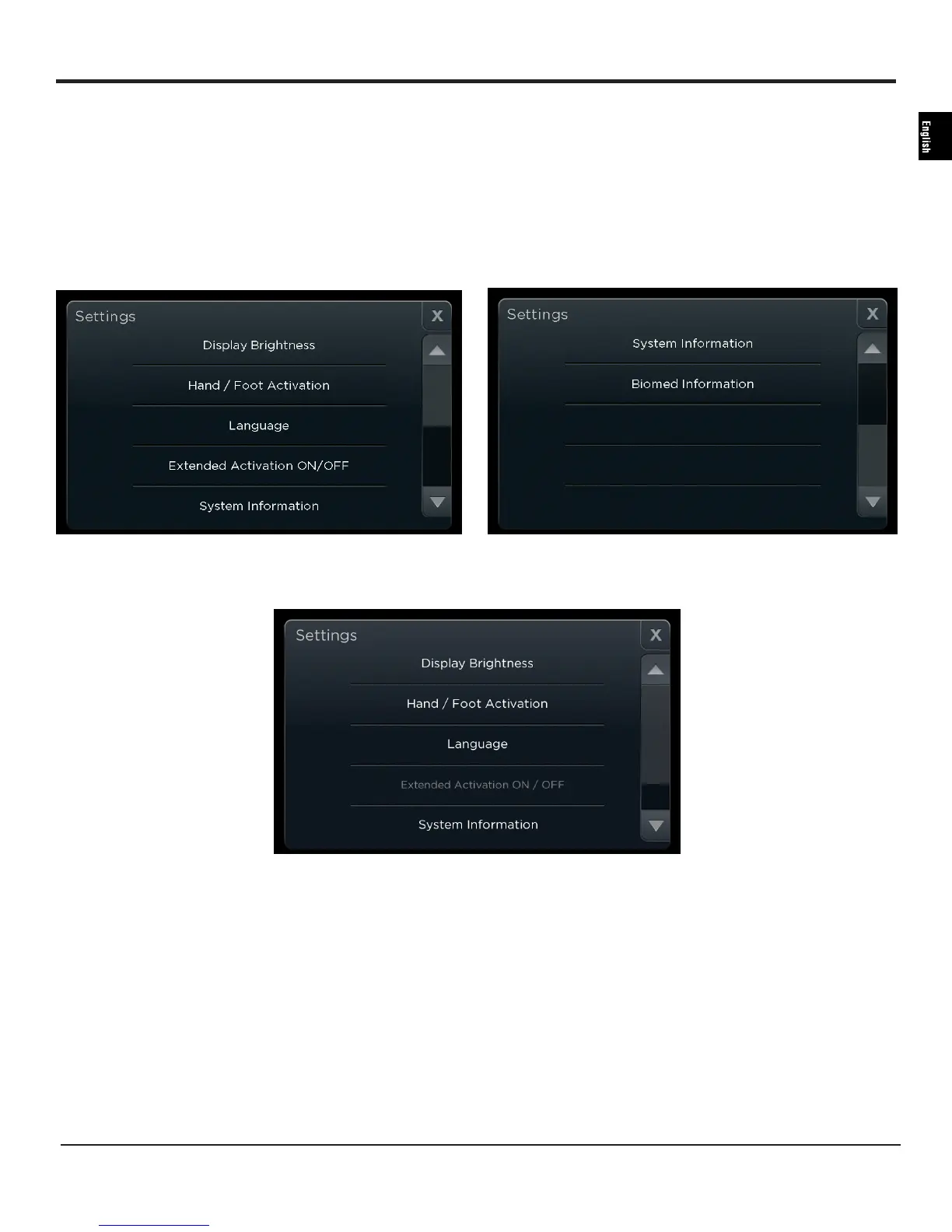
Touch the ‘Settings’ button to make adjustments in the system setup and access system information�
The settings screen opens� Scroll down for further options�
Note: If power is activated while in the Settings menu, the Settings window automatically closes and returns to the ready screen�
Touch the close button ‘X’ to exit from anywhere within the Settings menu� Touch the back arrow to go to the previous menu from the
submenu screens�
Figure 12A Figure 12B
Figure 12C
Display Brightness
Select ‘Display Brightness’ to see a preview of the ready screen while adjusting the brightness�
Touch the plus or minus button to adjust the brightness�
Touch the back arrow or close button after adjusting the settings to exit� Once a new brightness setting is selected that setting becomes the new
system default�
Hand / Foot Activation
Select the handswitch activation or footswitch activation or both on the ‘Hand / Foot Activation’ screen during startup� This selection can be
changed during use�
A dot is used to indicate the current setting while a green glow highlights the current selection�


 To Next Page